Astro Island Architecture Explained
Various sources say Island Architecture first appeared sometime around 2019/2020, yet this idea has only lately been getting a lot of attention. Let’s find out what makes Astro stand out and whether it could be a good fit for your next project.
Various sources say Island Architecture first appeared sometime around 2019/2020. This idea has only lately been getting a lot of attention, and the reason is the clear growth in popularity of the Astro framework. According to the state of JS 2022 survey, it is the technology with the highest spike of interest among Rendering Frameworks. Let’s find out what makes Astro stand out and whether it could be a good fit for your next project.
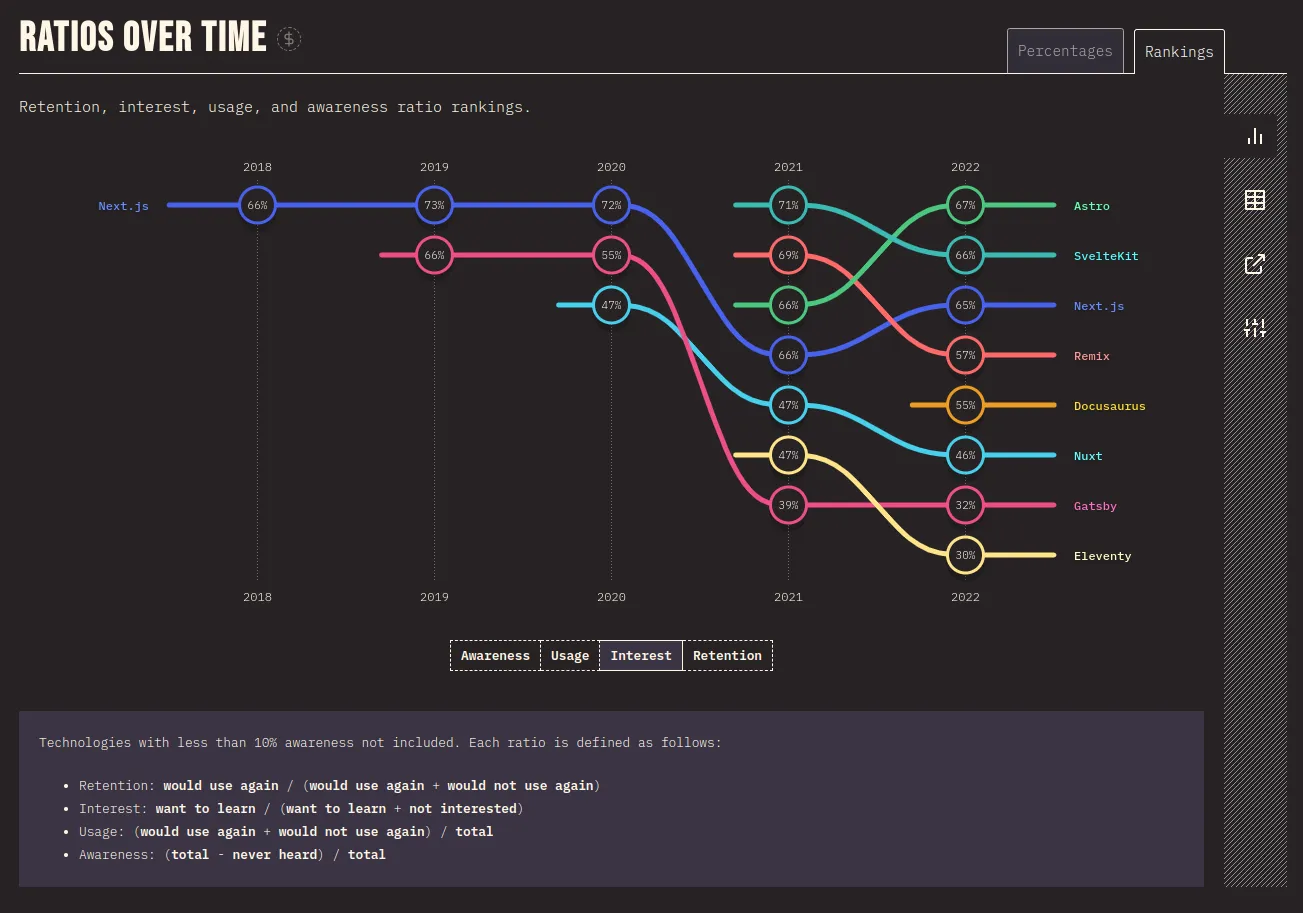
source: https://2022.stateofjs.com/en-US/libraries/rendering-frameworks
What is the Astro Framework
Astro is a framework built primarily for creating fast websites rich in content. It can do that because it concentrates on SSG (Static Site Generation) and because, out of the box, it ships no JavaScript to the user at all. As we will see further on, interactivity (which means JS has to be present) is something you opt into, with very precise control.
Astro targets content-driven websites that need quick loading, excellent performance, and SEO optimizations, and all of its core features are designed with this audience in mind. This is worth remembering, because the Astro team states clearly that it may not be the ideal tool for building fully featured web applications.
source: https://docs.astro.build/en/concepts/why-astro/
Apart from that, it is extremely customizable thanks to its rich ecosystem of integrations and full UI framework agnosticism, so we can build websites using the tools we already know and enjoy, with hardly any overhead from the Astro API. Several UI frameworks can even be combined at once; for instance, when moving our codebase to another tool, we are not locked into a single solution and can migrate step by step.
What is unique about Astro
Entry level
One thing I like about Astro is how low its entry barrier is: if you are familiar with HTML, CSS, and basic JavaScript, you will feel right at home. You will of course need to pick up a few abstractions, such as Astro Components. Even so, the entire API was designed to be easy to work with, whatever your previous experience in web development.
Opt-in nature
The more advanced UI development concepts are opt-in, which matters for two reasons:
- If you are not comfortable bringing in solutions like React or Vue, you can still create a website and enjoy all the advantages of the Astro build environment.
- If you are an experienced developer, you can add as much complexity as you like – Astro is flexible and can be extended with over 100 different integrations.
Speed
Astro is fast out of the box: there is no configuration to switch on and no special feature to use – it simply works that way from the start. This is largely thanks to its server-first approach, which tries to render as much as possible on the server-side instead of the client-side. But isn’t that just ordinary static site generation, which has been around for decades? Not quite, or at least not the way Astro does it. What sets it apart from other frameworks is the idea of interactivity islands, the so-called Island Architecture, which offers a way to build interactive websites while keeping loading times excellent by adding JS selectively, only where it is actually required.
A line from the Astro documentation that has stayed with me is “Building a slow website with Astro should be close to impossible.”, and I believe it captures the overall spirit of this tool really well.
Island Architecture
Island Architecture, the core idea behind Astro, is a way of building websites by splitting them into self-contained, independent islands of functionality. An island may be a single component, a group of components, or even an entire page; we decide how fine-grained it should be.
The great thing about this approach is that when only a small portion of the page is interactive, there is no need to wrap the entire website structure in a UI framework. We can apply partial hydration to just that island and leave the static content untouched, exactly as it is.
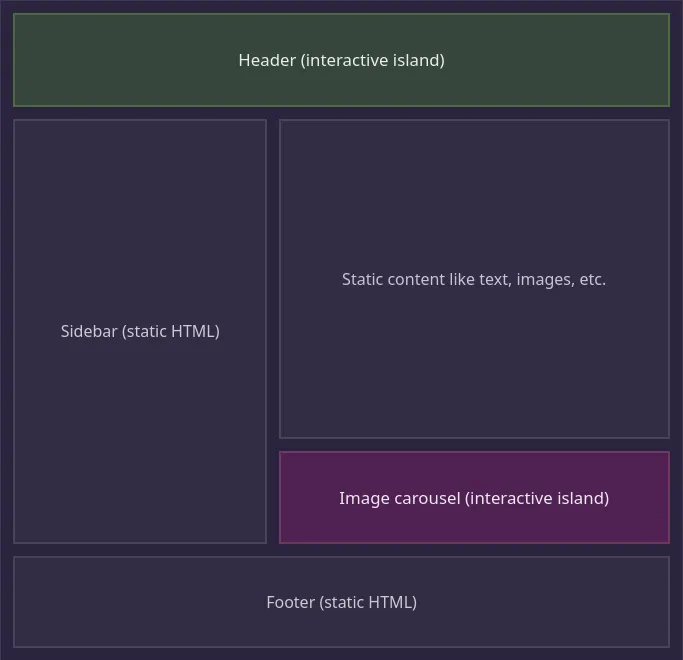
source: https://docs.astro.build/en/concepts/islands/
Every island is rendered on its own, so each has an independent life cycle and none of them blocks the others. This works very well when there are several islands loading in parallel: with the right directives, we can assign priorities and choose which islands load sooner and which can wait.
Let’s go through a few examples. To start, we need to get to know the basic building block - the Astro Component. Such components live in files with the .astro extension.
---
const message = "Hello, Astro!";
---

<main>
  <h1 class="header">{message}</h1>
</main>

<style>
  .header {
    color: steelblue;
  }
</style>
The first thing you notice is the triple dash —, which separates the Component Script from the Component Template. The script section at the top is evaluated only at build time and never reaches the user, which makes it ideal for all kinds of network or database calls, since we can be sure none of it ends up in the final bundle.
In the template section, we describe our component’s structure with a JSX-like syntax, along with its CSS styles.
Now let’s make things more interesting by adding a UI framework component. My examples use React, but there are other options; as of version 2.6.0, they are Preact, Svelte, Vue, SolidJs, AlpineJs, and Lit. I am skipping the configuration step, since it is very simple and comes down to running a single CLI command.
We will build a simple counter component that keeps a numeric value in local state: two buttons with handlers that add or subtract 1, and a span that displays the current count.
import React, { useState } from "react";

export const Counter: React.FC = () => {
  const [count, setCount] = useState(0);

  return (
    <div>
      <button onClick={() => setCount((count) => count - 1)}>-</button>
      <span>{count}</span>
      <button onClick={() => setCount((count) => count + 1)}>+</button>
    </div>
  );
};
Then we import it into our Astro Component and render it as a child of the <main> tag.
---
import Counter from "./Counter";
---

<main>
  <Counter />
</main>

<style>
  ...
</style>
When you run this code, you may be surprised: the component is rendered correctly, yet clicking the + or - buttons does not update our local state. The reason is that our Counter component was rendered on the server, and the user received only its markup.
To make it interactive, it has to go through hydration, which we can trigger with a client directive. Here are the available options:
---
import { Counter } from "./Counter";
---

<main>
  <Counter client:load />
  <Counter client:idle />
  <Counter client:visible />
  <Counter client:media="(max-width: 800px )" />
  <Counter client:only="react" />
</main>- client:load- high priority; the component is loaded and hydrated right away
- client:idle- medium priority; the component is loaded and hydrated once the page has finished loading
- client:visible - low priority; the component is loaded and hydrated when it comes into the viewport
- client:media=* - low priority; the component is loaded and hydrated once the given css media query matches
- *client:only=* - behaves like client:load, except that server rendering is skipped and the client alone handles rendering; we have to specify the name of the framework we are using
- client:* - since Astro version 2.6.0, we can create our own custom directives! - https://docs.astro.build/en/reference/directives-reference/#custom-client-directives
Let’s see how the structure has changed once one of these directives is applied.
Our component is now wrapped in an <astro-island> custom element, whose main job is to load the right JS files and kick off hydration. This is how Astro keeps each island isolated.
As you can see, we get fine-grained control over the behavior of our islands, and the elegance of this solution lies in the fact that it takes just one line of code – everything else is taken care of for us behind the scenes. Note that these directives work only on UI framework components; they cannot be used on Astro Components.
Thanks to the isolation of islands, we can also combine components from different UI frameworks within one view. I would not push hard for doing this, but the option exists, and having extra flexibility never hurts.
---
import { ReactComponent } from "./ReactComponent";
import { VueComponent } from "./VueComponent";
import { SvelteComponent } from "./SvelteComponent";
---

<main>
  <ReactComponent />
  <VueComponent />
  <SvelteComponent />
</main>
All in all, Island Architecture looks like an excellent idea for certain kinds of websites/applications, letting us reach great performance while enjoying a first-class developer experience. It is good to see a growing number of tools shifting to a server-first approach that smartly uses advanced UI techniques tucked away behind an abstraction layer.
I hope this post served as a basic introduction to Astro and its approach to Island Architecture. Don’t forget to subscribe to our blog for more articles like this one!