Building onClick, onDoubleClick and onHold Streams in RxJS
A hands-on example of using RxJS to build a convenient abstraction over onClick, onDoubleClick, and onHold events.
In this post we walk through a hands-on example of using RxJS to build a convenient abstraction over onClick, onDoubleClick, and onHold events. You’ll find out how simple it is to combine RxJS primitives into a declarative solution that is readable as well as generic, which we can later extend to effortlessly produce further streams like onTripleClick and so on.
All three gestures are quite widespread in hardware-based UIs, watches for example, yet there is nothing preventing us from using them in more modern, digital designs too.
Defining our system
Let’s start by considering which events exist in our “system”. Every click and hold originates from the user pressing a button or a screen and then lifting their finger. That means the only two events reaching us from the “outside” are the down event and the up event. Note that whether the user taps a screen, hits a keyboard key, or clicks a mouse makes no difference – the logic stays identical. Let’s express that in RxJS:
import { Subject } from "rxjs";

export const downSubject = new Subject<"down">();
export const upSubject = new Subject<"up">();

const down$ = downSubject.asObservable();
const up$ = upSubject.asObservable();
Further on, we’ll rely on the subjects to translate particular events, like React’s MouseDown and MouseUp, into our platform-independent logic.
The actual values these streams emit are not important, as long as we can tell them apart. Plain strings will do, but should we ever want to attach payloads to the events – say, the x and y coordinates of the mouse when the event fired – we could write something along these lines:
type Event<T extends string> = {
  type: T;
    // add payload here if needed
};

export const downSubject = new Subject<Event<"down">>(); // changed
export const upSubject = new Subject<Event<"up">>(); // changed
Fine, what’s next? Let’s consider what a click actually is at a low level. When we, as users, want to click on something, we:
- simply press it and let go immediately
- don’t want to feel as if we’re racing and must pay close attention to lifting our finger quickly enough to avoid accidentally triggering some other action
Implementing clicks alone would be trivial:
const click$ = down$.pipe(
  switchMap(() =>
    up$.pipe(map(() => ({ type: "click" } as Event<"click">)))
  )
);

click$.subscribe(console.log);
Each time a down event fires, we subscribe to the up event stream, and once the up event fires we map it to a click event.
Refining the click stream
Incidentally, we are assuming here that the combined stream of down and up events looks like this::
D--U-----D-U-----DU--DU---->In other words, two down events never arrive one after another, and the same goes for up events. Is that assumption valid?
Honestly, I can’t come up with an interface that would let us press something twice (using a second finger?) and release it only once. But picture a situation where we’re working with an unreliable network link that occasionally duplicates events at random.
If, say, the up event got duplicated, our present implementation would produce two clicks rather than one.
Fortunately, we can just unsubscribe from the up$ once a single event has arrived:
const click$ = down$.pipe(
  switchMap(() =>
    up$.pipe(
            take(1) // new
        ).pipe(map(() => ({ type: "click" } as Event<"click">)))
  )
);

click$.subscribe(console.log);
Now, no matter how many ups and downs arrive, we’ll produce one click for every distinct pair consisting of a down event and a subsequent up event. Nice!
This example shows that with a good grasp of how streams behave, we can frequently meet various requirements with very little effort, using just one RxJS operator.
Hold event stream
Next, let’s define the events we want to produce, along with a few event creators:
type Click = Event<"click">;
type DoubleClick = Event<"doubleClick">;
type Hold = Event<"hold">;

const createClick = () => ({ type: "click" } as Click);
const createDoubleClick = () => ({ type: "doubleClick" } as DoubleClick);
const createHold = () => ({ type: "hold" } as Hold);
Once a down event fires, there are just two possibilities: map it to a click or map it to a hold. A hold will be emitted automatically if a certain amount of time passes with no up event. So we have a race between a timer that fires the hold event and an up event that fires a click and cancels the timer. That’s precisely what we’ll implement:
const HOLD_INTERVAL = 500;

const clickOrHold$ = down$.pipe(
  switchMap(() =>
    up$.pipe(
      map(createClick),
      raceWith(timer(HOLD_INTERVAL).pipe(map(createHold)))
    )
  )
);

clickOrHold$.subscribe(console.log);
To make things more convenient, we can also set up a separate stream for each gesture:
const click$ = clickOrHold$.pipe(
    filter((event) => event.type === "click")
);

const hold$ = clickOrHold$.pipe(
    filter((event) => event.type === "hold")
);
Double clicks
Excellent – the one remaining gesture is a doubleClick. Because we already have a stream producing click or hold events, we’ll apply the filter operator to keep only the clicks, then measure how much time passes between successive clicks, and if they are close enough together, map them to doubleClick:
const DOUBLE_CLICK_INTERVAL = 300;

const doubleClick$ = click$.pipe(
  timeInterval(),
  filter(({ interval }) => interval < DOUBLE_CLICK_INTERVAL),
  map(createDoubleClick)
);

doubleClick$.subscribe(console.log);
Here we relied on the timeInterval operator, which attaches an interval field holding the time that passed between successive emissions.
Bringing everything together
You might think that a merge function is all we need to build a stream emitting every gesture:
// won't work as we would expect
export const gestures$ = merge(click$, hold$, doubleClick$);
However, whenever a user quickly clicks twice in succession, that stream will produce 3 events: click, click, and doubleClick! Most likely we’d rather it emitted just one doubleClick.
The first idea that comes to mind may be to implement it the same way we built clickOrHold$:
// won't work!
const clickOrDoubleClick$ = click$.pipe(
  switchMap(() =>
    click$.pipe(
      map(createDoubleClick),
      raceWith(timer(HOLD_INTERVAL).pipe(map(createClick)))
    )
  )
);
Sadly, this fails because in switchMap the outer observable and the inner observable are the same, so as soon as a second click arrives we unsubscribe from the inner observable right away and never emit the doubleClick event.
So we’ll turn to a different, widely used technique instead. We’ll collect incoming clicks into an array and emit an event depending on how long that array is:
const DOUBLE_CLICK_INTERVAL = 200;

const clickOrDoubleClick$ = click$.pipe(
  buffer(click$.pipe(switchMap(() => timer(DOUBLE_CLICK_INTERVAL)))),
  map((clicksArr) =>
    clicksArr.length > 1 ? createDoubleClick() : createClick()
  )
);
The buffer operator gathers values until the observable given to it as a parameter emits. The whole trick, then, lies in supplying the right parameter. In this case I supplied an observable that emits 0 (timer emits 0; the value itself is irrelevant here) 200ms after every click event. Should the user click 2 (or more) times within that window, the array will hold more than 1 element and we’ll map it to doubleClick.
At last we can build a gestures stream that behaves correctly:
export const gestures$ = merge(clickOrDoubleClick$, hold$);Complete code and usage example
Below is all the code we’ve written:
import {
  buffer,
  filter,
  map,
  merge,
  raceWith,
  Subject,
  switchMap,
  timer,
} from "rxjs";

type Event<T extends string> = {
  type: T;
};

export const downSubject = new Subject<Event<"down">>();
export const upSubject = new Subject<Event<"up">>();

const down$ = downSubject.asObservable();
const up$ = upSubject.asObservable();

export type Click = Event<"click">;
export type DoubleClick = Event<"doubleClick">;
export type Hold = Event<"hold">;

const createClick = () => ({ type: "click" } as Click);
const createDoubleClick = () => ({ type: "doubleClick" } as DoubleClick);
const createHold = () => ({ type: "hold" } as Hold);

const HOLD_INTERVAL = 500;

const clickOrHold$ = down$.pipe(
  switchMap(() =>
    up$.pipe(
      map(createClick),
      raceWith(timer(HOLD_INTERVAL).pipe(map(createHold)))
    )
  )
);

const click$ = clickOrHold$.pipe(filter((event) => event.type === "click"));

const hold$ = clickOrHold$.pipe(filter((event) => event.type === "hold"));

const DOUBLE_CLICK_INTERVAL = 200;

const clickOrDoubleClick$ = click$.pipe(
  buffer(click$.pipe(switchMap(() => timer(DOUBLE_CLICK_INTERVAL)))),
  map((clicksArr) =>
    clicksArr.length > 1 ? createDoubleClick() : createClick()
  )
);

const doubleClick$ = clickOrDoubleClick$.pipe(
  filter(({ type }) => type === "doubleClick")
);

export const gestures$ = merge(hold$, clickOrDoubleClick$);
Now let’s look at how these streams could be used inside an app. I generated a fresh Vite project from the React and Typescript template and changed App.tsx as follows:
import "./App.css";
import { downSubject, gestures$, upSubject } from "./gestures";

gestures$.subscribe((gesture) => {
  console.log(gesture);
});

function App() {
  return (
    <div className="App">
      <button
        onMouseDown={() => {
          downSubject.next({ type: "down" });
        }}
        onMouseUp={() => {
          upSubject.next({ type: "up" });
        }}
      >
        Button
      </button>
    </div>
  );
}

export default App;
Exercise for the reader
Here’s a challenge to help you practice what we covered today.
Build a ClickStreak$, a stream that emits numbers (to keep things simple) and behaves like this:
- When the user clicks a button n times, each click coming within 200ms of the previous one, the stream emits n.
So if somebody clicks a button once and then pauses for 0.2s, 1 gets emitted. If somebody clicks it 17 times in quick succession, only the number 17 gets emitted, and so on.
Bonus: State Machines
Although our stream-based implementation is far better than typical imperative spaghetti code packed with if statements, variables, and setTimeouts, there is yet another approach that might be even better: state machines.
I won’t go deep into state machines if you haven’t come across them, but in short, we describe our system as the set of every state it can be in and every possible transition between those states, transitions that are typically triggered by events.
Below is a diagram showing how our system could be modeled as a state machine:
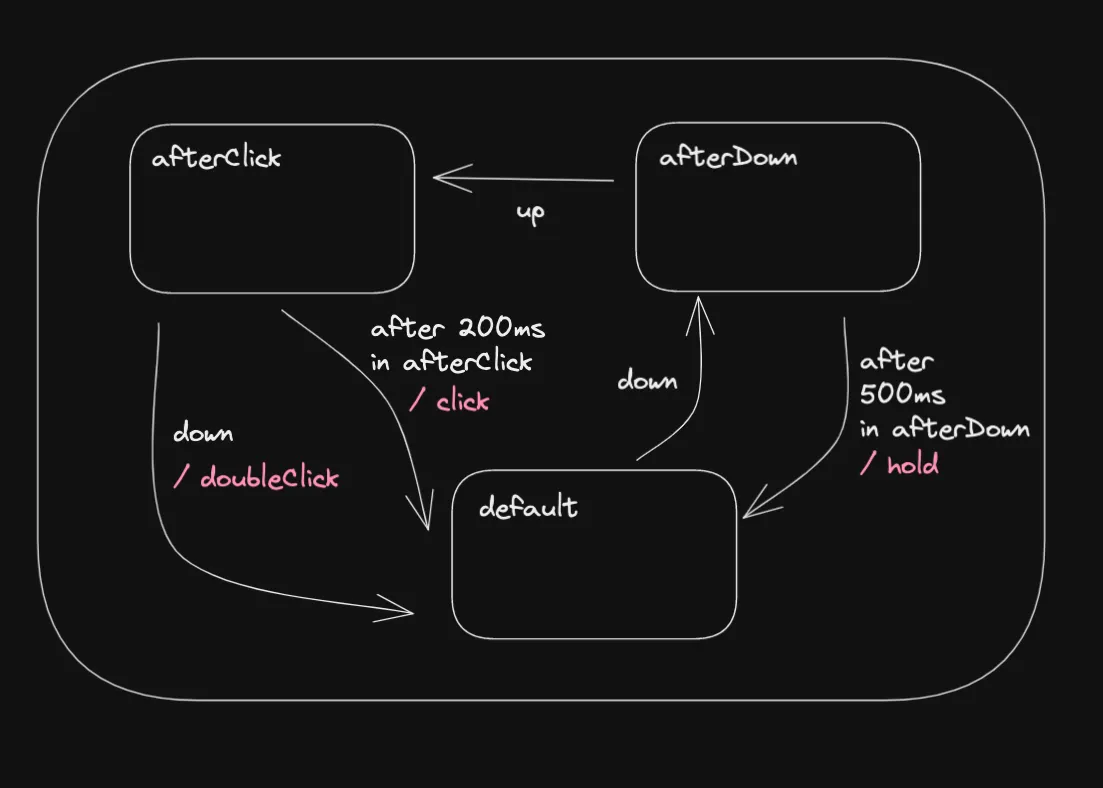
- We begin in a state named
default, from which the only possible transition is toafterDown, triggered by adownevent. - On entering
afterDownwe start an internal 500 ms timer that returns us todefaultand emits aholdevent. The timer is thrown away, however, if we leave that state. - Hence, if an
upevent arrives while we’re in theafterDownstate, we move toafterClick. - On entering
afterClickwe start a second timer, this one for 200 ms, which returns us to default and emits aclick. - If, however, a
downevent arrives before that timer runs out, we move todefaultwith adoubleClickevent instead.
Here’s how it could be implemented using xstate, a widely used state machine library for JavaScript and Typescript:
import { createMachine } from "xstate";

const timer = (ms: number) => new Promise((resolve) => setTimeout(resolve, ms));

export const gesturesMachine = createMachine({
  schema: {
    events: {} as { type: "UP" } | { type: "DOWN" },
  },
  initial: "default",
  states: {
    default: {
      on: {
        DOWN: "afterDown",
      },
    },
    afterDown: {
      on: {
        UP: "afterClick",
      },
      invoke: {
        src: () => timer(500),
        onDone: {
          target: "default",
          actions: () => console.log("hold"),
        },
      },
    },
    afterClick: {
      on: {
        UP: {
          target: "default",
          actions: () => console.log("doubleClick"),
        },
      },
      invoke: {
        src: () => timer(200),
        onDone: {
          target: "default",
          actions: () => console.log("click"),
        },
      },
    },
  },
});
And this is how it could be used in React:
import "./App.css";
import { useMachine } from "@xstate/react";
import { gesturesMachine } from "./stateMachine";

function App() {
  const [_current, send] = useMachine(gesturesMachine);

  return (
    <div className="App">
      <button
        onMouseDown={() => {
          send("DOWN");
        }}
        onMouseUp={() => {
          send("UP");
        }}
      >
        State Machine Button
      </button>
    </div>
  );
}

export default App;
Well done, you’ve reached the end! I hope this short guide gave you a bit of inspiration. If you have ideas or your own experience building handy streams with RxJS, don’t hesitate to tell us about it in a comment 🙏🏻