Using Pub/Sub from Scala
Microservice systems (and many others) frequently need services to talk to each other asynchronously through some messaging layer. Google Pub/Sub, offered by Google directly within GCP, is a convenient option for this: less sophisticated than Kafka, yet simple to work with and requiring no maintenance.
What Pub/Sub is
Microservice architectures (though not only them) very often call for asynchronous communication between services built on some messaging solution. There is a wide range of options to choose from at that stage, from a single-node RabbitMQ setup all the way to a complete multinode Kafka cluster. Google Pub/Sub is Google’s take on asynchronous communication, available right inside Google’s GCP – it is less advanced than Kafka, but in exchange it is straightforward to use and needs no maintenance.
Pub/Sub lets you build a system of producers and consumers for your events. Producers push events to the Pub/Sub service without knowing when or how they will be processed, and the Pub/Sub service then attempts to deliver every one of those messages to the subscribers defined beforehand.
Google Pub/Sub comes in two variants: the standard one, known simply as Google Pub/Sub, and the lite one, which costs less but offers lower availability and a reduced feature set. Pub/Sub Lite can, for instance, run in a single zone – this lowers the cost but means your data is replicated only inside that zone, while standard Pub/Sub guarantees synchronous replication to a minimum of two zones plus best-effort replication to a third.
Configuring Google Pub/Sub
You manage Google Pub/Sub in the GCP web console alongside every other GCP service, which is very handy.
Creating a topic
The choices you get when creating a topic are usually few: apart from giving it a name (obviously), you can opt to have a default subscription created, define a schema for your messages (which you create separately), set the message encoding and choose the retention duration. For ordinary everyday work, picking a name is all it takes.
Quick Tip: Before creating topics for a production application, spend 5 minutes with your team agreeing on naming conventions to be applied throughout the entire Pub/Sub system, so that topics and the subscriptions to them are named consistently – this pays off enormously when you have to find Pub/Sub resources among hundreds of topics and subscriptions.
Creating a subscription
Once the topic(s) you will send messages to exist, the next step is to create subscriptions, which hold the data on Google’s infrastructure until it is delivered to your services. Subscriptions come with a far richer set of configuration options (you can even push messages straight into Google BigQuery); we won’t cover them all, only the key ones.
The main points to think about when setting up a subscription are:
- How long your messages are expected to wait to be processed or, more importantly, how long it will be before they are acknowledged – this determines the message retention duration you need to set (7 days by default)
- How much time the subscriber needs to process a message – the default is 10 seconds, and if Pub/Sub doesn’t get an ack or nack within that window, the message is delivered again (possibly to another subscriber instance).
- Retry policy – whether Pub/Sub should resend your messages right away or with an exponential backoff delay (I’d suggest the latter, as it gives the services acting as subscribers some time to recover after a failure)
- Dead Lettering – strongly advised for every subscription – a message that can’t be processed (e.g. the subscriber is unable to parse it) will then neither be redelivered over and over, consuming your subscriber service’s resources, nor be lost once the retention period expires.
Quick Tip: When setting up subscriptions, it is well worth using another GCP service, namely Alerting. Alerts can fire whenever new messages land on your dead letter subscriptions or when messages on your subscriptions exceed a certain age – that way you’ll be informed when your subscribers are lagging or when something has gone wrong.
Handy tools
Besides the alerting mentioned above, a range of available metrics lets you keep an eye on your subscriptions:
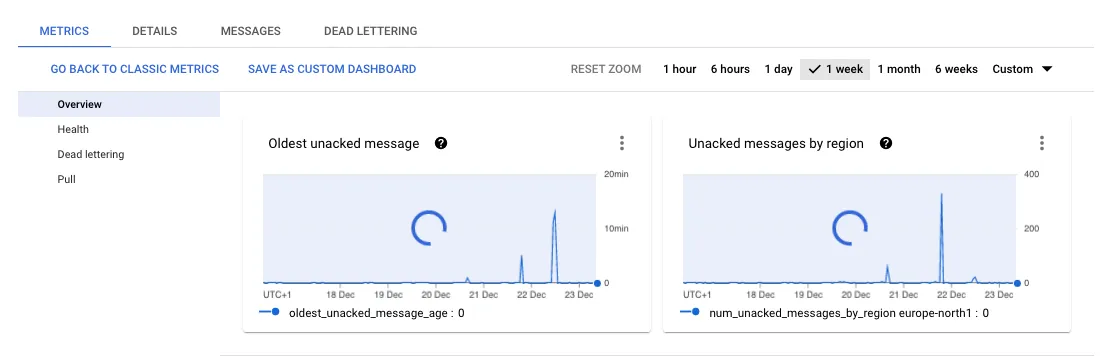
You can also pull a sample of messages from your subscriptions, without acknowledging them, to inspect what they contain.
Working with Google Pub/Sub in Scala
Google does ship bindings for all its services (Pub/Sub among them), along with a Java SDK https://cloud.google.com/pubsub/docs/reference/libraries, but if you work in Scala with effect types, there’s a neat library built by permutive-engineering named fs2-google-pubsub that lets you work with PubSub through Fs2 streams.
The library can be used in two ways: either via the Google Grpc version or via Http with Http4s and the REST protocol. The library’s GitHub page describes all the differences, advantages and drawbacks of each, so I won’t repeat them here. Our example project relies on the Http4s variant, which is fully functional and stable.
Sample project
To show the basic operations with Scala and Pub/Sub, I’ve put together a simple Http4s-based project.
The basic flow consists of accepting an Order object via an HTTP Post request and forwarding it to our Google Pub/Sub topic. A separate service named OrderService keeps receiving all Order messages that show up on one of the subscriptions to the order topic. This makes it easy to see how to deal with both the publisher and subscriber sides in your Scala projects.
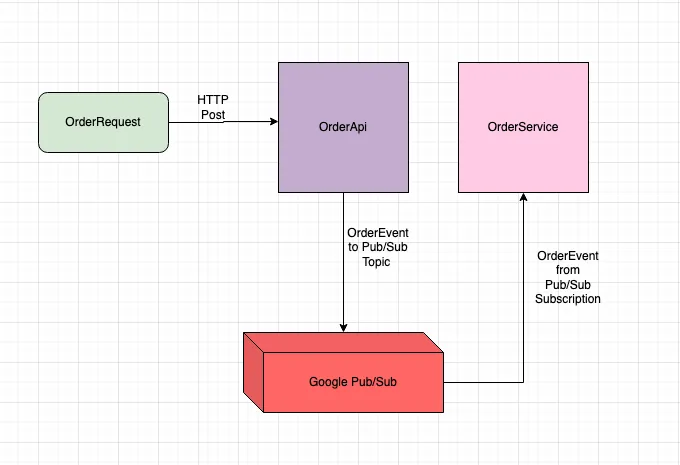
Our first step is to declare the topics and subscriptions created in Pub/Sub via the GCP console, together with the path to your key file, which must be generated in advance in order to talk to your Google Pub/Sub instance.
application.conf
http {
    host = "localhost"
    host = ${?HOSTNAME}
    port = 8089
    port = ${?PORT}
}

pub-sub {
    project-id = "some-project-id"
    project-id = ${?PROJECT_ID}
    host = "pubsub.googleapis.com"
    port = "443"
    key-file-location = "/var/secrets/googlepubsub/key.json"
    key-file-location = ${?PUB_SUB_KEY_FILE_LOCATION}
    subscriptions {
        orders = "orders-dev-sub"
        orders = ${?ORDERS_SUBSCRIPTION}
    }
    topics {
        orders = "orders-dev"
        topic = ${?ORDERS_TOPIC}
    }
}
The OrderEvent passed around in our Scala code is a plain case class with a few fields, along with some extra implicit decoders and encoders.
OrderEvent
import com.permutive.pubsub.consumer.decoder.MessageDecoder
import com.permutive.pubsub.producer.encoder.MessageEncoder
import core.pubsub.CirceImplicits.{pubSubDecoder, pubSubEncoder}
import io.circe.{Decoder, Encoder}
import io.circe.generic.semiauto.{deriveDecoder, deriveEncoder}

case class OrderEvent(id: String, name: String, price: Double)

object OrderEvent {
  implicit val orderDecoder: Decoder[OrderEvent] =
    deriveDecoder[OrderEvent]
  implicit val orderEncoder: Encoder[OrderEvent] =
    deriveEncoder[OrderEvent]
  implicit lazy val pubSubMsgEncoder: MessageEncoder[OrderEvent] = pubSubEncoder[OrderEvent]
  implicit lazy val pubSubMsgDecoder: MessageDecoder[OrderEvent] = pubSubDecoder[OrderEvent]
}
For publishing messages to Pub/Sub, we’ve hidden producer creation behind a kind of factory, which lets you build any number of producers that differ only by topic name.
import cats.effect.IO
import cats.effect.kernel.Resource
import cats.implicits.catsSyntaxOptionId
import com.permutive.pubsub.producer.{Model, PubsubProducer}
import com.permutive.pubsub.producer.encoder.MessageEncoder
import com.permutive.pubsub.producer.http.{HttpPubsubProducer, PubsubHttpProducerConfig}
import config.PubSubConfiguration
import org.http4s.client.Client
import org.typelevel.log4cats.Logger

private[pubsub] trait PubSubProducerFactory {
  def createProducer[T: MessageEncoder](topicName: String): Resource[IO, PubsubProducer[IO, T]]
}

private[pubsub] class PubSubProducerFactoryImpl(
    client: Client[IO],
    config: PubSubConfiguration
)(implicit logger: Logger[IO]) extends PubSubProducerFactory {

  def createProducer[T: MessageEncoder](topicName: String): Resource[IO, PubsubProducer[IO, T]] =
    HttpPubsubProducer.resource[IO, T](
      projectId = Model.ProjectId(config.projectId),
      topic = Model.Topic(topicName),
      googleServiceAccountPath = config.keyFileLocation.some,
      config = PubsubHttpProducerConfig[IO](
        host = config.host,
        port = config.port,
        isEmulator = false,
        onTokenRefreshError = e => logger.error(s"Producer $topicName error - Token refresh error: $e"),
        onTokenRetriesExhausted = e =>
          logger.error(
            s"Producer $topicName error -  Token retries exhausted error: $e"
          )
      ),
      client
    )
}
On the subscriber side, two classes come into play; the first, PubSubSubscriber, is initialized with the name of your subscription:
Subscriber setup
def subscribe(subscriptionName: String): fs2.Stream[IO, ConsumerRecord[IO, T]] =
    PubsubHttpConsumer.subscribe[IO, T](
      projectId = ProjectId(config.projectId),
      subscription = Subscription(subscriptionName),
      serviceAccountPath = Some(config.keyFileLocation),
      config = PubsubHttpConsumerConfig[IO](
        host = config.host,
        port = config.port,
        isEmulator = false,
        onTokenRefreshError = e =>
          logger.error(
            s"Subscriber $subscriptionName error - Token refresh error: $e"
          ),
        onTokenRetriesExhausted = e =>
          logger.error(
            s"Subscriber $subscriptionName error - Token retries exhausted error: $e"
          )
      ),
      client,
      (msg, err, _, nack) =>
        logger.error(
          s"Got error: $err from subscription: $subscriptionName on message: ${msg.messageId}"
        ) *> nack
    )
The second one mirrors our producers: a consumer factory that builds your consumers on top of the subscriber described above.
Consumer factory
import cats.effect.IO
import cats.implicits.catsSyntaxApply
import com.permutive.pubsub.consumer.decoder.MessageDecoder
import config.PubSubConfiguration
import org.http4s.client.Client
import org.typelevel.log4cats.Logger

class PubSubConsumer[T: MessageDecoder] private[pubsub] (
    pubSubSubscriber: PubSubSubscriber[T],
    subscriptionName: String
)(implicit logger: Logger[IO]) {
  def consumePubSubMessages(consumptionRecipe: T => IO[Boolean]): fs2.Stream[IO, Unit] = {
    fs2.Stream.eval(logger.info(s"Running $subscriptionName consumer")) *>
      pubSubSubscriber
        .subscribe(subscriptionName)
        .evalMap(
          msg =>
            consumptionRecipe(msg.value).flatMap(
              isSuccessful =>
                if (isSuccessful) msg.ack
                else msg.nack
            )
        )
  }
}

object PubSubConsumer {
  def create[T: MessageDecoder](client: Client[IO], subscriptionName: String, config: PubSubConfiguration)(
      implicit logger: Logger[IO]
  ): PubSubConsumer[T] =
    new PubSubConsumer[T](
      pubSubSubscriber = new PubSubSubscriberImpl[T](client = client, config = config),
      subscriptionName = subscriptionName
    )
}
To consume the incoming messages and make them visible, I wrote a very basic service that just logs them:
OrderService
class OrderService()(implicit logger: Logger[IO]) {
  def consumeOrder(msg: OrderEvent): IO[Boolean] = {
    logger.info(s"Consuming order: $msg") *> IO.pure(true)
  }
}
Usage
Creating a producer only requires passing in a reference to your http client and the configuration:
Create producer
class PubSubModule(client: Client[IO], pubSubConfiguration: PubSubConfiguration)(implicit logger: Logger[IO]) {
  lazy val pusSubProducerFactory = new PubSubProducerFactoryImpl(client, pubSubConfiguration)

  lazy val orderProducer: Resource[IO, PubsubProducer[IO, OrderEvent]] =
    pusSubProducerFactory.createProducer[OrderEvent](pubSubConfiguration.topics.orders)
}
The consumer side is wired up in our Main method, where we also indicate which service is responsible for handling incoming messages:
Init consumers
override def run(args: List[String]): IO[ExitCode] = {
    //resource modules
    lazy val infrastructureResourceModule = new InfrastructureResourceModule(config)

    val programStream =
      for {
        //modules
        ....................
        //routes
        ....................
        //server initialization
        _ <- BlazeServerBuilder[IO]
              .bindHttp(config.http.port, config.http.host)
              .withHttpApp(
                (http4sInterpreter.toRoutes(endpoints.asInstanceOf[List[ServerEndpoint[Fs2Streams[IO], IO]]]) <+>
                  http4sInterpreter.toRoutes(swaggerEndpoints)).orNotFound
              )
              .serve
              .concurrently {
                //consumers initialization
                coreModule.orderMessageConsumer
                  .consumePubSubMessages(
                    coreModule.orderService.consumeOrder
                  )
                  .void
              }
      } yield ()
    programStream.compile.drain.as(ExitCode.Success)
  }
Example
Check that every setting in application.conf is filled in, start the project with the usual sbt run, open the auto-generated swagger docs at http://localhost:8089/docs/ and post a message to the /api/create endpoint.
Using Swagger:
OrderApi should receive the message and hand it to the producer, which forwards it to Google Pub/Sub. Pub/Sub then distributes the message to every subscriber defined for the topic (just one in our case). As soon as the message lands in our subscription, our subscriber should pick it up, and the OrderService should process it.
Messages shown in the GCP Pub/Sub console:
Output of the running app:
Summary
Google Pub/Sub can be a really valuable addition to your toolbox when designing a microservice-based system built around asynchronous messaging, especially if you’d rather avoid the extra effort of maintaining a Rabbit cluster or Kafka would be overkill for your needs. Getting started is simple, monitoring is easy, and you can be alerted whenever something goes wrong. Its popularity keeps growing as more libraries and tools appear each year, so it deserves at least a look when you plan your next project and/or already rely on other GCP services.