Is It Possible to Self-Host the Signal Server?
Signal is a secure yet intricate messaging platform. This article explores whether the Signal server can be self-hosted on a local machine.
Signal is a great messenger that puts privacy first and offers end-to-end encryption. What’s more, the app is open source, so you can inspect and audit the code – and maybe even run it yourself.
In this post, I’d like to tell you about my attempt to get Signal running on my local machine.
Server
The official signal repository contains a number of components: the server, the android app, libsignal, the contact discovery service, and more.
Even though the precise system architecture hasn’t been officially documented, I managed to put together a few high-lever architecture overviews with AI’s help.
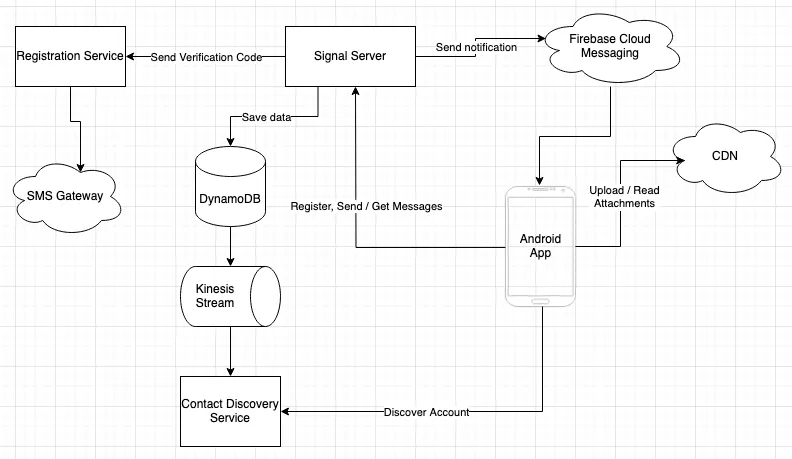
Note: The diagram is simplified and omits some elements.
Clearly, the one component that is absolutely needed is the server, so that’s where I began. The repo lacks good documentation, but LocalWhisperServerService is worth a look. This class, located in the test scope, lets you run a local instance of Signal Server, with the caveat that some options aren’t available. To launch this test server, I simply ran it from my IDE.
It also refers to the default test config src/test/resources/config/test.yml and the secrets src/test/resources/config/test-secrets-bundle.yml. There you’ll find more details on the server’s required dependencies. A quick glance is enough to see that it’s not as simple as spinning up a few containers, but perhaps we could try connecting a mobile app to LocalWhisperServerService?
Mobile App
I fetched the mobile app from this repository and opened it in Android Studio to browse the code conveniently.
While poking around, I came across app/build.gradle.kts, which contains a set of URLs for various services. I swapped every URL under the SIGNAL_URL keys for my PC’s IP address on the home network.
Next, I launched the application in the emulator, and it ran – a great success!
Still, although the app worked, it couldn’t connect to the server running locally. Let’s look into what the cause might be.
The output logs showed an error saying only TLS connections were permitted, so I set out to obtain a domain and a certificate. I discovered a “trick”: you can generate a valid certificate by registering a duckdns subdomain and using Let's Encrypt. To make use of the certificate, I ran nginx-proxy-manager locally in a container, with the right redirects to LocalWhisperServerService.
Second attempt and… still not working… It seemed the certificate came from an untrusted CA, even though the browser reported no problems. As it turned out, the mobile app keeps its own trust store, so I had to add the root CA to app/src/main/res/raw/whisper.store
Third attempt and… success – I managed to “register” a fake phone number.
The first step was a CAPTCHA check. Once I completed it correctly, I got an error and was sent back to the screen where I’d entered the phone number.
When I tried registering the number again, I landed on the screen asking for the pass code. Since I hadn’t configured any SMS gateways and this was a “TestServer”, I entered the last 6 digits of the phone number. After I typed the code, the loader kept spinning, and after a few minutes with no outcome I clicked Resend Code, which did the trick. I later learned that any code is accepted.
Next, I had to enter my first and last name. Then I had to provide a PIN number twice for my ‘account’. That step failed with an error pop-up, but I could still proceed and was taken to the main page.
Let’s launch a second app and check whether we can exchange messages. The app boots up, but another obstacle appears: finding another contact requires the contact discovery service.
Contact Discovery Service
Getting this service up isn’t straightforward. It depends on a few native libraries compiled specifically for the x86 architecture, so running it on MacOS is out of the question.
The reason is that Signal takes our privacy seriously: the contact discovery service relies on enclaves that keep RAM from leaking your data. This is done through encrypted and obfuscated RAM access patterns, so malicious actors can’t “guess” them. Signal’s Blog explains this nicely.
Could it run in a container, perhaps? Sadly, not fully. Once more, the service needs native libraries, and one of them has to be compiled – which happens… in a container.
After quite a few attempts, I switched to a VM running Ubuntu, and there I managed to get it running.
All right, that was a lot of effort just to get the Contact Discovery Service running – surely I can connect to it now?
In the mobile app repository, I updated the URLs for the Contact Discovery Service in app/build.gradle.kts (the config fields with the SIGNAL_CDSI_URL key). I launched the application, but saw no outgoing requests at all, only error logs showing that the service couldn’t be reached.
Digging further, I discovered that the connection to this service is handled by libsignal – a shared protocol library. That also means the connection URL lives there (the ones in app/build.gradle.kts appear to be unused). Luckily, the mobile app can be built against a local copy of libsignal by uncommenting and setting the libsignalClientPath and org.gradle.dependency.verification properties in the gradle.properties file. libsignalClientPath has to point to where the libsignal repository lives on the machine.
I updated the URLs for the DOMAIN_CONFIG_CDSI properties in /rust/net/src/env.rs in the libsignal repository, rebuilt the mobile app, launched it, and… the connection still failed with the same error.
That’s when I chose to abandon the attempt, since this was only the tip of the iceberg, and debugging and figuring out every component would take a great deal of time
libsignal
So we now know that self-hosting the Signal server is very hard (if it can be done at all), but what about the protocol and the shared library? Could I write my own server on top of this library?
I gave it a shot and built a simple PoC server that relies on libsignal and MySql to store messages and device info for retrieval later.
It consists of two subprojects:
clientis a console app acting as a protocol client capable of encrypting, decrypting, receiving, and sending messages.serveris a spring boot server that stores all the required information and messages, which makes the process asynchronous.
client and server talk to each other over HTTP.
To run both of them, follow the instructions in the project’s README.md
Registering a device
Before messages can be encrypted and decrypted, we first have to generate:
org.signal.libsignal.protocol.IdentityKeyPairorg.signal.libsignal.protocol.state.SignedPreKeyRecord- a list of
org.signal.libsignal.protocol.state.PreKeyRecord
The generated data should be persisted for later use in an implementation of org.signal.libsignal.protocol.state.SignalProtocolStore, so that your “credentials” don’t get lost; to keep things simple, though, I relied on the InMemory implementation shipped with libsignal and stored the data there. As a result, every run of the application generates fresh credentials.
So that other users can set up a session with us, the following data has to be sent to the server at registration:
- IdentityKey (public)
- SignedPreKey (public) - part of
SignedPreKeyRecord - PreKeySignature - part of
SignedPreKeyRecord - PreKeys
Using this data, the server can later send a PreKeyBundle to a device that asks for it.
Below is a code snippet from the example repository:
    println("Enter your username:")
    val username = readln()
    val serverClient = ServerClient(serverURL = URI("http://localhost:8080"))
    val identityKeyPair = IdentityKeyPair.generate()
    val protocolStore = InMemorySignalProtocolStore(identityKeyPair, 2137)

    val preKeys = generatePreKeys(1, 100)
    preKeys.forEach { protocolStore.storePreKey(it.id, it) }

    val signedPreKey = generateSignedPreKey(identityKeyPair, 0)
    protocolStore.storeSignedPreKey(signedPreKey.id, signedPreKey)

    val deviceDTO = serverClient.registerUser(username, identityKeyPair, signedPreKey, preKeys) ?: return
Setting up a session
There are two ways to establish a session:
- by retrieving an
org.signal.libsignal.protocol.state.PreKeyBundlefrom the server - by receiving an
org.signal.libsignal.protocol.message.PreKeySignalMessage- typically the first message coming from another device.
The initiator first has to retrieve from the server the PreKeyBundle belonging to the recipient’s device. Then it has to create an org.signal.libsignal.protocol.SessionBuilder and call its process(PreKeyBundle) method. This step stores all the required information in SignalProtocolStore, which is used later for encrypting and decrypting messages.
This is the part of the example repository that handles it:
    val receiverInformation = getAndSaveUserInformation(serverClient, receiverName, otherUsers)
    if (!protocolStore.containsSession(receiverInformation.toSignalProtocolAddress())) {
        val userBundle = serverClient.getUserBundle(receiverName)
        SessionBuilder(protocolStore, receiverInformation.toSignalProtocolAddress())
            .process(userBundle.toPreKeyBundle(deviceDTO.deviceId))
    }
Sending Messages
Sending a message requires creating an org.signal.libsignal.protocol.SessionCipher, giving it the SignalProtocolStore and the recipient’s SignalProtocolAddress.
Note: To keep things simple, the data needed for SignalProtocolAddress is generated by the server and retrieved whenever it’s required.
Once you have the SessionCipher, you just call the org.signal.libsignal.protocol.SessionCipher#encrypt(byte[]) method. The encrypted message it returns goes to the server, where the other device can pick it up later.
Example:
    val cipher = SessionCipher(protocolStore, receiverInformation.toSignalProtocolAddress())
    val ciphertextMessage = cipher.encrypt(message.toByteArray())
    serverClient.sendMessage(username, receiverName, ciphertextMessage)
Receiving Messages
To get its messages, the device calls a server endpoint that returns everything in the inbox, along with details about the sender and the message type. Each message can be decrypted just once, and the server deletes it after it has been fetched.
Decrypting a message requires creating (or retrieving) the SessionCipher associated with its sender. For decryption to work, the message has to be cast to the correct type:
PreKeySignalMessagefor the first message from a deviceSignalMessagefor all other messages
The cast is determined by the messageType, which the server stores and returns.
Note: libsignal offers other message types as well, but to keep it simple I concentrated on just 2.
Decrypting a PreKeySignalMessage establishes a session with the given device, so no extra data has to be fetched from the server.
Remarks
Note that libsignal is released under the AGPL-3.0 license, so any software that uses it has to be released under the same license.
The library is excellent and lets you build software with end-to-end encryption, but it’s built purely for the Signal ecosystem, and its types and structures appear to fit only that ecosystem.
Most of the library is written in rust, which makes debugging very difficult, particularly in Java / Kotlin clients.
Summary
Signal is a secure yet intricate messaging platform. Self-hosting the whole service is close to impossible, given the scarce documentation, the complexity of the stack, and the customization options. Writing your own server, on the other hand, is a tough job as well, even with libsignal at hand. It means open-sourcing your code, understanding the Signal Protocol well, and dealing with many edge cases you don’t think about on a daily basis.