Building efficient data processing pipelines with Elixir and Broadway
What is Broadway in Elixir? Discover what this Elixir library can do - it lets you ingest data and build pipelines for processing it!
In this post I’ll take a look at what Broadway can do - it is Elixir’s approach to building data ingestion and data processing pipelines.
Broadway lets developers build and manage data pipelines by composing complex topologies on top of GenStage. In essence, Broadway adds another abstraction layer over GenStage that greatly simplifies complicated GenStage topologies (backpressure, batching and graceful shutdown in particular). It supports concurrent, multi-stage processing of data coming from many kinds of sources, such as message queues, streaming platforms and cloud services. Broadway takes care of the pipeline’s orchestration, concurrency, fault-tolerance and back-pressure for you. It was built to be scalable, dependable and simple to use for data ingestion and data processing work.
Broadway’s key built-in features are:
- Back pressure
- Automatic acknowledgment
- Fault tolerance
- Graceful shutdown
- Built-in testing
- Custom failure handling
- Static and Dynamic batching
- Ordering and Partitioning
- Rate Limiting
- Metrics
To explore some of these features, we will build a small Phoenix application that consumes messages from a Google PubSub subscription and runs them through our pipeline, which will include batch pre-processing of messages, handling of individual messages, static batch processing, custom failure handling and partitioning. Finally, we will plug in Broadway Dashboard, which lets us visualise the pipeline and spot potential bottlenecks and message throughput in real time.
Basic Setup
GCP Credentials and PubSub Subscription
If you’d like to follow along with the code samples, you first need to create a Google Service Account with Google IAM. The service account is required to create a subscription to the publicly available topic with New York City taxi events. I won’t explain how to configure it in the Google console here. Simply follow the steps for setting up a subscription.
If you already know Google GCP, the key step is to create a subscription to an existing topic: projects/pubsub-public-data/topics/taxirides-realtime.
Be aware that your subscription will receive an enormous number of messages, so I strongly suggest deleting every resource created for this tutorial once you are done experimenting.
As soon as you have the subscription name and the .json file with your service account credentials, you’re good to go.
Phoenix Application
We begin with a basic Phoenix application. Broadway pipelines don’t require Phoenix, but setting things up this way makes using Phoenix Dashboard much simpler.
This tutorial uses no html views and no databases, so there is no ecto.
Once the skeleton app is generated, we have to add the required dependencies. Put the following into your mix.exs file:
and run mix deps.get so that your Phoenix app downloads the dependencies it needs.
Basic Data Ingestion Pipeline
A typical implementation of the Broadway behaviour (which you can also find on the Broadway github pages) looks like this:
start_link is where you configure your producer and define the entire topology of your processing pipeline. You can either write your own producer or pick one of the existing connectors:
- Amazon SQS
- Apache Kafka
- Google Pub/Sub
- RabbitMQ
Here we will rely on the official Broadway connector for Google Pub/Sub.
When you use the default producer and batcher with concurrency set to 1,
the topology of your pipeline for the configuration above looks as follows:
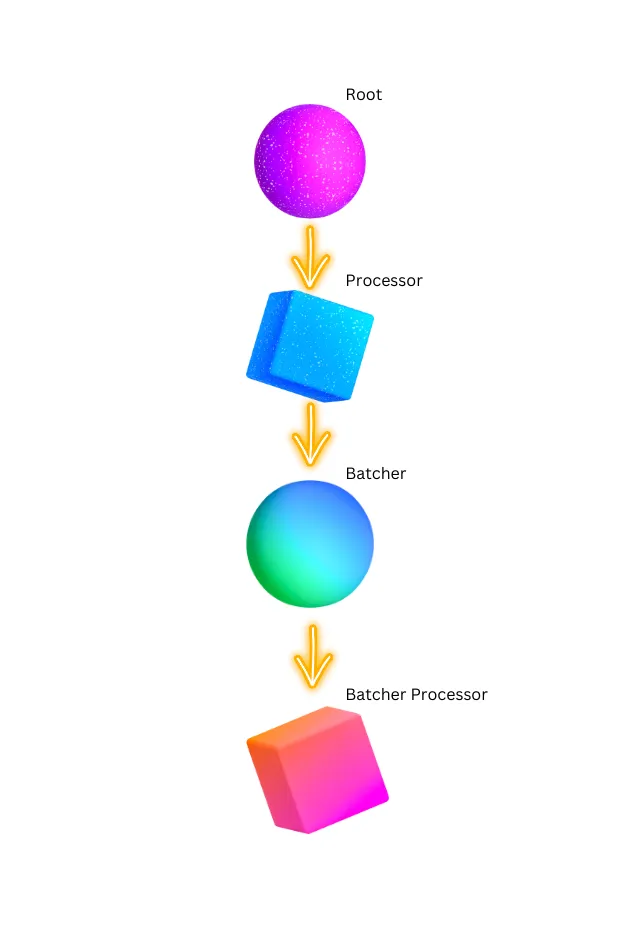
A supervision tree this simple essentially gives you one processor and one batcher working through your pipeline. Any logic you put in handle_message runs inside your processor actor, and anything you do in handle_batch is handled further down the supervision tree by your batcher. Each message the batcher returns is acknowledged automatically, though this behaviour can be overridden - we’ll come back to that later.
Naturally, a topology like that doesn’t make use of the best tool at our disposal, namely the concurrency that Elixir and GenStage provide. What makes Broadway great is that you can define far more complex topologies simply by changing the configuration in start_link. Below is the topology we will build in this tutorial:
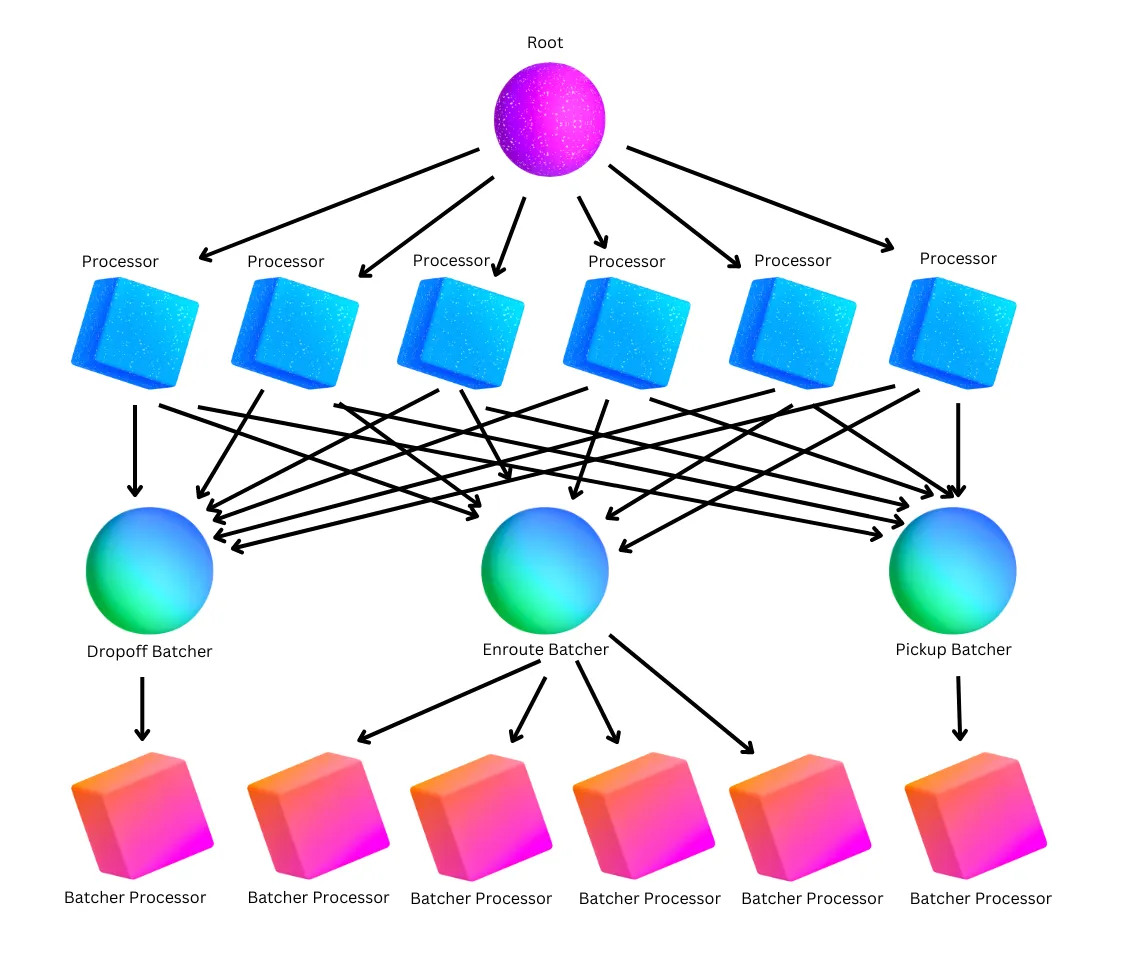
To keep the diagram readable, it leaves out the custom error handling and partitioning we will add to the project; still, let’s start by describing what we are about to build.
The Data
To begin with, for clarity and reference, here is what a single example message from the Google subscription looks like:
Our pipeline will do the following:
- Shard on the processor level by
ride_id, so that a given ride_id always lands on the same processor instance. - Pre-process messages with a dedicated handler method
prepare_messages(messages, _context), which in our case parses the JSON string into an Elixir map. - Send each message to the right batcher according to its
ride_status - Handle custom errors with
handle_failed(messages, _context)whenever theride_statusis unknown - Print the results in every batcher and acknowledge the message.
Our Topology Explained
As the previous image shows, we raised the number of processors handling our messages to 6, and then each message is routed to a particular batcher based on its content. Google Pub/Sub sends us 3 types of messages:
- Pickup event
- Enroute event
- Dropoff event
Batches of each type are processed in separate batchers.
The key point is that batching lets us raise throughput even more by handling many pieces of data in a single operation, e.g. inserting several messages into the database at once after the processor has processed and prepared them in handle_message. In this tutorial we simply print the contents of the processed messages and acknowledge them.
We know that in the stream coming from Google most messages are enroute, so pickup and dropoff don’t need many batch processors, since they handle only a small share of the work; that’s why the pickup and dropoff batchers have concurrency set to 1. The enroute batcher gets 4 separate processors for its work.
The configuration is very simple: as mentioned, there are 6 processors receiving data from the Pub/Sub producers and 3 separate batches, each with its own number of processors. You can freely adjust these numbers and observe the pipeline live in the Broadway Dashboard to spot potential bottlenecks quickly and reshape your topology as needed.
The Code Explained
Even though the pipeline is fairly complex, only a handful of Elixir methods were needed to implement its logic. Before we get to the actual Elixir code, let’s look at how the connection to our Google Pub/Sub subscriber is configured:
Pre-processing
With the prepare_messages method, Broadway lets you pre-process messages in batches. This is where you can parse a message or enrich it with extra data before handing it further down the processing tree to the processor – for instance, by adding user data loaded from the database.
The important thing about prepare_messages is that it works on a batch of messages rather than on one message, which can boost throughput if we can load many records from the database with a single call. Another line worth noting is Broadway.Message.update_data, which updates the data field of the Broadway message struct. The messages returned from prepare_message go on to the processors, where handle_message runs for each of them.
Jason.decode may return different kinds of values (either :ok or :error), and these are handled by separate implementations of handle_message thanks to Elixir’s powerful pattern matching.
Handle message
We actually defined 2 variants of handle_message, and the one that runs depends on what the prepare_messages logic returned. When JSON parsing succeeds, the message is routed to the appropriate batcher; otherwise we rely on Broadway’s custom error handling and mark the message as failed. Failed messages are dealt with by an extra method, described below.
Handle failed
Our implementation just matches failed messages tagged as ‘invalid-data’, prints them and acknowledges them. This way you can build your own error handling and choose what happens for each kind of error - e.g. acknowledge, resend, or store for later analysis.
Handle batch
After handle_message processes the messages, they are grouped into batches once more and handled further down the tree in batchers. We used static batching here: the batcher names are listed in the configuration and every batcher executor gets its own method. Messages returned from batchers are acknowledged automatically.
Partitioning
To make it a bit more interesting, we added a form of partitioning. Partitioning can be defined for producers and batchers: either two separate methods for both or for just one, or a single partition method placed in your config after the processors and batchers configuration, which both will use. n the latter case, keep in mind that the message you get in partition is first the one entering the producer and later the one entering the batcher, so be careful if you modify messages on the fly in the handle_message method.
The partition method has to return an integer; if your message body has none you could use, you can hash a string with the built-in Erlang method :erlang.phash2.
Broadway Integration
With all the methods in our module implemented, we can plug it into our Phoenix application. A few changes to the existing generated Phoenix files are required, beginning with application.ex
Our custom Broadway module BroadwayPubSubSimple has to be added as a child to the Phoenix application’s list of children.
Broadway Dashboard
As said at the start, we are adding Broadway Dashboard to visualize the topology of our pipeline. Provided you added the dependency as described above, you only need to change route.ex and add additional_pages to Phoenix’s built-in live dashboard. As a result, a new tab appears in your regular Phoenix dashboard where you can watch your pipelines.
Running the application
With our Broadway module implemented and added to Phoenix, along with a bit of extra configuration for Broadway Dashboard, you can launch the application and watch the pipeline process messages live.
First, expose the Google Pub/Sub credentials as en environment variable by exporting it in your shell, then start the Phoenix app:
Messages from the subscription begin to be processed immediately. Open your Phoenix dashboard and go to the Broadway pipelines tab to watch our topology at work.
To show partitioning at work, I filtered the logs for one ride_id (here ”732c74e0-d54c-439c-b950-340f30c201c3”)
Since each log line includes the PID, we can see that a given ride_id is always handled by the same processor. Partitioning is configured only on the processor level, so once messages move down the tree to the batcher layer, partitions no longer matter and the same ride_id gets handled by different batch actors.
Final notes
Broadway elegantly solves the question of how to structure supervision trees, giving you concurrency, fault tolerance and the other features mentioned earlier out of the box. While the pipeline we built is fairly simple and demonstrates basic Broadway functionality, we did not cover many important features, such as dynamic batching, graceful shutdown and rate limiting, to name only a few. Those will have to wait for future blog posts in my exciting Broadway adventure.