How to Prepare for the AWS ML Specialty Certificate
A concise exam guide meant to help you earn the AWS Machine Learning Specialty Certificate.
Being an ML Engineer with a solid Software Engineering background, I frequently catch myself trying to reinvent the wheel, as the saying goes. After many hours of development, I regularly discover an off-the-shelf solution that performs better than my own code and, crucially, won’t require maintenance down the road.
Naturally, ready-made solutions often come with limited configuration options and can be affected by changes their authors make, but most of the time they let us build our solution with less work in a fraction of the time.
To address this and get a thorough understanding of the strengths and weaknesses of such solutions, I decided to take the AWS ML Speciality certificate. It gives me a broad picture of what AWS ML services can do and where they fall short (AWS being the cloud I had the most experience with).
This blog post walks through an exam guide and then presents four interesting AWS services that can noticeably improve your ML pipeline within minutes of setting them up.
Why is it worth getting?
First, you get to understand what goes on under the hood. At a time when AI is being adopted almost everywhere, Software Engineers can gain a lot from knowing how the underlying models and architectures work and from being able to build and fix them to meet requirements.
Second, even experienced people can pick up something new. As an ML practitioner, I managed to organize the areas of my ML knowledge where I had less hands-on experience, e.g., which time series solution fits which setup best.
Third, the certificate validates your knowledge of both ML and AWS. It signals to a potential employer that you can handle ML topics and deploy them quickly on AWS. In this post, I actually describe several tools I found interesting and somewhat unusual (often going further than training simple models in Sagemaker), despite my years of experience in the field.
Lastly, studying makes you feel like an actual ML consultant. A big part of my job involves finding the best-fitting solution for requirements set by people less familiar with ML. Questions are frequently phrased much like a real-world problem (e.g., build Amazon Alexa with minimal effort), and you have to give the client the most appropriate solution (think of combining e2e tools such as Lex and Polly).
The AWS ML study path
This specialisation sits at the top of the machine learning courses AWS offers. If, after reading this, you feel less advanced, you may want to look at lower-level certificates that could better match your knowledge. I’m referring to 2 ML-related ones (both still in beta version at the time of writing):
- AI Practitioner (Foundational level) works well for people with less technical background too.
- Machine Learning Engineer (Associate level) covers much of the same ground as the ML Speciality level, but with easier-to-digest details and less ML expertise needed.
Furthermore, since ML roles come in many flavours (MLOps, Prompt Engineer, Data Scientist or ML Engineer), I can recommend this guide (from the official AWS website):
Source: AWS journey path
Exam format and details
The ML Specialization exam is an AWS certification exam made up of multiple-choice questions (some of which have more than one correct answer). For this exam, you have 180 minutes to answer 65 questions. It combines cloud-related knowledge and ML-specific expertise in a well-balanced way.
The questions come from these domains:
Source: [Official ML Specialty Study Guide](https://d1.awsstatic.com/training-and-certification/docs-ml/AWS Certified Machine Learning - Specialty_Exam Guide (1).pdf)
A passing score is anything above 750 (on a scale of 100-1000).
The guide states that questions within the domains may cover the following topics (quoted from the [AWS study guide](https://d1.awsstatic.com/training-and-certification/docs-ml/AWS Certified Machine Learning - Specialty_Exam Guide (1).pdf)):
- Domain 1: Data Engineering
- 1.1 Build data repositories for machine learning.
- 1.2 Determine and implement a data-ingestion solution.
- 1.3 Determine and implement a data-transformation solution.
- Domain 2: Exploratory Data Analysis
- 2.1 Clean and prepare data for modelling.
- 2.2 Carry out feature engineering.
- 2.3 Analyze and visualise data for machine learning.
- Domain 3: Modeling
- 3.1 Express business problems as machine learning problems.
- 3.2 Choose the right model(s) for a given machine learning problem.
- 3.3 Train machine learning models.
- 3.4 Carry out hyperparameter optimisation.
- 3.5 Evaluate machine learning models.
- Domain 4: Machine Learning Implementation and Operations
- 4.1 Design machine learning solutions for performance, availability, scalability, resiliency, and fault tolerance.
- 4.2 Recommend and implement suitable machine learning services and features for a given problem.
- 4.3 Apply fundamental AWS security practices to machine learning solutions.
- 4.4 Deploy and operationalise machine learning solutions.
Since these requirements may feel somewhat vague, the next section lists some useful study resources.
Helpful resources
To get ready for the exam, I went through two courses: one from Whizlab and a course on Udemy (by Stephen Mareek and Frank Kane).
The ML course by Stephan Mareek and Frank Kane is the most effective resource for passing the exam. The material is explained clearly, with emphasis on information likely to show up in the exam.
The Whizlab course, by contrast, is excellent for getting hands-on practice (with over 12 labels), which helps you understand what particular tools look like in the AWS Console and which parameters they offer.
AWS Skill Builder is a great addition to your studies and helps you find knowledge in your articles.
Finally, there’s the AWS documentation (for ML, Sagemaker, or other data-related tools), which proved useful for a range of exam questions.
Exam tips
As you can probably tell, I took quite a few practice exams to prepare and build confidence, so here are some tips:
- Keep the time limits in mind during the exam. In practice runs I finished in about 60% of the time on average, yet in the real exam I used all the time available. Non-native speakers can request an additional 30 minutes.
- Think about booking a practice exam through AWS. It shows you whether you’re ready and gives you a better sense of how the real exam will feel.
- Don’t stick only to the easiest and most popular question sets. Work through harder questions too, so you’re ready for more demanding scenarios that may also come up in the exam.
Noteworthy AWS ML features
This section describes several AWS features I discovered while studying for the certificate.
The two sides of Sagemaker Canvas
Sagemaker Canvas workflow as a no-code approach to ML workflows, source: aws.amazon.com
Since I like to know how the underlying components work, I was skeptical of the whole AutoML trend. AWS SageMaker Canvas, however, is something else entirely. It lets you build a complete end-to-end ML lifecycle by dragging and dropping. Solutions like this are common in AI; Roboflow, Encord, and SuperAnnotate offer similar ones.
While it probably won’t be the go-to option for experienced Machine Learning Engineers who need a custom setup – its target audience is less technical – it can still serve simpler use cases that have to move fast.
The price itself is modest: a single instance costs 1.9$/h (plus small additional fees once you exceed 5GB of data).
Then again, as everyone who has used AWS knows, at some point you may forget that a certain service is still running while your AWS bill keeps growing. That happens often, but with AWS Sagemaker Canvas it can get even worse, since there are some stories of AWS changing its billing rules and generating extra charges for a hidden Canvas instance.
In short, AWS Sagemaker Canvas can be a useful tool when you have to deliver a solution fast, but you need to be especially careful to remove unused resources and keep a close eye on costs.
Tackling fairness and bias with AWS Clarify
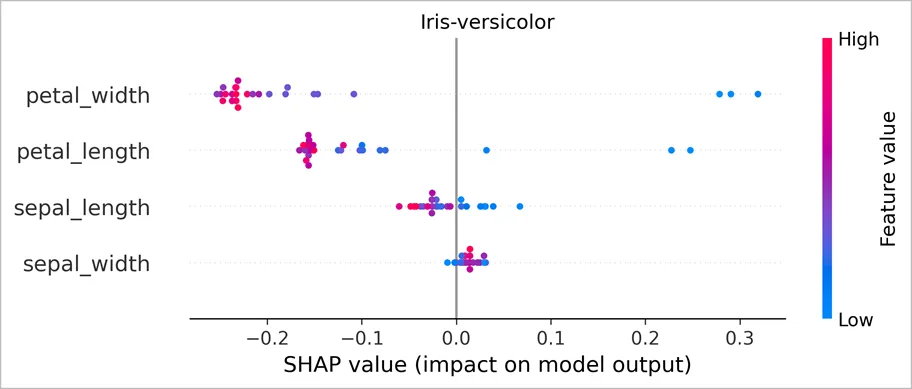
Global explanations for the iris dataset produced with AWS Clarify, source docs.aws.amazon.com
AWS Clarify lets you evaluate and interpret model results as well as potential biases in your dataset. Paying attention to these aspects may be necessary when following guidelines such as ISO/IEC 42001 while preparing data, building a model, or running it in production.
To detect bias, you first define demographic groups (e.g,, race, gender, age, etc), and then you can apply one of the available metrics:
- Class Imbalance – e.g., a class may be underrepresented.
- Demographic Parity Difference – measures how positive outcomes differ between demographic groups (e.g., whether white males tend to receive higher credit scores).
- The difference in Positive/ Negative Outcome – measures how the likelihood of positive and negative outcomes differs between groups.
- Disparity Impact – e.g., verifying that minority groups aren’t put at an unfair disadvantage.
- Equal opportunity difference – measures how true positive rates differ between groups.
- Average odds difference – compares the differences in false positive and true positive rates among groups.
- Conditional Demographic Parity – checks whether positive outcomes are fair across groups while conditioning on other features.
For model interpretability, AWS Clarify provides Kernel SHAP for both local interpretability (per sample) and global interpretability (per dataset). These values help explain feature attributions during both training and deployment, which can serve as a solid starting point for detecting data drift.
Cutting labelling time the easy way with AWS Ground Truth Autolabeling
SageMaker Ground Truth applied to LIDAR data, source: aws.amazon.com
As far as labelling tools go, the AWS one resembles the rest. What sets it apart, though, is active learning, which turns labelling into a hybrid process combining the work of human labellers with an automatically retrained model. Paired with the huge range of models available on the AWS cloud (Bedrock, dedicated services or custom deployed models), this can make for a very powerful combination.
Regarding setup, AWS recommends in their guide labelling at least 1250 objects (with 5000 strongly suggested). The workflow then trains a model for the given domain and runs it in batch mode to label the unlabeled portion of the dataset (whenever a label’s confidence exceeds the configured confidence threshold). Examples with low confidence go to human labellers. These two final steps repeat until there are no low-confidence examples left. This hybrid workflow can cut labelling time considerably (by up to 70%, according to AWS). For more details, I suggest this guide from AWS.
AWS Ground Truth is also well known for its inexpensive, on-demand Mechanical Turk workforce. Yet most solutions either need specialised domain knowledge or come with strict data privacy requirements, which restricts how useful the AWS workforce can be.
Human review with AWS Augmented AI
Reaching 100% accuracy when designing a Machine Learning solution is almost impossible. Usually you have to strike the best balance between false positives and false negatives. But what if that isn’t necessarily a lost battle?
AWS Augmented AI lets you add human review for low-confidence samples, in effect building a hybrid system that puts humans in the loop for the harder examples.
Briefly (see here for more details), the steps are:
- Set up a labelling workforce in Sagemaker Ground Truth (just a few clicks in the console).
- Set up a human workflow through A2I and attach the labelling workforce to it (a few more clicks).
- Call the workflow wherever a response is required.
The code below (step 3) detects sensitive and adult content with the AWS Recognition service. If you need a custom task for your use case, take a look at this tutorial.
response = client.detect_moderation_labels(
            Image={
                "S3Object":{
                    "Bucket": "amzn-s3-demo-bucket",
                    "Name": "image-name.png"
                }
            },
            HumanLoopConfig={
               "FlowDefinitionArn":"arn:aws:sagemaker:us-west-2:111122223333:flow-definition/flow-definition-name",
               "HumanLoopName":"human-loop-name",
               "DataAttributes":{
                    ContentClassifiers:["FreeOfPersonallyIdentifiableInformation"|"FreeOfAdultContent"]
                }
             })
Sample code for starting a human in the loop job, source: AWS guide on A2I
Conclusions
This post provided a brief exam guide to help you earn the certificate and introduced several tools that can support your ML deployment – from Sagemaker Canvas, a no-code way to build ML workflows, through AWS Clarify, a tool for bias and interpretability, to human-in-the-loop solutions for labelling and deploying ML models.