Hibernate vs. Exposed: Picking the Best Persistence Tool for Kotlin - Round 3
Compare Hibernate and Exposed in terms of data fetching, batching, and how well they suit Kotlin – and pick the persistence tool that fits you best.
This is the third and last round of the Hibernate vs. Exposed face-off – welcome!
If you’ve read the series from the very start, you’ve hopefully picked up a fair amount, such as:
- The basics of Hibernate and Exposed, how to configure them in different environments, and how to model your data with each of them.
- The various ways both frameworks let you create, update, delete, and query data, plus how transactions are defined and configured.
This last article takes you into more advanced topics - especially query performance, a few caveats and pitfalls of each framework, and how well each of them fits into the Kotlin ecosystem.
Happy reading!
Performance Considerations
Since database interactions are I/O operations, they can turn into serious performance bottlenecks and noticeably impact both the latency and throughput of our applications. This is why optimizing the performance of our database queries with care is so important. Persistence frameworks can help a lot here, but sadly, they can also bring extra problems of their own, mostly because we misuse them or misunderstand how they work.
This section covers a few of the most frequent performance issues associated with persistence frameworks, and I’ll try to explain how Hibernate and Exposed can each help us - or get in our way - when dealing with them.
Data fetching
Getting data fetching right is key to an application’s performance. Persistence frameworks - particularly those that hide the complexity of database queries - usually provide a range of strategies and mechanisms for loading data, whether automatically or semi-automatically. These approaches give you, the developer, varying degrees of control over how and when data gets loaded.
Lazy loading is among the best-known features related to data fetching, especially in ORM frameworks. It’s a mechanism that can either help you or hurt you. Although its purpose is to reduce how much data gets loaded when you fetch entities with many relationships, it can easily cause problems - the notorious N+1 queries problem among them. It can also lead to runtime exceptions you wouldn’t anticipate at first sight.
Lazy loading isn’t the only feature that can bite you when misused, though. Eager loading can cause performance issues as well, particularly when entities have too many associations or fetch strategies are set up incorrectly.
That can certainly cause a headache! Don’t worry, though - this section explains how Hibernate and Exposed approach data fetching and digs into the specifics of their mechanisms.
Data fetching - Hibernate
In Hibernate, data fetching is a rather complex, multifaceted subject. Fetching strategies can be defined, redefined, and overridden in several ways. The subject is actually so extensive that it deserves its own blog post. So I’ll only scratch the surface here and keep the description as brief as I can.
Talking about data fetching in Hibernate, two key dimensions need to be taken into account:
- Timing - when related data gets fetched:
- Eager loading: loaded right away together with the main entity
- Lazy loading: loaded later, upon access
- Scope - where the fetching gets defined:
- Static: specified in the entity mapping
- Dynamic: specified at runtime, for a particular query
Keeping these dimensions in mind, let’s see how fetching timing is defined within the various scopes in Hibernate.
Static fetching strategies declaration
Fetching is most often defined by declaring the FetchType of relationships statically, right in the entity class:
@Entity
@Table(name = "board_games")
open class BoardGame(
// other properties ommited for brevity
) {
    @OneToMany(mappedBy = "boardGame", fetch = FetchType.LAZY)
    @Fetch(FetchMode.SUBSELECT)
    open var ratings: MutableSet<Rating> = mutableSetOf()
// ...
}

@Entity
@Table(name = "ratings")
open class Rating(
// other properties ommited for brevity
) {
    @ManyToOne(fetch = FetchType.LAZY)
    @Fetch(FetchMode.SELECT)
    @JoinColumn(name = "board_game_id", nullable = false, updatable = false)
    open val boardGame: BoardGame

// ...
}
The example above defines a @OneToMany relationship from the BoardGame entity to its Ratings. We mark it as lazy explicitly, although that’s not actually needed here - Hibernate makes every @OneToMany and @ManyToMany relationship lazy by default.
Then there’s the Rating entity, which defines a @ManyToOne relationship pointing back to BoardGame. This one we mark as lazy explicitly, since Hibernate makes @ManyToOne and @OneToOne relationships eager by default.
Apart from the FetchType definition, you may have spotted the extra @Fetch annotation. FetchType belongs to the JPA standard and determines when related entities are fetched, whereas the @Fetch annotation is specific to Hibernate and determines how fetching is carried out.
@Fetch offers three options:
- SELECT - Works for both eager and lazy associations. In this fetch mode, related entities are loaded by a secondary query (run after the main one). It’s the default for relationships that aren’t eager and is susceptible to the N+1 queries problem.
- JOIN - Works only with eager associations. It tells Hibernate to load related entities within the primary query by means of a JOIN. It’s the default fetch mode for eager relationships.
- SUBSELECT - Works for both eager and lazy associations, but only with collections. Just like the SELECT fetch type, it relies on a secondary query - but rather than running one query for each parent entity, it embeds the original SELECT in an IN clause so that all related entities are loaded in one go. That way, the N+1 problem is avoided.
Let’s stop for a moment and look at when the notorious N+1 queries problem can occur.
Imagine we disregard the @Fetch(FetchMode.SUBSELECT) annotation on the BoardGame.ratings property - and treat it as an ordinary lazy association using the default FetchMode.SELECT.
Then take a look at this code:
val boardGames = session.byMultipleIds(BoardGame::class.java).multiLoad(boardGameIds)

boardGames.forEach { boardGame ->
   println("Found board game: ${boardGame.title}")
   println("Found board game ratings: ${boardGame.ratings}") // N + 1 queries!
}
Here, each access to boardGame.ratings triggers a separate SQL query.
If you switched the fetch strategy to FetchType.EAGER, though, the problem would go away, since JOIN is the default fetch mode for FetchType.EAGER. Board games and their ratings would then be loaded together in one query using a JOIN.
HOWEVER - should you explicitly put @Fetch(FetchMode.SELECT) on an eager association, the N+1 problem would return. And here it would show up even sooner than in the lazy variant – right after the main query runs.
Dynamic fetching strategies declaration
The previous section showed how fetch strategies can be declared statically. As mentioned before, however, Hibernate also lets you specify dynamic fetch strategies – meaning fetch settings applied at runtime for a given query. Keep in mind that dynamic strategies always take precedence over any static fetch configuration defined on your entities.
Let’s see what Hibernate has to offer here.
Hibernate gives you three main mechanisms for specifying fetch strategies dynamically:
- Queries (HQL and Criteria API)
HQL (Hibernate Query Language) and the Criteria API both let you decide which associations get fetched eagerly. You can achieve this with:
- the
JOIN FETCHclause in HQL, - the
Root.fetch()method in the Criteria API.
Below is an example taken from our board game store application, in which we want to load a BoardGame together with all of its Ratings eagerly:
// HQL
val boardGame = session.createQuery(
   "FROM BoardGame bg LEFT JOIN FETCH bg.ratings WHERE bg.title = :title",
   BoardGame::class.java)
   .setParameter("title", "Dune: Imperium")
   .singleResult

// Criteria API
val criteriaBuilder = session.criteriaBuilder
val query = criteriaBuilder.createQuery(BoardGame::class.java)
val root = query.from(BoardGame::class.java)

root.fetch<BoardGame, Rating>("ratings", JoinType.LEFT)

query.select(root).where(
   criteriaBuilder.equal(root.get<String>("title"), "Dune: Imperium")
)

val boardGame = session.createQuery(query).singleResult
This is a spot where the N+1 queries problem can creep in unnoticed unless you pay attention.
Suppose the BoardGame.ratings property is declared with FetchType.EAGER, either implicitly (without a @Fetch annotation) or explicitly with @Fetch(FetchMode.JOIN).
Let’s now compare two ways of loading a board game by its ID:
// direct entity find by ID
val boardGameByFind = session.find(BoardGame::class.java, boardGameId)
   ?: throw EntityNotFoundException()

println("Board game ${boardGameByFind.title} has the following ratings: ${boardGameByFind.ratings}")

// HQL query
val boardGameByHQL = session.createQuery(
   "FROM BoardGame WHERE id = :id",
   BoardGame::class.java
)
.setParameter("id", boardGameId)
.singleResult

println("Board game ${boardGameByHQL.title} has the following ratings: ${boardGameByHQL.ratings}")
You’d probably expect both approaches to load the ratings of the BoardGame eagerly through the JOIN clause of the main query, wouldn’t you?
Not quite.
In the first case (session.find(...)), FetchMode.JOIN is respected, and a single query loads everything.
In the second case (with HQL), on the other hand, the static @Fetch(FetchMode.JOIN) annotation gets ignored, and Hibernate runs a separate SELECT to load the ratings.
The reason is that dynamic fetching always takes precedence over static declarations. In the case of HQL, this means: unless you explicitly use JOIN FETCH, no joins will be made - whatever the entity declares. So if you depend on @Fetch(FetchMode) annotations while using HQL queries, keep this subtlety in mind.
- JPA Entity Graphs
With JPA’s entity graphs, you can build a custom fetch graph by listing explicitly which associations should be fetched. Such graphs can be named and reused, and they can even contain subgraphs for nested relationships.
Here’s a simple entity graph that fetches BoardGame together with its Ratings:
@NamedEntityGraph(
   name = "BoardGame.ratings",
   attributeNodes = [NamedAttributeNode("ratings")]
)
@Entity
@Table(name = "board_games")
open class BoardGame(
And here’s how such a graph is used in a query:
val boardGame = session.find(
   BoardGame::class.java,
   boardGameId,
   mapOf("jakarta.persistence.fetchgraph" to session.getEntityGraph("BoardGame.ratings")))
Configured like this, Hibernate loads Ratings eagerly with a JOIN - even when the ratings property is declared as FetchType.LAZY in the entity class.
A significant caveat: With an entity graph, every association listed in the graph is treated as FetchType.EAGER, while every other association (not listed in the graph) is treated as FetchType.LAZY - whatever the static annotations say!
- Hibernate Fetch Profiles
Fetch profiles are Hibernate’s counterpart to JPA entity graphs. They come in especially handy where entity graphs aren’t supported – for example, when fetching by natural ID. Entity graphs and fetch profiles can’t be combined. When both are defined, entity graphs win.
Assume the title field is declared as the @NaturalId of the BoardGame entity. Then we can define and apply a fetch profile as follows:
@FetchProfile(
   name = "BoardGame.ratings",
   fetchOverrides = [
       FetchOverride(
           entity = BoardGame::class,
           association = "ratings",
           mode = FetchMode.JOIN
       )
   ]
)
@Entity
@Table(name = "board_games")
open class BoardGame(
   @NaturalId
   @Column(name = "title", nullable = false)
   open var title: String,
And then apply it in a query like this:
session.enableFetchProfile("BoardGame.ratings")

val boardGame = session.bySimpleNaturalId(BoardGame::class.java)
   .load("Dune: Imperium")
In this way, we told Hibernate to load the ratings of a BoardGame eagerly within one query using JOIN.
Note that a Fetch Profile takes a list of FetchOverrides. So, just as its name implies, a Fetch Profile only overrides the fetch strategies of the particular associations you select, while the others keep their default or statically declared FetchTypes. That’s the opposite of the Fetch Graph behaviour described before, which overrides every association of the given entity.
Lazy initialization exception trap
There’s one more issue I want to point out. As I noted at the start of the Data Fetching section, lazy loading can genuinely help you make your queries faster - yet it’s also very easy to misuse, which can result in runtime errors. Let me show you what I mean.
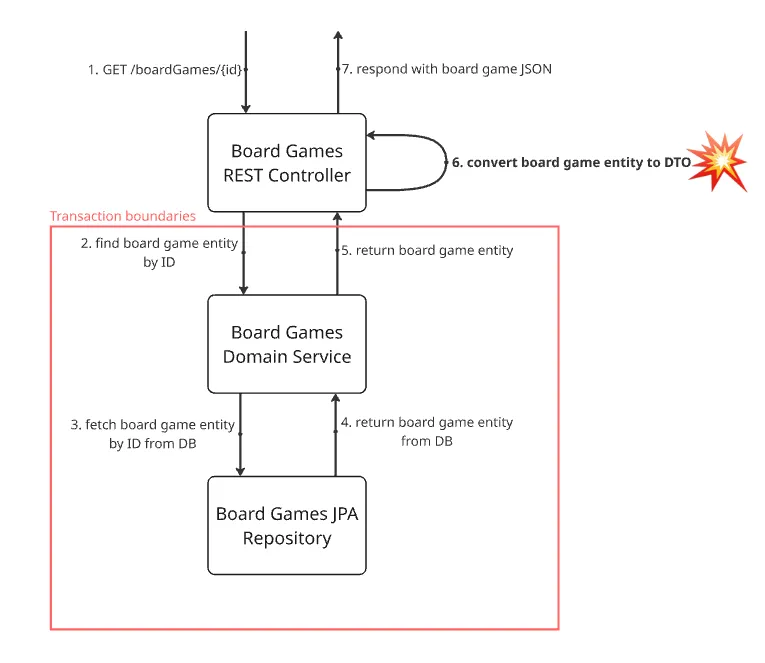
Picture a REST endpoint that fetches a BoardGame by its ID. To handle such a request, your application first hits the REST Controller, which calls a Domain Service, which then relies on a JPA Repository to load the BoardGame entity. Once the entity reaches your Controller, it gets mapped to a DTO that uses every field of the entity, including the ratings, which are declared with FetchType.LAZY. The transaction is wrapped around the Service method.
The diagram below shows the flow just described and “gently” highlights the point in the flow where an exception can be expected:
Here’s what it might look like in code:
// BoardGamesService
@Transactional(readOnly = true)
open fun findBoardGame(id: Long): BoardGame {
   val game = boardGamesRepository.findById(id).orElseThrow { EntityNotFoundException() }
   // some additional business logic here
   return game
}

// BoardGamesController
val boardGame = boardGameService.findBoardGame(boardGameId)
val boardGameDto = BoardGameDto(
   ratings = boardGame?.ratings?.map { RatingDto(it.rating) } ?: emptyList() // BOOM!
   // other properties omitted
)
In this scenario you’d end up with org.hibernate.LazyInitializationException. Hibernate throws it because you’re trying to access the ratings property of a BoardGame entity which, due to its FetchType.LAZY, hasn’t been loaded yet. And because this happens outside the transaction boundaries, Hibernate is no longer able to load the ratings from the database - which is why it fails at runtime.
I’m confident you know about this problem and normally steer clear of such situations in your code. Sadly, not everybody does - and this issue still turns up in the codebases of many production applications. That’s why I chose to discuss it in a bit more detail in this section.
That wraps up data fetching in Hibernate. You’ll find everything you need on this subject, in even greater depth than I’ve covered here, in the Fetching section of the Hibernate documentation.
Data Fetching - Exposed
Data fetching is far simpler in Exposed than in Hibernate, so this section will be considerably shorter.
To begin with, this section concerns only Exposed DAO, since Exposed DSL is essentially a thin wrapper around SQL queries. Exposed loads just the data you explicitly request in your DSL query – there’s no lazy loading involved.
Eager and lazy loading in Exposed DAO
For their lightweight ORM module – Exposed DAO – the authors of Exposed went with a simple assumption. They chose to make every relationship in Exposed entities lazy-loaded by default. That doesn’t mean Exposed restricts you to lazy-loaded associations only, though. You can choose to load particular associated entities eagerly at runtime, for each query separately.
Let me first recall how relationships are defined in Exposed DAO entities, using our BoardGame and Rating entities as an example:
class BoardGame(id: EntityID<Long>): LongEntity(id) {
   companion object: EntityClass<Long, BoardGame>(BoardGamesTable)

   val ratings by Rating referrersOn RatingsTable.boardGameId
    // other properties omitted for brevity
}

class Rating(id: EntityID<Long>) : LongEntity(id) {
   companion object : LongEntityClass<Rating>(RatingsTable)

   var boardGame by BoardGame referencedOn RatingsTable.boardGameId
   // other properties omitted as well
}
You’ll notice there are two distinct infix functions for defining a relationship:
referencedOn- declares the relationship in the entity on the owning side of it (the child). Here, the owning side is the Rating entity, mapped to the RatingsTable, which is where theboardGameIdcolumn is actually stored.referrersOn- declares the relationship in the entity on the opposite side of it (the parent). In the example above, theBoardGameentity is that opposite side, since its underlying table holds no information about the relationship. Notice that the relationship in theBoardGameentity points explicitly to theRatingsTable.boardGameIdcolumn as the referrer.
Bearing that in mind, here’s how you can load a BoardGame together with all of its Ratings eagerly:
// Eagerly loading ratings for a single board game
val boardGame = BoardGame.findById(1L)?.load(BoardGame::ratings)
println(boardGame)
println(boardGame?.ratings?.toList())

// Eagerly loading ratings for multiple board games
val boardGames = BoardGame.all().with(BoardGame::ratings)
boardGames.forEach {
   println(it)
   println(it.ratings.toList())
}
Let’s go through what the code above does.
It shows two different examples of eager loading in Exposed DAO. In the first, we look up a single BoardGame entity and call the load(BoardGame::ratings) function on the result, so that all ratings of this BoardGame are loaded right away. Behind the scenes, Exposed runs a separate SQL query that loads every associated Rating entity as soon as the primary query has returned the BoardGame. Without the load() call, that very SQL query would run later – the first time the BoardGame.ratings property was accessed.
The second example demonstrates how to eagerly load the associated ratings of multiple BoardGame entities – here obtained through the all() function. This time, we called the with(BoardGame::ratings) function on the returned BoardGames collection to eagerly load all Ratings of every BoardGame instance in it. Exposed then runs just a single extra SQL query to load all associated Ratings, with an IN clause taking all the BoardGame IDs as arguments. Without the with() function, the ratings of each BoardGame would be loaded separately on first access – resulting in the N+1 queries problem.
You may have noticed that Exposed DAO provides no way to eagerly load the main entity together with all associated entities in one query through a JOIN clause, the way Hibernate does with FetchMode.JOIN. Exposed always requires a secondary query.
Using relationships outside of a transaction
There’s one more point worth noting. Because every loaded association (lazy or eager) is kept in a transaction cache, it’s accessible only inside the transaction block. To use associations outside a transaction, you have to set keepLoadedReferencesOutOfTransaction in DatabaseConfig:
val db = Database.connect(
   url = "jdbc:h2:mem:test;DB_CLOSE_DELAY=-1",
   driver = "org.h2.Driver",
   databaseConfig = DatabaseConfig {
       keepLoadedReferencesOutOfTransaction = true // this option allows to use associations outside of transaction block
   })

val boardGame = transaction {
   BoardGame.findById(1L)?.load(BoardGame::ratings)
}

println(boardGame)
println(boardGame?.ratings?.toList())
Without that setting, the call to boardGame?.ratings?.toList() in the example above would throw an exception.
This situation closely resembles Hibernate’s LazyInitializationException discussed earlier. Here, however, eagerly loaded associations are affected too.
More details on lazy and eager loading in Exposed are available in the Relationships section of the Exposed documentation.
Batching
Batching is one more factor affecting the performance of applications that work with relational databases. JDBC drivers come with built-in batching, which lets batched SQL queries be sent to the database server all at once rather than individually. This can reduce the number of network round trips between the application and the database server.
This section shows how each of the two persistence frameworks makes use of JDBC batching.
Batching - Hibernate
Out of the box, Hibernate doesn’t batch and sends every query separately. You can easily change that, though, by setting this property (e.g. in hibernate.properties):
hibernate.jdbc.batch_size=20This setting instructs Hibernate to use JDBC batching and send as many as 20 queries per batch to the database server.
The parameter can also be set for each session individually:
sessionFactory.inTransaction { session ->
   session.jdbcBatchSize = 10
   // ...
}
This overrides the hibernate.jdbc.batch_size property.
From now on, you can simply insert new entities in a loop, and Hibernate will batch the queries behind the scenes:
sessionFactory.inTransaction { session ->
   val batchSize = session.properties.getOrDefault("hibernate.jdbc.batch_size", 10) as Int

   for (i in 0..99) {
       if (i > 0 && i % batchSize == 0) {
           session.flush()
           session.clear()
       }

       session.persist(BoardGame("BoardGame$i", 1, i, 10 * i))
       println("BoardGame$i created")
   }
}
You’ve likely spotted the code that periodically flushes and clears the session based on the batchSize variable. This little piece of boilerplate keeps the memory used by the persistence context as small as possible. Here it may not be strictly needed, since we’re creating only 100 BoardGame entities, but it’s generally a recommended practice.
With hibernate.jdbc.batch_size configured, update queries can make use of JDBC batching too. Have a look at this example:
sessionFactory.inTransaction { session ->
   val batchSize = session.properties.getOrDefault("hibernate.jdbc.batch_size", 10) as Int

   val scrollableResults = session.createQuery("FROM BoardGame", BoardGame::class.java)
       .scroll()

   var count = 0
   while (scrollableResults.next()) {
       val boardGame = scrollableResults.get()
       boardGame.title = boardGame.title + "_new"

       if (count++ % batchSize == 0) {
           session.flush()
           session.clear()
       }
   }
}
Besides the session.flush() and session.clear() calls I explained earlier, the Hibernate team also advises using ScrollableResults when loading data for batch updates. In the example, this is done by calling scroll() on session.createQuery(). The point is to make use of server-side cursors for queries that might return lots of rows.
Before closing this section, I want to share one more important point. Keep in mind that Hibernate automatically and quietly turns off JDBC batching for entities using the IDENTITY identifier generator. So if the primary key property of your entity carries the following annotation, batching won’t work:
@GeneratedValue(strategy = GenerationType.IDENTITY)Batching - Exposed
Exposed can take advantage of JDBC batch inserts as well, which is done through the Table DSL. Inserting multiple rows into the board_games table with Exposed would look like this:
val boardGamesToCreate = (0..99).map {
   BoardGameData(title = "BoardGame$it", minPlayers = 1, maxPlayers = 4, playTime = 60)
}

BoardGamesTable.batchInsert(data = boardGamesToCreate, shouldReturnGeneratedValues = false) {
   this[BoardGamesTable.title] = it.title
   this[BoardGamesTable.minPlayers] = it.minPlayers
   this[BoardGamesTable.maxPlayers] = it.maxPlayers
   this[BoardGamesTable.playTimeInMinutes] = it.playTime
}
BoardGamesTable.batchInsert() takes a number of parameters, of which the key, mandatory ones are:
data- a collection of values used in the body of the batch insert,body- a function responsible for turning a single entry of the data parameter into a new Exposed Table row.
Besides these two, the example above uses one more parameter:
shouldReturnGeneratedValues- determines whether the function returns auto-generated values for the new rows (such as auto-incremented IDs). If those values aren’t needed, setting it to false is better for performance.
Batch updates are possible in Exposed too, although they’re harder to find and less thoroughly documented than batch inserts. The Table DSL offers no handy batchUpdate() function (at least as of this writing). You can still achieve it this way:
BatchUpdateStatement(BoardGamesTable).apply {
   boardGamesForUpdate.forEach { boardGameRow ->
       addBatch(boardGameRow[BoardGamesTable.id])

       this[BoardGamesTable.title] = "Updated ${boardGameRow[BoardGamesTable.title]}"
   }

   execute(TransactionManager.current())
}
Here, boardGamesForUpdate has the type List<ResultRow>, but any collection of data will do. The key part of BatchUpdateStatement is passing the ID of the particular row to be updated to the addBatch() function, together with the actual values to update.
Clearly, Exposed handles batching somewhat differently than Hibernate. Exposed has no batch_size setting – it offers an explicit way of triggering batch operations instead. As a result, you must decide yourself where batching happens by using a dedicated API, but in return you get more control and transparency.
Oddly enough, Exposed lacks any official, detailed documentation on batching, though some information can be found in the section devoted to CRUD operations - particularly on batch inserts.
Integration with Kotlin Features
Since this article is all about Kotlin, it’s only natural to ask how each of the two frameworks discussed here makes use of native Kotlin features, and how easy and pleasant writing Kotlin code with them is. Let’s look at each in turn.
Hibernate
Unsurprisingly, Hibernate was built exclusively for Java, with only Java in mind. That’s hardly anyone’s fault – Hibernate is in fact far older than Kotlin, and likely older than most other non-Java JVM languages too. This makes Hibernate a highly mature, battle-tested framework, but also one tightly bound to Java syntax, so it feels somewhat less natural in other languages.
As far as Kotlin features go, then, Hibernate provides no dedicated integration, APIs, DSLs, or anything of the sort. It’s perfectly usable in Kotlin projects, but that’s due to Kotlin’s Java interoperability rather than to Hibernate itself. Kotlin’s syntactic sugar can be used in Hibernate entities or query APIs exactly as with any other pure Java library.
Somewhat more worrying is that, because of certain specific and strict requirements of the JPA specification, Hibernate makes us give up some Kotlin niceties, which leads to even more boilerplate. I already covered most of these issues in the Mapping & Schema Definition section, when talking about Hibernate entities. To sum up, these are the JPA restrictions I mainly have in mind:
- an entity class has to provide a no-arg constructor,
- an entity class can’t be final,
- none of the entity class’s methods or persistent instance variables can be final.
Because of them, you either have to open every entity class and its properties by hand, add default constructors, and give up data classes and immutability, or rely on third-party build plugins that alter your bytecode.
Exposed
Since Exposed is written in Kotlin and for Kotlin, you’d naturally expect it to integrate much better with native Kotlin features – and that’s exactly how it is.
Let me concentrate on a few particular Kotlin idioms and show how Exposed uses them to make things convenient and improve the developer experience:
- data classes - Curiously, Exposed doesn’t explicitly rely on data classes – one of the coolest features Kotlin has (personal opinion alert!). Exposed DSL Tables are declared as objects, and Exposed DAO entity classes are built in a way that makes defining them as data classes difficult. That doesn’t stop you from using data classes in code that works with Exposed, though. Quite the contrary – you certainly can, and it feels very natural and simple. This comes in particularly handy when converting
ResultRowsinto domain objects:
val boardGames = BoardGamesTable.selectAll().map {
   BoardGameData(
       it[BoardGamesTable.id].value,
       it[BoardGamesTable.title],
       it[BoardGamesTable.minPlayers],
       it[BoardGamesTable.maxPlayers],
       it[BoardGamesTable.playTimeInMinutes]
   )
}- infix functions - Infix functions really pay off in Exposed DSL queries. With infix functions such as
eq, greater, lessEq, like, and, or, etc., conditions inwhereexpressions read more naturally and become more legible:
BoardGamesTable.selectAll()
   .where { (BoardGamesTable.maxPlayers lessEq 4) and (BoardGamesTable.title like "Aeon's End%") }
.toList()- extension functions - Exposed makes heavy use of extension functions (for reference, see the many functions in the org.jetbrains.exposed.sql package). It also encourages developers to use extension functions in their own code to customize and reuse queries. For instance, you could write your own extension functions for
ResultRowthat neatly turn it into your domain objects:
fun ResultRow.toBoardGameData() = BoardGameData(
   id = this[BoardGamesTable.id].value,
   title = this[BoardGamesTable.title],
   minPlayers = this[BoardGamesTable.minPlayers],
   maxPlayers = this[BoardGamesTable.maxPlayers],
   playTime = this[BoardGamesTable.playTimeInMinutes]
)- lambdas with receivers - Kotlin’s ability to pass a lambda expression as a parameter outside the main parameter list has made its way into Exposed too. Lambdas with receivers make Exposed DSL queries much more expressive, compact, and readable:
BoardGamesTable.insert {
   it[title] = "Champions of Midgard"
   it[minPlayers] = 2
   it[maxPlayers] = 4
   it[playTimeInMinutes] = 90
}

BoardGamesTable.selectAll()
   .where { BoardGamesTable.playTimeInMinutes lessEq 90 }
   .forEach {
       // ...
}- type safety - Exposed DSL as a whole is promoted as a type-safe syntax resembling SQL. This really helps when writing Exposed queries, since every part of a typical SQL query (such as SELECT, JOIN, WHERE), along with the arguments of those clauses, is verified at compile time and gets syntax completion in your IDE:
BoardGamesTable.innerJoin(RatingsTable)
   .select(BoardGamesTable.title, RatingsTable.rating.avg())
   .groupBy(BoardGamesTable.title)
   .where { BoardGamesTable.title like "Aeon's End%" }
   .forEach {
       println("Average rating of ${it[BoardGamesTable.title]} is ${it[RatingsTable.rating.avg()]}")
}- nullability handling - I’d say Kotlin’s nullability handling is at its best when declaring the schema - that is, the properties of Exposed tables that represent database columns. Exposed doesn’t define columns through annotations or other configuration mechanisms; you do it purely in Kotlin code. As a result, both the type and the nullability of your properties are checked at compile time:
object RatingsTable: LongIdTable("ratings") {
   val rating: Column<Int> = integer("rating")
val comment: Column<String?> = varchar("comment", 256).nullable() // actual nullable type- coroutines - Even though database access with most JDBC drivers today remains blocking, coroutines are gradually finding their way into Exposed too. Functions such as
newSuspendedTransaction()andwithSuspendTransaction()let you work with Exposed insidesuspendblocks while passing aCoroutineContext, andsuspendedTransactionAsync()lets you run some Exposed code asynchronously and await its result later in your code:
suspend fun findBoardGame(id: Long): BoardGameData? = newSuspendedTransaction(Dispatchers.IO) {
   BoardGamesTable.selectAll().find { it[BoardGamesTable.id].value == id }?.toBoardGameData()
}

suspend fun getAllBardGames(): Deferred<List<BoardGameData>> = suspendedTransactionAsync(Dispatchers.IO) {
   BoardGamesTable.selectAll().map { it.toBoardGameData() }
}
Summary: Hibernate or Exposed?
Let’s quickly sum up today’s topics (performance considerations and Kotlin integration). After that comes the final verdict wrapping up the whole series.
Performance Considerations
Both support lazy loading, eager loading, and batching – each with its own ergonomics and gotchas.
Hibernate offers more options (e.g. fetch profiles, entity graphs), along with more opportunities to shoot yourself in the foot.
Exposed is simpler and more predictable - particularly for anyone who favours explicit data fetching and thinner abstractions.
Kotlin Integration
For many, this could tip the scales.
Hibernate does work with Kotlin, but it was never built for it. Because of various restrictions, it can sometimes even get in the way of using particular Kotlin idioms.
Exposed, by contrast, fully embraces Kotlin idioms such as extension functions, DSLs, lambdas with receivers, coroutine support, and more. If writing idiomatic, expressive Kotlin matters to you most, Exposed will probably feel more natural.
Final Thoughts
When you’re building a Spring-based enterprise application that requires JPA compliance, mature tooling, and industry backing, Hibernate is a safe and powerful option (particularly if you already know it well). Just keep its verbosity and the points of friction with Kotlin in mind.
When you’re building a lightweight Kotlin app, particularly with Ktor or other modern stacks, and you care about control, conciseness, and Kotlin-first APIs – Exposed will probably suit you better.
To put it briefly: Hibernate shines when you need abstraction and compatibility. Exposed shines when you’re after clarity and a Kotlin-native developer experience.
Whichever you go with, know the trade-offs, embrace the idioms of your stack - and don’t let your persistence framework dictate your architecture.