How Can You Speed Up the Startup of JVM-Based Applications?
In this blog post, several ways of reducing JVM startup time are put side by side.
This blog post puts side by side several ways of reducing JVM startup time. Let me begin by explaining what I mean by startup time. It’s the period between launching a JVM process and the moment it can start doing the work it was meant to do. What counts as that “intended work” differs from one application to another.
The JVM is a powerful tool, famous for its “write once, run anywhere” promise. It does come with downsides, though, among them the time it takes to set up everything related to classes, such as:
- loading,
- verifying,
- initializing,
- linking,
and so on.
Because of this, the JVM is frequently criticized for being slower than technologies such as C++, Rust, and Go. The JVM community, however, has come up with a number of strategies to tackle the problem.
I’ll give a short description and comparison of several options that are available, namely:
- Class Data Sharing - CDS
- Application Class Data Sharing - AppCDS
- GraalVM
- Coordinated Restore at Checkpoint - CRaC
- Project Leyden
I’ll present benchmarks run against a simple Netty server application. The benchmark captures the time from launching the JVM process until the Netty server is fully up and able to serve HTTP requests.
Class Data Sharing - CDS
Class Data Sharing (CDS) first appeared in JDK 5. Whenever a JVM instance is created, it has to convert the bytecode of the core JDK classes into an internal representation it can use. Before CDS, this conversion was repeated every single time a JVM instance started on the same host machine.
CDS means this work is done just once, on the first launch of a JVM application. After that first run, an archive file holding this data can be generated and then mapped straight into memory on later JVM runs. Even though CDS dates back to JDK 5, it has only been turned on by default since JDK 12. From that release on, the JDK ships with the archive file built in, which benefits plenty of developers who might not even know it’s there.
Keep in mind that CDS can be switched off whenever you like by passing this option when launching the JVM: -Xshare:off. A sample command that disables CDS could look like this:
java -Xshare:off -jar myapp.jarPros:
- enabled by default since JDK 12.
Cons:
- the startup gain is rather modest.
Application Class Data Sharing - AppCDS
This idea, introduced in JDK 10, builds on CDS. If an archive can be produced from core JDK classes, why not do the same with the application’s own classes? This, however, has to be done deliberately. With JDK versions older than 19, it takes two distinct commands.
On the application’s first run, you have to add this option: -XX:ArchiveClassesAtExit=myapp.jsa.
On later runs, the JVM needs to be told which archive file to use, which you do by adding this option:
-XX:SharedArchiveFile=myapp.jsa.
So, with JDK versions older than 19, the first command could look like this:
java -XX:ArchiveClassesAtExit=myapp.jsa -jar myapp.jarLater commands could then look like this:
java -XX:SharedArchiveFile=myapp.jsa -jar myapp.jarStarting with JDK 19, things get even simpler, since you can use one and the same command on every run, including these two options:
-XX:+AutoCreateSharedArchive, -XX:SharedArchiveFile=myapp.jsa.
The command could then look like this:
java -XX:+AutoCreateSharedArchive -XX:SharedArchiveFile=myapp.jsa -jar myapp.jarUsing such a command, the archive gets created any time it’s missing or corrupted. Keep in mind that the older approach still works on JDK 19 and later.
Pros:
- still really simple to use,
- a larger startup time gain than with CDS.
Cons:
- there’s still plenty of room left for improvement.
GraalVM
The JVM compiles bytecode into machine code that runs on particular hardware. With that in mind, why not move compilation from runtime to build time? That’s exactly the approach GraalVM takes. It uses ahead-of-time (AOT) compilation to produce machine code that can run without any extra steps. At first sight, this looks highly promising. It gives a quick startup and good performance from the very start of the process. Sometimes, that may be enough. This approach has its downsides as well, though.
The first difficulty is that building a native image with GraalVM can be tricky, particularly with more complex codebases. The AOT compiler has to know upfront which classes will be needed at runtime, including any that might be loaded dynamically through reflection. Luckily, GraalVM JDK distributions come with a Java agent that generates configuration files for exactly this.
To use the Java agent, launch your application with this option: -agentlib:native-image-agent=config-output-dir=./native-config.
The output path can be adjusted to your needs. The first command could look like this:
java -agentlib:native-image-agent=config-output-dir=./native-config -jar myapp.jarMake sure to go through all, or at least the main, use cases of your application so the Java agent can gather everything it needs. Skipping this can lead to errors when you start an application built as a native image. Moreover, configuration files alone may not be enough, since you may run into a range of errors while building the native image. Which errors you’ll hit depends on your application.
How a native image is built depends on the technology you use. For example, because my sample project was written in Scala, I relied on the sbt plugin sbt-native-packager. Still, it should be easy to find comparable solutions for Maven or Gradle. A native image is basically an executable file that you can launch like any other executable on your operating system.
The second problem is that you lose the JVM’s cross-platform support. A separate native image is needed for every environment, so you have to build different native images for Linux, Windows, and macOS.
The last issue is that your application rarely reaches optimal performance. On the JVM, the JIT compiler profiles and optimizes the application according to how it’s actually used. Moving to AOT compilation takes that ability away.
I’d like to stress that I’m not opposed to GraalVM. I think it’s rather interesting and a good fit for certain use cases. Still, knowing its limitations is essential if you want to pick what best suits your particular needs.
Pros:
- really fast startup,
- steady, high performance right from the start.
Cons:
- building a native image can be troublesome, at times outright impossible – when I was writing this blog post and testing this solution (late January - early February 2025), GraalVM didn’t yet support virtual threads GR-59499,
- a separate executable has to be built for every environment,
- it rarely achieves the best performance possible.
Coordinated Restore at Checkpoint - CRaC
A JVM application is simply a process running on your host machine. With that in mind, why not snapshot the process and later resume it from precisely that point? That’s exactly what CRaC does. Under the hood, it relies on CRIU (Checkpoint/Restore in Userspace) to make this possible.
Since the end of 2024, an extra checkpoint engine named WARP has been supported, although I only tried out the CRIU option. Bear in mind that CRIU is a project specific to Linux. As a result, you get the full advantages of CRaC only on a Linux operating system. Solutions for Windows and macOS do exist, but they’re mostly meant for development. They can create checkpoints and restore applications right away, but they’re unable to persist those checkpoints on disk.
Here’s how CRaC operates: it snapshots your process and produces a checkpoint from which your application can be restored later on. Even though CRaC is built on CRIU, JVM use cases call for some adjustments. Before a checkpoint can be made, you as the developer have to make sure your application is cut off from the outside environment. In other words, there must be no open sockets, database connections, or similar resources.
To help with that, CRaC offers a simple API. It includes an interface named Resource with two methods: beforeCheckpoint and afterRestore. Their names speak for themselves, so I won’t go into them. You can register any number of resources. If, for instance, you register two resources, A and B, beforeCheckpoint gets called on A first and then on B. The afterRestore method, on the other hand, gets called in the opposite order: on B first, then on A. Every class that has to be notified when a checkpoint is made should be registered – for instance, a class that opens a database connection. The Azul documentation contains a few tips and tricks for working with CRaC resources.
It may look simple, but changing the source code can raise maintenance costs. That said, Spring Boot, Micronaut, and Quarkus support CRaC, which softens this problem.
I also found that it’s best to run every CRaC-related command as the root user, which may cause difficulties in some situations.
Here’s how CRaC is used: start by running the application with the -XX:CRaCCheckpointTo=/crac-image/ option, which tells the JVM where the checkpoint files should go. The complete command looks like this:
java -XX:CRaCCheckpointTo=/crac-image/ -jar myapp.jarThe checkpoint process can be triggered from a separate terminal or programmatically from the code. You need to know the process ID. With it, a checkpoint can be created using the jcmd command.
jcmd <pid> JDK.checkpointAfter the checkpoint is created, the application shuts down. Restoring from the checkpoint is then done with this command:
java -XX:CRaCRestoreFrom=/crac-image/Notably, CRaC lets us restore our application at its peak performance level. For that, we have to perform a training run, during which the JIT compiler applies all the optimizations our application needs. When that’s done, the checkpoint can be created.
It’s also worth noting that AWS Lambda SnapStart works in much the same way as CRaC. A few helpful links:
Pros:
- really fast startup,
- the application can run at peak performance right from the start,
- supported by the biggest Java web frameworks - Spring Boot, Micronaut, Quarkus.
Cons:
- more complex applications need code changes (unless they use Spring Boot, Micronaut, Quarkus),
- full support only on Linux,
- depending on what your application uses, you may run into particular problems, e.g. my test application was a simple Netty server, and on the first run I needed to add this option:
-Dio.netty.native.deleteLibAfterLoading=falsebefore I could create a checkpoint, - at the moment, only the Zulu and Liberica OpenJDK distributions support it.
Project Leyden
As noted before, CDS and AppCDS exist mainly to cache some of the information the JVM requires during startup. That information lives in an archive file which can be mapped into memory. Project Leyden pushes this idea further. Its main aim is to put extra information into an archive so that both the JVM startup and warmup phases can be sped up. Project Leyden’s scope covers three JEPs (JDK Enhancement Proposals):
- JEP 483: Ahead-of-Time Class Loading & Linking,
- JEP draft: Ahead-of-Time Code Compilation,
- JEP draft: Ahead-of-Time Method Profiling.
Work is ongoing, since only the first part has been finished. Still, the concept looks very promising. These JEPs tackle problems similar to those CRaC deals with, though in a somewhat different way. No external tools are involved, because the JDK takes care of everything itself. That suggests the technique should be fairly simple to use, and this expectation turns out to be right. To benefit from what Project Leyden brings, all we have to do is add a single option to our command – even less than AppCDS requires:
-XX:CacheDataStore=myapp.aot. Both the first run and every later run can use a command like this:
java -XX:CacheDataStore=myapp.aot -jar myapp.jarThat’s all! One thing to remember, just as with CRaC, is that a training run has to happen before the archive gets created. Since this is still under development, I’m looking forward to the final results. Even now, the gains are clearly visible, as I’ll show you later.
Pros:
- really simple to use,
- possibly excellent performance right from the start.
Cons:
- still under development; only early access builds can be used.
Comparison
With all the options covered, it’s time to compare them. For this purpose, I put together a simple project based on a web service template. These were the options I picked:
- Scala 3 (to be exact, I’m using the 3.7.0-RC1-bin-20250207-d60a914-NIGHTLY version of Scala, since it’s compatible with Project Leyden),
- sbt as the build tool,
- Future as the stack,
- Netty as the server implementation.
The source code has four separate branches:
- main,
- graalvm,
- CRaC,
- project_leyden (it exists only for convenience, to build a jar with a particular name, since its source code is identical to the main branch).
For CRaC, I implemented a Resource interface that makes sure the server is stopped before the checkpoint and started once more after restoration.
The GraalVM build configuration is different, because I had to add a plugin together with the right configuration for building the native image.
These are the Java versions I used:
- Temurin-21.0.6+7 (build 21.0.6+7-LTS),
- Oracle GraalVM 21.0.6+8.1 (build 21.0.6+8-LTS-jvmci-23.1-b55),
- Zulu21.38+21-CRaC-CA (build 21.0.5+11-LTS),
- 24-leydenpremain 2025-03-18.
I wrote a simple benchmark application. It launches a given process and waits for a console message saying the server is ready – meaning it can accept incoming HTTP requests – and then kills it. Every measurement is made up of 50 iterations. I ran the tests on two different machines:
- local PC:
- Intel(R) Core(TM) i5-8500 CPU @ 3.00GHz
- 6 vCPU (6 cores)
- 16 GB RAM
- Ubuntu 22.04-LTS
- virtual machine running on Google Cloud:
- Intel(R) Xeon(R) CPU @ 2.20GHz
- 8 vCPU (4 cores)
- 8 GB RAM
- Ubuntu 24.04-LTS
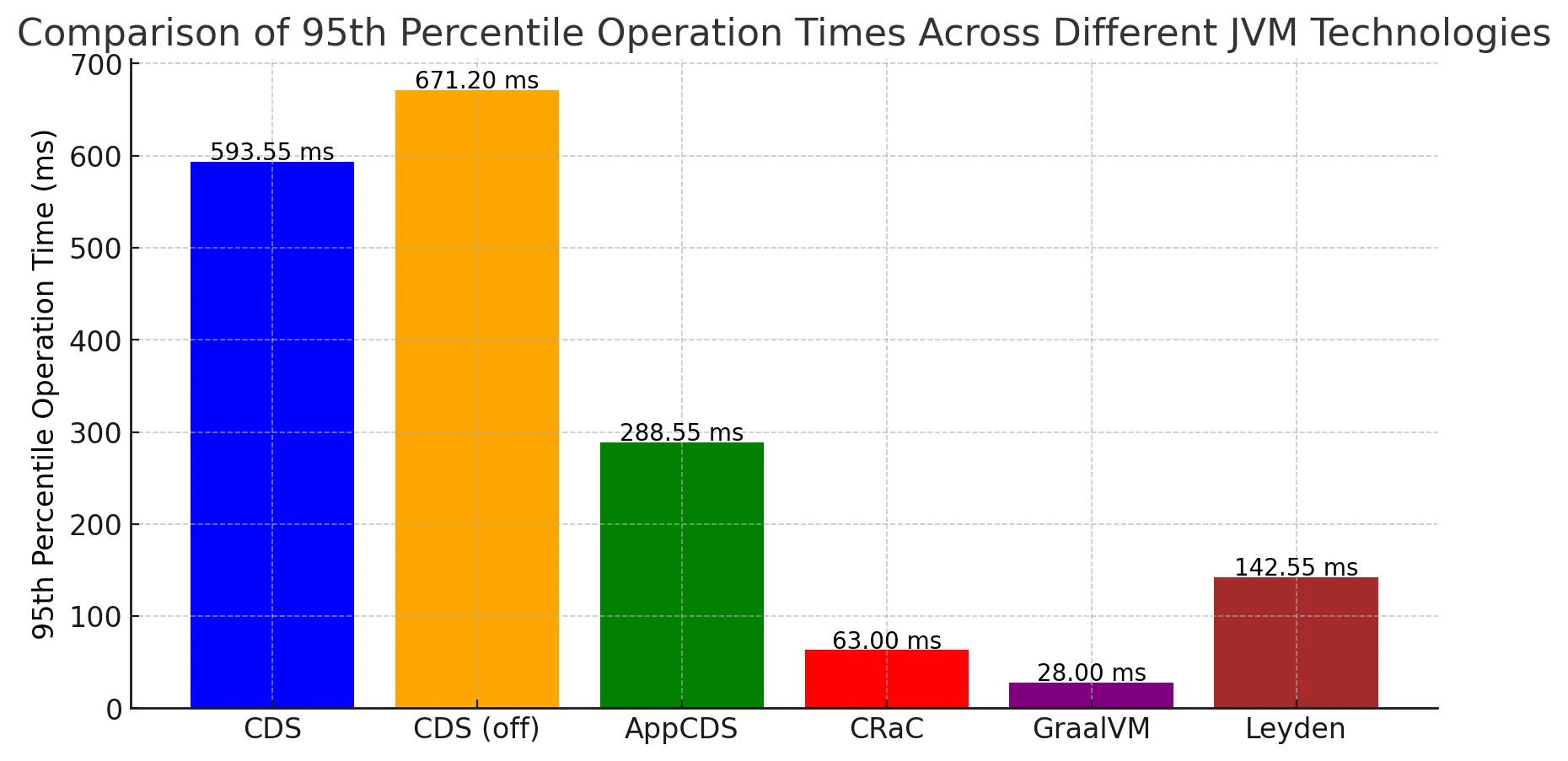
Here’s what my tests showed:
- local PC:
- virtual machine on Google Cloud:
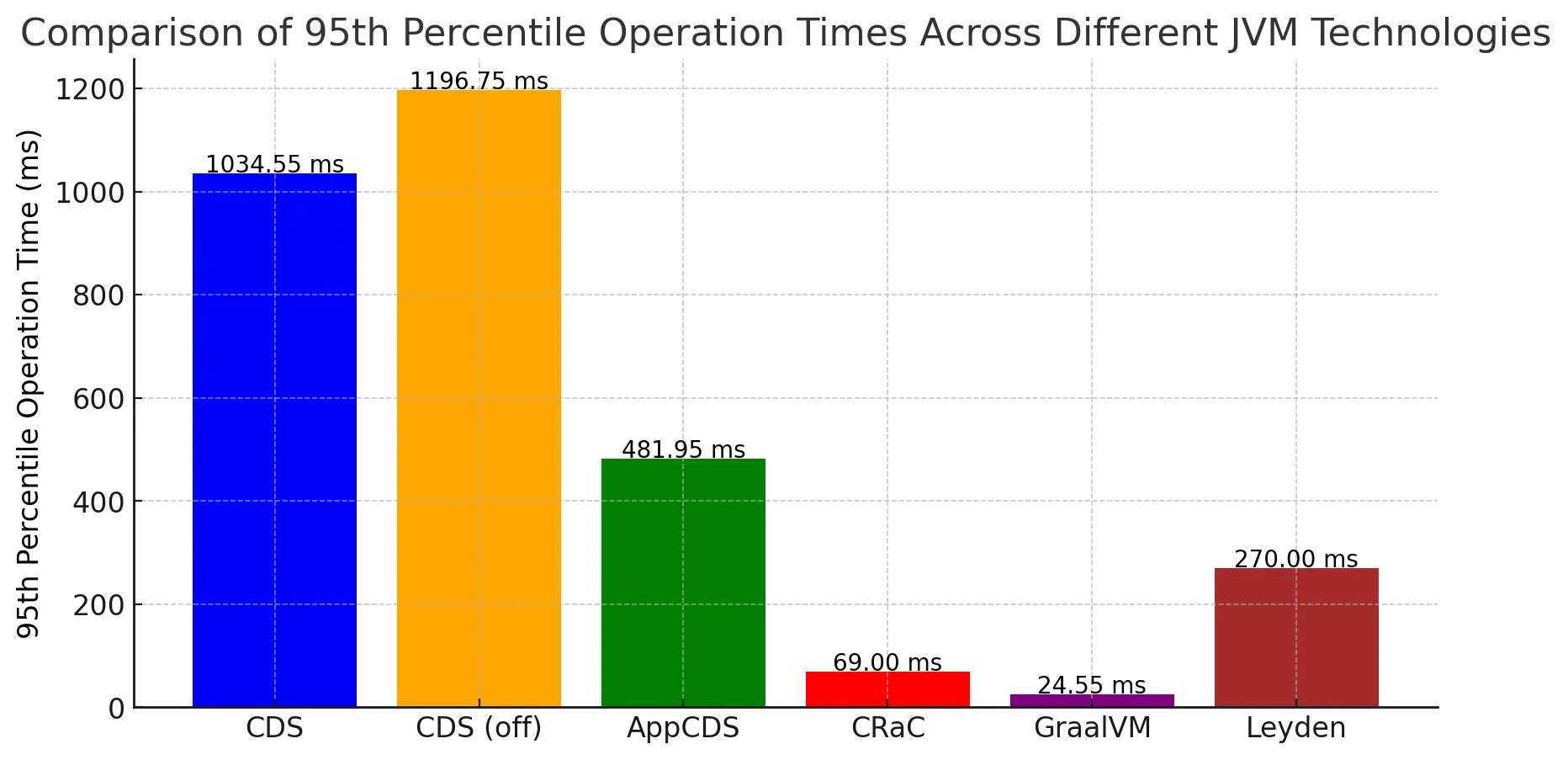
The comparison holds no surprises. Ignoring the time values, the bars on the two charts look very much alike. The version with CDS enabled – the default in newer JDKs from version 12 onwards – can serve as the baseline. The tests showed that turning CDS off makes startup slower. Turning on AppCDS more than halves the startup time in both setups. Next, CRaC and GraalVM turned out to be the fastest options. Project Leyden lands between AppCDS and CRaC/GraalVM, though keep in mind that it’s still under development. It will be interesting to see what these charts look like once Project Leyden is finished.
Conclusion
The JVM can be sped up in a number of ways, and which one is best depends on the particular application at hand. With older JDK versions (10 and earlier), CDS is the only option for improvement. Newer JDK versions, however, give us more to choose from: AppCDS, CRaC, and GraalVM.
I’d say AppCDS is the simplest to use, even though it brings the smallest gain of the three. CRaC suits long-running applications well, since it lets the JVM optimize at runtime. GraalVM, by contrast, may be a better fit for short-lived applications where a quick startup matters more than reaching peak performance, particularly when CRaC can’t be used.
As usual, no single solution fits every case. I hope this blog post helps you pick the option that best matches your particular needs.