Slashing Costs by More Than 90% by Swapping Google APIs for an LLM-Based Microservice
Swapping expensive Google APIs for an LLM microservice cut costs by 90% – see how Gemini AI made this possible.
We swapped our use of two separate Google services for one small microservice powered by an LLM, Gemini AI (which also comes from Google). The outcome? Costs went down by more than 90%, and flexibility went up, after only a couple of days of work.
Introduction
While doing a routine review of our client’s GCP billing account, I looked closely at a few ready-made Google APIs that we rely on for translating languages (Cloud Translation API) and for sentiment analysis (Cloud Natural Language API). Recent changes to parts of the business logic, together with features we intended to build over the summer, meant the cost of these services was expected to rise sharply, and I had to estimate by how much so we’d be better prepared for product discussions with the so-called ‘business’.
Initially, our workflow with the two Google APIs was simple: translate the user’s text into English, then run sentiment checks on it. Translation was there only because the sentiment API didn’t support the original language of the text. Whenever the text seemed suspicious (offensive, profane, or suspiciously polished), we marked it for review by a team of humans.
Going forward, we intended to use the Translation API in many more places, and the volume of calls to these services was set to grow exponentially. We wanted to improve the UX by translating into 12 languages while keeping sentiment analysis. That would mean thousands of API calls per day only for translations (we cache the results and refresh them only when the source text changes).
As we analysed the present and expected call volumes, it dawned on us that one LLM-based service could take the place of both APIs. I had to put together a quick Proof-of-Concept (PoC) to see what it would cost to get the same functionality through simple LLM calls via the API.
The business requirements for the new PoC microservice were straightforward:
- handle 12 languages,
- handle sentiment analysis (preferably in one call rather than two),
- compare the costs with the current setup.
Background & the Previous Setup
Before the migration, the architecture was trivial. One of our microservices received a message with the text to check, called the Google Translation API to get the English version of the text, and then called the Cloud Natural Language API twice to obtain the different sentiment analysis results we cared about.
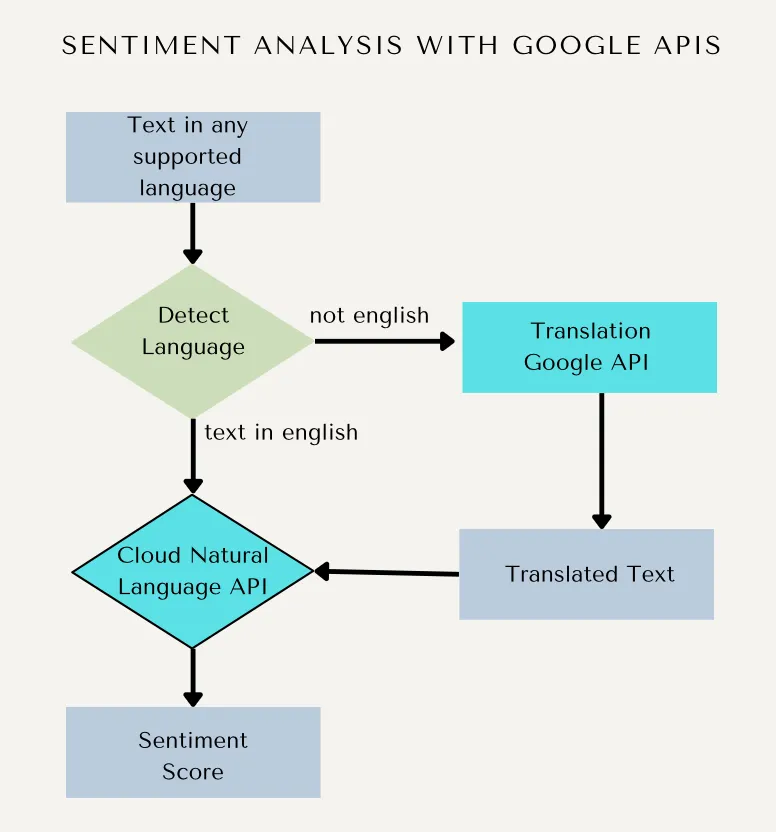
The new features required translating text into 11 languages, detecting the source language when it wasn’t known, and still performing sentiment analysis.
As a result, the number of requests to the existing API would have to be multiplied several times over, and that wasn’t the end of it. The features planned for the summer included changes that meant far more (hundreds of times more) pieces of text had to be translated in advance. All in all, API usage was going to increase hundreds-fold in the near future.
Before calculating what we’d pay for the services with the existing setup, or what an LLM would cost, we could run a simple experiment: we roughly knew how often we called the Google Services, since we knew how many pieces of text went through our Pub/Sub messaging system. If we rolled out the new project fast and that microservice handled roughly the same number of messages, comparing it with the old approach would be easy. That’s exactly what we did. In a single day, we built a very simple, one-file microservice in Python, written entirely through vibe coding with cursor, deployed it to our Kubernetes cluster, and redirected the API calls from Google to our microservice. You’ll find the results (without exact numbers) in the Cost Comparison section further down.
Why We Looked at an LLM-based Solution
For an LLM, translating text or checking whether it contains swear words in a particular language looks like an easy job. Even the earliest versions of ChatGPT impressed me with how they handled translation. Both tasks are ideal for LLMs. The one unknown was the cost. With new models released nearly every month, there’s plenty to choose from. As it turned out, one of the cheapest models available in Gemini did the job perfectly for us.
Estimating costs is often hard even for the simplest cloud services (whoever the provider is), and LLMs are no exception. The price depends mostly on token volumes and how complex the model is. You can make a rough estimate, of course, but in my view, if you’re able to build a small project and run it in production for a week or two to see the real costs, that’s the way to go (though, naturally, it’s not always possible or practical).
So we knew that cost would be the deciding factor before we settled on the final solution, but there were other significant reasons to go with an LLM.
An LLM gives you a huge advantage: you can ask for, and get, any response you like. That lets you make your API as flexible as you want – you can request several things at once or, if you prefer maximum simplicity, use a single call to cut down on the tokens used. You also don’t have to translate anything up front for sentiment analysis; just changing your prompt is enough to have the LLM detect the language, translate a piece of text, find swear words, etc.
In the end, the LLM-based solution proved far cheaper. The texts we translate are usually short (1-2 paragraphs, or sometimes just one word), so token usage stays low as well. We also tried several of the available models and discovered that one of the cheapest performs remarkably well for our tasks.
On top of that, well-structured LLM prompts let us handle some tasks in one request rather than several, as was necessary with the separate Google APIs, which lowered the overall latency in the production system.
It’s worth stressing that while we went with Gemini AI, any of today’s popular LLM models would most likely do the job. I even looked into implementing our functionality with Ollama hosted in-house on one of our servers, but keeping a server powerful enough to run even the smallest models available 24/7 would cost more than calling the Gemini API, so we dropped the idea (at least for the time being).
TL;DR
Why go with an LLM?
- Cost optimization: The short texts we typically translate turn out to use very few tokens.
- Flexibility: A single prompt can handle detection, translation, and sentiment checks in one call.
- Faster iteration: We define the output schemas (JSON/enums/scores) ourselves instead of a third-party API dictating them.
- LLM provider choice: We went with Gemini, but other mainstream LLMs would do just as well.
How We Designed the New Microservice
As I said, I built this microservice twice. The first version was a quick-and-dirty PoC, written in Python entirely by the AI. Talking to the Gemini API is quite simple – an API key is all you need. The second time, we rewrote the microservice in Scala so that it followed the style of the other microservices in our codebase, and ran it on our cluster. Starting with Python seemed sensible for getting a vibe-coded solution quickly, but in hindsight the service is so simple that we could have skipped that step altogether, written it directly in Scala, and saved a few man-hours – well, live and learn.
There’s one endpoint for detecting the language, two for translations (from one language into another, and from one language into all the others in one go), an endpoint that checks for excessive superlatives, and one more dedicated to swear words. /healthcheck and /api/languages are utility endpoints – the former serves the Kubernetes healthcheck mechanism, and the latter simply lists the languages we support.
What’s interesting about the new solution is that we could shape the output of these APIs exactly as we wished. There was no need to dig through documentation to understand why Google returns one score for a given text and a different one for another example. With an LLM, we can simply tell the agent what to return – e.g., a value between 0 and 1, or perhaps an enumeration such as “good”/”bad” – the sky’s the limit.
To illustrate, I’ll show you how simple it is to handle a text translation request. The /api/translate API accepts the following json request:
{
  "text": String,
  "source_lang": Option[String],
  "target_lang": String
}
The source_lang field is optional. When our microservice receives such a request, we simply adjust the prompt that we send to Gemini AI:
val prompt: String = req.source_lang match {
         case Some(src) =>
           s"""Translate the following text from ${LanguageUtils.nameFor(src)} (${src.code}) to ${LanguageUtils
               .nameFor(req.target_lang)} (${req.target_lang.code}).

Text: "${req.text}"

Provide only the translated text without any additional explanations or formatting."""
         case None      =>
           s"""Detect the language of the following text and translate it to ${LanguageUtils.nameFor(
               req.target_lang
             )} (${req.target_lang.code}).

Text: "${req.text}"

First, detect the language and provide the language code, then provide the translation. Format your response as:
Detected language: [language_code]
Translation: [translated_text]"""
       }
We tell it explicitly either to translate the text and return only the translation when source_lang is set, or to detect the language on its own and return the detected language together with the translated text.
This simple example nicely shows what LLMs can do and how flexible they are compared with relying on several different 3rd-party services exposed via REST APIs.
Here’s another example, this time for detecting superlatives:
val prompt = s"""Analyze the following English text for excessive use of superlatives (words like "best", "worst", "most", "least", "greatest", "amazing", "incredible", "fantastic", "terrible", "horrible", etc.).

Text: "${req.text}"

You must respond with ONLY valid JSON in this exact format:
{
   "score": <number from 1-10 where 1=no superlatives, 10=excessive superlatives>,
   "analysis": "<brief explanation of the score>",
   "detected_superlatives": ["<list of detected superlative words/phrases>"]
}

Do not include any text before or after the JSON. Only the JSON object."""
This prompt assumes the text is in English (which made it easy to swap in for the earlier version of this functionality, so we could hot-replace it on prod with few changes), but it shows the general idea. We tell Gemini to return nothing but JSON, give it a sample structure, and explain how to calculate the score. Simple!
In the end, the solution was implemented as one controller exposing the endpoints described above, plus one more for Kubernetes pod health checks. It’s all small, smooth, and fast thanks to http4s and other open-source libraries, which also handle the Gemini AI calls.
When a piece of text has been translated into the 11 other languages, we save the results in a relational database with doobie, so the same text doesn’t have to be translated again and again (with a simple mechanism that detects changes to the original text, of course).
Deployment & Scaling Approach
One downside of switching to a Gemini-based LLM service is that we now have to run it ourselves. That’s not a problem for us, since all our microservices already run smoothly on the Kubernetes cluster, and one more doesn’t hurt. A single pod with minimal resources would actually be enough, but to allow rolling updates we need at least two pods of the same instance running and handling requests.
The only additional work needed to ship it was a healthcheck endpoint that the Kubernetes cluster itself could use.
Since we host the service ourselves, we get full GCP-native observability: we can easily see exactly what the service is doing and how many resources it uses, look at the logs, set up alerts in case something goes wrong, and respond fast, just as we do for every other microservice we’ve deployed.
Cost Comparison: Before and After
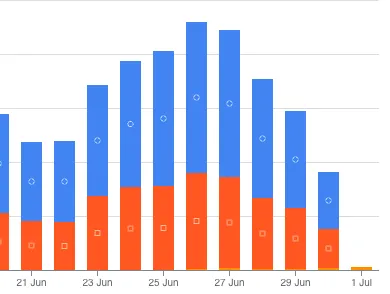
Because of client confidentiality, we can only share percentages, not absolute numbers. As you may have guessed from the first image, the cost of making requests to Google Services went down by at least 90%. This is, naturally, a rough estimate. On the one hand, it leaves out the extra cost of running the pods on our cluster (which is small); on the other, the gap would be far larger if we compared current usage, now that the new features related to translations into 12 languages are live and we send hundreds of times more requests every day.
Red and blue represent the Google translation and sentiment services, while orange is what Gemini AI costs for doing the same work. As the chart shows, on the first of July we cut out every call to the two previous APIs.
Of course, this was just a quick PoC, a way to show (mostly to ourselves) that the LLM solution works at least as well as the ready-made APIs offered by Google.
TL;DR
After traffic was moved from the two managed APIs to the LLM microservice, the monthly bill for this workload fell by >90%.
First Results & Their Impact
Once the first Python version of our PoC was ready, we found that the translations were very accurate (at least in the languages we speak). The remaining ones needed some checking by 3rd-party translation agencies, but on the whole, the translation part worked out well.
Sentiment analysis was an even greater success, going beyond what we had hoped for. The main reason was that with the Google API we had to analyse the scores returned for our data in depth and work out the precise threshold that was “good enough” for us. With the LLM solution, by contrast, we could easily write many tests using real-world examples and tweak the LLM prompt until it behaved as we wanted. What’s more, we could come up with our own scoring output, which was far easier to use in our business logic.
Translating into many languages may take a while, so we chose to make it fully asynchronous using a messaging solution we already had in place. Translation requests therefore don’t go through a REST API endpoint; instead, they’re wrapped in a Pub/Sub message, and when Gemini AI has prepared the translations, a new message is produced and sent back to the interested parties on our cluster.
All in all, the gains were big compared to the small amount of work. We also showed the business that integrating AI isn’t hard, so they can begin thinking of new use cases for using more and more AI on their platform.
If we start using LLMs more and run them in-house, another benefit will be that the data stays with us and doesn’t have to go to any 3rd-party services unless we want it to; that isn’t critical for this use case, but it may be for others.
TL;DR
- Translation quality: High across the supported languages (spot-checked by people when necessary).
- Sentiment & policy: Easier to adjust, with no more reliance on fixed vendor scoring
- Latency: Fewer network hops thanks to combining steps into single calls.
- Throughput: Asynchronous translation via Pub/Sub keeps the UX responsive.
What We Learned
Once the idea of having LLMs handle our translations came up, we soon saw that it was low-hanging fruit, and also a way to show “the business” what LLMs can do for us and how fast and easy integrating them can be.
Even though the entire implementation took only a few days, we picked up many “lessons learned” along the way.
First, vibe-coding a PoC is great, but be careful not to overcomplicate things. A PoC exists to prove that something is doable and works. At the start, we needlessly tried to make it as quick as possible with Python, while the whole solution was simple enough to write in Scala right away, with no rewrites needed. Vibe-coding the PoC was, of course, a great idea, but ultimately you still have to keep an eye on what has been generated and adjust the code to the standards you want your code base to follow.
Prompts for LLMs don’t always behave as expected on the first try. They need tuning, which may take several iterations.
With LLMs, rather than tracking the request count of our old APIs, we now have to track token usage, which comes with new aspects developers need to learn (context, the size of the data to process, and what has to be returned).
TL;DR
What worked well:
- A simpler architecture → easier maintenance.
- Prompts can be updated flexibly without touching the code.
Difficulties:
- Tuning the prompts took several iterations.
- Token usage spiked unexpectedly when reviews included HTML or odd formatting.
Advice:
- Always enforce a JSON schema on LLM output.
- Track the per-request cost in tokens.
- Keep concurrency low until you trust the stability.
Plans for the Future
Once the PoC had been written, tested locally, and released to production as an extra service available for specific data flows with other microservices, it became obvious that running the LLM-based service would cost much less. This opened the eyes of many people on our team, as we can now approach new ideas together with the “business” in an entirely different way. Plenty of people got enthusiastic, and new ideas are bound to follow.
Reducing the existing translation and sentiment analysis costs was only a small part of the overall success and impact that this small PoC had on our team and on the company we work for.
Conclusion
Vibe-coding a PoC in a couple of days may not sound like much work or anything to boast about, yet its overall impact turned out larger than we’d anticipated. We’ve fully eliminated our interactions with, and use of, two expensive Google APIs. Even with the fairly modest number of requests we sent to them, we’ve cut costs by 90% and ended up with equal or better quality and a far more flexible solution.
If you’re a developer, CTO, or manager, I’d urge you to pause for a moment and consider how LLMs could help with the work you’re already doing. It may turn out that you can make it ten times cheaper, take your software solution to a whole new level, and shift your team’s mindset a little, so you can hop on the AI bandwagon and make the most of it before your competitors do.
If so, and if any of this sounds familiar, we’re here to help.