Avro vs Protobuf: comparing data serialization tools
This article compares how Protobuf and Avro perform on several metrics: encoding time, decoding time, serialized size and throughput.
Data serialization plays a key role in today’s software development, letting applications exchange data in a compact, efficient format that does not depend on the platform. Two widely used data serialization systems are Google’s Protocol Buffers (Protobuf) and Apache’s Avro. Each of them has its pros and cons, but performance is one of the main things developers weigh when deciding between Protobuf and Avro. In this post, we compare how Protobuf and Avro perform on several metrics: encoding time, decoding time, serialized size and throughput.
By examining the outcomes of these tests, I want to help developers better understand how each system performs and how to pick the one that matches their particular requirements.
Protobuf and Avro at a glance
Google created Protobuf in 2008, and it is open-source software. It aims to be simple, fast and efficient, and it supports many programming languages, among them C++, Java, Python and Ruby. Protobuf describes the structure of data with a schema definition language, which is then compiled into code that serializes and deserializes the data.
Apache created Avro in 2009, and it is open-source software too. Avro was built with schema evolution in mind, so data can be serialized and deserialized even after the schema has changed. Avro covers roughly the same set of programming languages as Protobuf, with particularly good support for Java, Python and Ruby. It describes the data structure with a JSON-based schema definition language, and the schema can be stored together with the data.
When comparing Protobuf and Avro, it helps to know how each is applied across industries and applications. Below are sample use cases for both formats.
Protobuf:
- Google first built Protobuf for its own internal systems, such as Google Search, Google Maps and Gmail.
- gRPC for communication between microservices.
- Financial institutions, for high-frequency trading, risk management and fraud detection.
- Game developers use it to improve network performance and cut bandwidth consumption.
- IoT applications, to send data between devices like sensors, gateways and cloud servers.
- Automotive applications, to exchange data between cars and infrastructure like traffic lights and parking meters.
Avro:
- Apache Hadoop, the open-source big data platform, uses Avro to serialize data and exchange it between Hadoop components.
- Messaging systems like Apache Kafka and Apache Pulsar, for streaming data between applications and services.
- Analytics platforms like Apache Spark and Apache Flink, for processing and analyzing data.
- Machine learning frameworks like TensorFlow and PyTorch, for serializing data and passing it between the training and inference stages.
- Log collection tools like Apache Flume and Apache NiFi, for streaming log data from many sources into one central place.
Broadly speaking, Protobuf is favored in low-latency, high-performance settings, whereas Avro is favored in big data, distributed systems and analytics. Still, either format can serve many kinds of applications, and the right pick depends on the particular requirements and constraints of a given use case.
Prerequisites
To compare Protobuf and Avro performance, we use JMH (Java Microbenchmark Harness), a popular tool for benchmarking Java code. JMH offers a solid, dependable way to measure how small pieces of code perform in a controlled environment, so we can compare Protobuf and Avro precisely on metrics such as encoding time, decoding time, serialized size and throughput. For the test data, I built a sample object to be serialized with both Protobuf and Avro. It is a simplified model of a library with address and books fields. Every book has an author, pages and availability, and the author has a name, surname and nationality. An important difference between the Protobuf and Avro schemas lies in how collection fields are handled. Protobuf declares collection fields with a dedicated syntax marking the field as repeated, as the snippet below shows.
Two versions of Protobuf are currently in active use - Proto2 and Proto3. I went with version 3 rather than 2, since I think it has a simpler structure and is easier to use.
syntax = "proto3";

package protobuf;

option java_multiple_files = true;
option java_package = "com.example.protobuf.proto.model";
option java_outer_classname = "LibraryProtos";

message Author {
 optional string name = 1;
 optional string surname = 2;
 optional string nationality = 3;
}

message Book {
 optional string title = 1;
 optional Author author = 2;
 optional int64 pages = 3;
 optional bool available = 4;
}

message Library {
 optional string address = 1;
 repeated Book books = 2;
}
From this definition, the protocol buffer compiler can generate Java code.
Avro defines collections as an array, i.e. a collection of a given type. For the same object, the Avro schema looks like this:
{
 "type": "record",
 "name": "Library",
 "namespace": "com.example.avro.avro.model",
 "fields": [
   {
     "name": "address",
     "type": [
       "null",
       "string"
     ],
     "default": null
   },
   {
     "name": "books",
     "type": {
       "type": "array",
       "items": {
         "type": "record",
         "name": "Book",
         "fields": [
           {
             "name": "title",
             "type": [
               "null",
               "string"
             ],
             "default": null
           },
           {
             "name": "author",
             "type": {
               "type": "record",
               "name": "Author",
               "fields": [
                 {
                   "name": "name",
                   "type": [
                     "null",
                     "string"
                   ],
                   "default": null
                 },
                 {
                   "name": "surname",
                   "type": [
                     "null",
                     "string"
                   ],
                   "default": null
                 },
                 {
                   "name": "nationality",
                   "type": [
                     "null",
                     "string"
                   ],
                   "default": null
                 }
               ]
             }
           },
           {
             "name": "pages",
             "type": [
               "null",
               "long"
             ],
             "default": null
           },
           {
             "name": "available",
             "type": [
               "null",
               "boolean"
             ],
             "default": null
           }
         ]
       }
     }
   }
 ]
}
Using the Avro Java API, we can build the schema above and compile it to Java.
For the benchmarks I picked two variants of the Library object: a small one containing a single book and a large one containing one thousand books. To keep the JVM from optimizing things away, string fields get random content and random length (between 3 and 13 characters). Randomness is usually best avoided when comparing performance, but in our case its effect is negligible. Fixed values were used only for comparing serialized data size, since identical objects are needed there.
Keep in mind that the tests were run in Java only. Comparing Protobuf and Avro in other programming languages may give different results, because serialization libraries, language-specific performance traits and runtime environments vary. It is a good idea to run your own benchmarks and assess performance in the language you actually use.
Testing time
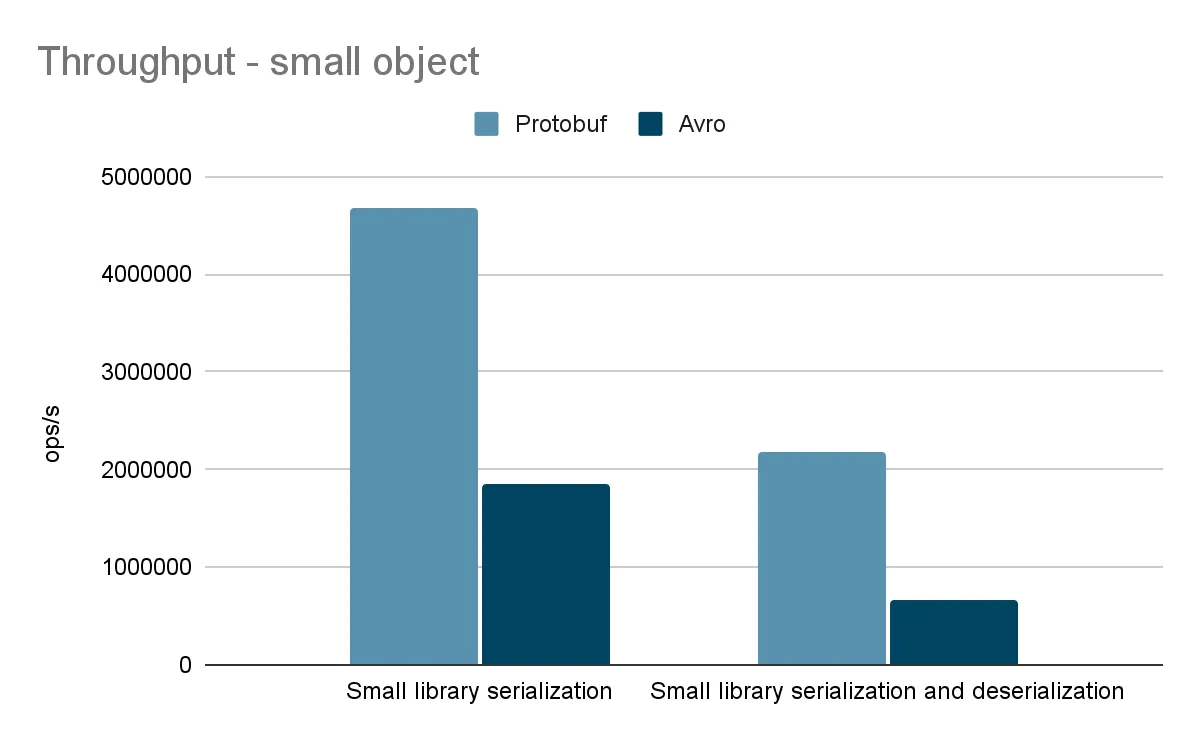
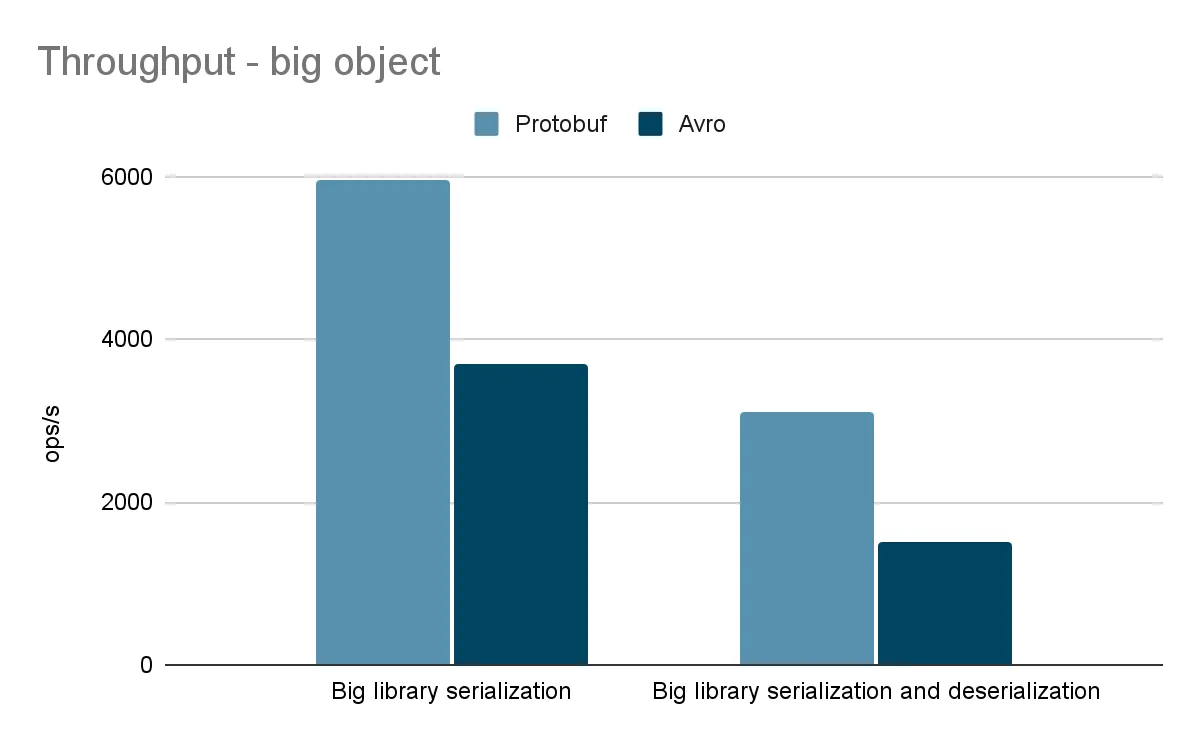
I concentrated on throughput, since the average operation time was too short to show any differences between the frameworks.
All of them used the same JMH options:
@Warmup(iterations = 3, time = 3)
@Fork(3)
@Measurement(iterations = 100, time = 3)
This asks for three warm-up runs and three executions of one hundred iterations each. Warmup and iteration times are given in seconds.
Each group covers four scenarios:
- serializing a small library
- serializing a big library
- serializing and deserializing a small library
- serializing and deserializing a big library
In addition, I compared the serialized size of libraries holding one, ten, one thousand and one million books. The tests ran on Ubuntu 22.04.2 LTS, an 11th Gen Intel i9-11900H 2.50 GHz, 64GB of DDR4 memory and the OpenJDK 17.0.5 JVM.
Here are the results we obtained:
| Books in the library | Protobuf | Avro |
|---|---|---|
| Serialized size, one book | 56 bytes | 54 bytes |
| Serialized size, ten books | 479 bytes | 441 bytes |
| Serialized size, thousand books | 55441 bytes | 51508 bytes |
| Serialized size, million books | 68539057 bytes | 64547317 bytes |
Conclusion
Our tests show that Protobuf wins on serialization and deserialization speed. Avro, in turn, produces slightly more compact serialized data. Which one to choose depends mostly on what your distributed system needs. If performance is crucial, Protobuf’s speed and efficiency may make it the better option. If you need more complex data structures or built-in compression, Avro may suit you better.
Whatever serialization framework you go with, remember that serialization is only one part of a distributed system. Other aspects, like network latency, data consistency, CPU usage and the libraries in use, also affect the overall performance and reliability of your system. Weighing all of these factors carefully and picking the serialization framework that fits your needs will help you build a distributed system that is fast, efficient and reliable.