Hibernate vs. Exposed: Picking the Best Persistence Tool for Kotlin – Round 1
Hibernate and Exposed compared in Kotlin. Find out which SQL persistence framework fits your next project best.
Introduction
Persistence and storing data are key ideas in IT systems. Over the course of my career, I have come across many more stateful applications than purely stateless ones. The huge variety of databases, each built for a different purpose, seems to back that up.
Looking closer, relational databases are still the most popular of all the databases out there. The latest db-engines.com ranking shows that, measured by popularity, relational databases account for almost 72% of the market.
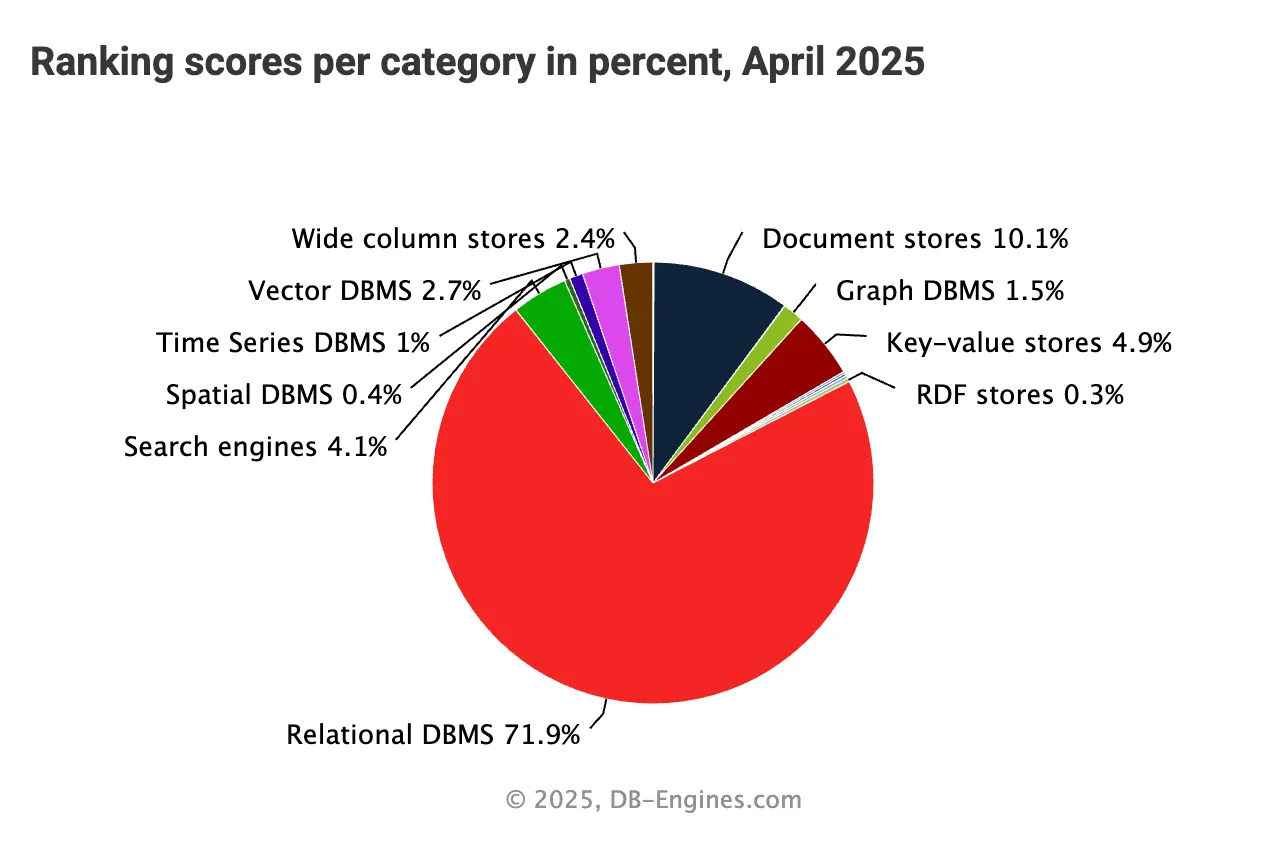
Given that, it is obvious how valuable a solid, dependable, fast and easy-to-use SQL persistence framework is in your toolbox.
Every programming language has its own battle-tested SQL frameworks. In this article, I will compare two widely used – but fundamentally different – JVM SQL frameworks and how they work in Kotlin projects.
Let me introduce:
- Hibernate – a Java persistence framework for relational databases,
- Exposed – a lightweight, type-safe SQL persistence framework built for Kotlin.
This is going to be quite a showdown! Let’s kick off the first round.
Philosophy & Design Goals
Before choosing a persistence framework for your next project, you have to answer a few questions. One of the less obvious ones could be: “What philosophy stands behind a given framework?”
This may not seem like an obvious factor in choosing a framework, yet, surprisingly, it can spare you plenty of trouble over time. A framework’s philosophy covers why it exists, which problems it addresses (and which it does not), and also the way it goes about solving them. Combined with your understanding of the upcoming project and your awareness of your own (or your developers’) skills and mindset around SQL integrations, this knowledge can be a real help.
Hibernate
Hibernate is a persistence framework built entirely around ORM (object-relational mapping). Its primary aim is to hide SQL’s complexity behind Java (or, here, Kotlin) classes. It tries to let developers trigger complex database interactions by carrying out simple operations on plain Java or Kotlin objects. The project’s website even features the motto “Relational persistence for idiomatic Java”. All the complexity is therefore tucked away under the hood, inside the framework’s code.
That said, Hibernate does let developers work with the underlying database in a more direct and controlled way, through a dedicated query dialect called HQL (covered in the next article of this series). It is, however, still an abstraction over pure SQL and still keeps the real complexity out of developers’ sight.
Another important element of Hibernate’s design is its JPA compatibility (Jakarta Persistence, previously called the Java Persistence API). Hibernate once even helped shape JPA, and today it is among the most widely used implementations of the standard. As a result, Hibernate can be used wherever JPA is needed, but it also has to comply with the standard and reliably deliver the functionality and API that JPA defines. Consequently, Hibernate’s developers may have less freedom and flexibility in evolving the framework than they would if they did not have to conform to a specific third-party standard.
Talking about Hibernate’s philosophy, one can hardly skip its support for a broad range of databases. As of this writing, the Hibernate maintainers state that it works with (and is tested against) PostgreSQL, MySQL, Db2, Oracle, SQL Server, Sybase ASE, EDB, TiDB, MariaDB, HANA, CockroachDB, H2, and HSQLDB.
Database portability is one of Hibernate’s key selling points (and of object-relational mapping in general). Besides supporting many databases, Hibernate therefore promises to let your application run against any number of them without modifying your code, and ideally without touching the mapping metadata either.
Exposed
The authors of Exposed describe it as an ORM framework for Kotlin, and also as a lightweight SQL library on top of a JDBC driver for Kotlin. Both descriptions are accurate in my view, but personally I think the second one captures Exposed’s core philosophy better.
The primary, default way of talking to databases in Exposed is its DSL, which works like type-safe SQL for Kotlin. Optionally, you can add a module for lightweight ORM and use it on top of the same model you defined for plain DSL queries. As a developer, you thus get the flexibility to pick the database interaction style that suits you better.
It is worth stressing that whichever style you go with (DSL or ORM), Exposed remains “just” a fairly thin layer over JDBC, which leads to one very important property: you have more control over the queries that actually get executed, and it is more transparent about what really happens in the database.
Another key design principle of the Exposed framework is that it works with many different relational databases. At present, the Exposed team lists support for these databases: H2, MariaDB, MySQL, Oracle, PostgreSQL, Microsoft SQL Server, and SQLite.
Finally, Exposed is written entirely in and for Kotlin and maintained by JetBrains, the company behind Kotlin. This reflects a deep commitment to Kotlin idioms, semantics and syntax as a core design principle.
Getting Started & Setup
Before you can work with a framework, you have to set it up and configure it. Normally this is done once, although with microservices you may have to go through the setup several times.
In this section, I will show a few simple examples of setting up both Hibernate and Exposed in a Kotlin project within three common ecosystems:
- plain JVM
- Spring
- Ktor
Each tool typically comes with many configuration options in each of these ecosystems. So besides simple examples with actual code, I will also give you a sense of the more advanced or alternative ways to configure each tool.
Enough theory – let’s jump right into the code!
Plain JVM project - Hibernate
To add Hibernate to your Kotlin project, start by declaring the right dependencies in your build.gradle.kts file. At minimum you need hibernate-core plus a database driver (here, PostgreSQL):
dependencies {
   implementation("org.hibernate.orm:hibernate-core:6.6.13.Final")
   implementation("org.postgresql:postgresql:42.7.5")
}
Hibernate also provides a number of additional modules available as optional dependencies. You will find the complete list in the Hibernate ORM Modules part of the Getting Started guide.
Then you need to provide connection details and other properties. In a native JVM application, the standard approach is to put them in a hibernate.properties file placed on the classpath (here, in the src/main/resources directory):
hibernate.connection.url=jdbc:postgresql://localhost:5432/boardgames
hibernate.connection.username=bgamer
hibernate.connection.password=pass

hibernate.hbm2ddl.auto=create
These are the essential connection options (along with the DDL generation mode). The complete list of configuration options can be found in the Appendix to the Hibernate User Guide.
Lastly, you create a SessionFactory in code, which lets you open real database connections:
fun main() {
   val registry = StandardServiceRegistryBuilder().build()

   val sessionFactory =
       MetadataSources(registry)
           .addAnnotatedClass(MyEntity::class.java)
           .buildMetadata()
           .buildSessionFactory()
With the SessionFactory in place, you can create sessions and transactions and work with the underlying database.
Plain JVM project - Exposed
To use Exposed in a plain Kotlin project, add a few dependencies to your build.gradle.ktsfile – for Exposed itself and for the database driver (PostgreSQL here):
dependencies {
   implementation("org.jetbrains.exposed:exposed-core:$exposed_version")
   implementation("org.jetbrains.exposed:exposed-jdbc:$exposed_version")
   implementation("org.postgresql:postgresql:42.7.5")
}
Exposed has some optional modules as well. They are all listed in the Modules section of the Exposed documentation site.
The next, and last, step of setting up Exposed is defining a database connection. This is done straight in Kotlin code with a call to the Database.connect() function:
Database.connect(
   url = "jdbc:postgresql://localhost:5432/boardgames",
   driver = "org.postgresql.Driver",
   user = "bgamer",
   password = "pass"
)
There are several variants of the Database.connect() function, which let you configure it with a range of optional parameters. There is also a variant of this function taking a javax.sql.DataSource, so you can configure it with the more advanced features of popular database connection pooling libraries, and so on.
And that is all – Exposed can now talk to your database.
Spring - Hibernate
Hibernate combined with Spring (Boot) is a very common setup found in many enterprise applications. The web is full of materials explaining how to configure it. Still, I felt it was worth covering here to complete the picture.
As always, we begin with the Gradle dependencies:
dependencies {
   implementation(platform("org.springframework.boot:spring-boot-starter-parent:3.4.4"))

   implementation("org.springframework.boot:spring-boot-starter-data-jpa")
   implementation("org.postgresql:postgresql:42.7.5")
}
With those in place, you can set up various data sources and Hibernate properties in the application.yaml or application.properties file:
spring:
 datasource:
   url: "jdbc:postgresql://localhost:5432/boardgames"
   username: bgamer
   password: pass

 jpa:
   hibernate:
     ddl-auto: create
Your data source supports many more properties. To discover some of them, see the appendix listing common application properties in the official Spring Boot documentation and look for properties starting with the spring.datasource prefix.
From this point on, you can inject a SessionFactory into your persistence layer to work with the database. As you may already know, Spring provides higher-level APIs for database interactions than a raw SessionFactory, but those will be discussed in the next article of the series.
Spring - Exposed
Exposed works in Spring applications too. JetBrains has developed a dedicated Spring Boot starter for Exposed. To use Exposed in your Spring Boot project, add this starter along with a few other dependencies to your build.gradle.kts file:
dependencies {
   implementation(platform("org.springframework.boot:spring-boot-starter-parent:3.4.4"))

   implementation("org.jetbrains.exposed:exposed-spring-boot-starter:0.61.0")
   implementation("org.postgresql:postgresql:42.7.5")
}
As you would expect, the database connection can now be configured in the application.yaml (or .properties) file. As noted before, Exposed can be configured with a standard javax.sql.DataSource, so the properties will look very familiar, like this:
spring:
 datasource:
   url: "jdbc:postgresql://localhost:5432/boardgames"
   username: bgamer
   password: pass

 exposed:
  generate-ddl: true
You are now ready to use the Exposed DSL or DAO classes in your application code!
Ktor - Hibernate
With Spring, I could safely assume the framework is so well known and widespread that it needs no introduction. Ktor, however, may be a different story. This article is not about Ktor, and it does not aim to go into detail on this web framework.
When you search the web for examples of integrating Ktor with Hibernate, the first thing you will probably notice is that… there are hardly any. In short, Ktor and Hibernate appear to be such an unusual pairing that documentation, blog posts or use cases are hard to come by online. Perhaps that is because Hibernate is so closely tied to the JPA standard that it feels more at home with Spring than with Ktor. It may also be because of (spoiler alert!) how well Ktor and Exposed fit together, as you will see in the next section. Either way, using Hibernate in Ktor applications is not a common practice. As of this writing, Ktor provides no plugin for Hibernate.
So what would I recommend if you want Hibernate in your Ktor project? Simply go back to the earlier section of this article, “Hibernate in plain JVM project”, and follow the steps described there. A Ktor project is, after all, just another JVM project, so the plain Hibernate setup will work there too. Or… you could write your own Ktor plugin for Hibernate!
Ktor - Exposed
In the previous section, I pointed out that Ktor and Hibernate lack official support and compatibility. This section is the exact opposite. If you want Exposed in a Ktor project, you are lucky – the two live in perfect symbiosis. There is an official Exposed plugin for Ktor, available in the Ktor Project Generator. The Exposed documentation also includes code samples showing how to integrate Exposed with Ktor. On top of that, you will find lots of articles, blog posts, tutorials and more on the subject.
Adding Exposed to Ktor feels completely natural. The simplest way to begin is with the Ktor Project Generator mentioned above, where you can select the Exposed plugin. The project scaffold it generates will already include the required Gradle dependencies. For reference, here they are:
dependencies {
   implementation("org.jetbrains.exposed:exposed-core:$exposed_version")
   implementation("org.jetbrains.exposed:exposed-jdbc:$exposed_version")

   implementation("com.h2database:h2:$h2_version")

   ...
}
The generator will add further dependencies, but these are the essential ones for Exposed.
By default, the Ktor Project Generator adds a dependency on the H2 database driver, but naturally you can swap it for whatever JDBC driver you prefer.
The initial project structure also gives you a Databases module in a Databases.kt file, with the database connection already defined:
fun Application.configureDatabases() {
   val database = Database.connect(
       url = "jdbc:h2:mem:test;DB_CLOSE_DELAY=-1",
       user = "root",
       driver = "org.h2.Driver",
       password = "",
   )
  ...
}
Once more, the Database configuration targets H2 by default, but you can change it to fit whichever database your project uses.
You will probably also find some additional generated code, such as a UserService, but it is only a sample demonstrating how to work with the DB through the Exposed API, and you can delete it or adapt it as needed.
As you can see, the generated code hardcodes the connection details, but you are free to inject them through properties instead.
The final step (which the Ktor Generator also handles for you) is to configure the Database module in the Application. This happens in the Application.kt file:
fun Application.module() {
   ...
   configureDatabases()
   ...
}
Other modules may be configured there too.
And that is everything you need to set up Exposed with Ktor in a Kotlin project.
Mapping & Schema Definition
Any persistence framework needs data structures to work with. Relational databases have tables, but persistence frameworks seldom work with raw tables directly. They typically require an abstraction layered on top. Hibernate and Exposed are no exception. In this section, I will show you how each of them abstracts database tables and represents your data schema.
Hibernate Entities
Hibernate is an object-relational mapping framework and treats that role seriously. Database tables stand for the relational side of things, while Hibernate makes sure your code deals with objects, concealing the database structure beneath. For this, Hibernate depends heavily on entities – plain Java (or here, Kotlin) objects that represent database tables. Entities are a core concept in Hibernate.
Here is an example entity representing a database table in an imaginary board game store:
@Entity
@Table(name = "board_games")
open class BoardGame(
   @Column(name = "title", nullable = false)
   open var title: String,

   @Column(name = "min_players", nullable = false)
   open var minPlayers: Int,

   @Column(name = "max_players", nullable = false)
   open var maxPlayers: Int,

   @Column(name = "playtime_minutes", nullable = false)
   open var playTimeInMinutes: Int,

   @OneToMany(mappedBy = "boardGame", cascade = [CascadeType.ALL], orphanRemoval = true)
   open val ratings: MutableSet<Rating> = mutableSetOf(),

   @Id
   @GeneratedValue(strategy = GenerationType.IDENTITY)
   @Column(name = "id", nullable = false)
   open var id: Long? = null
) {
   constructor() : this("", 0, 0, 0)
}
A key thing about Hibernate entities is that they are simply plain objects. They do not have to extend particular base classes or contain any other framework-specific code. Annotations are what turn them into Hibernate entities. This lies at the heart of Hibernate’s philosophy – keeping out of your domain code’s way and not imposing particular inheritance hierarchies or framework-specific constructs (apart from annotations, which act more as metadata than as real logic).
Note that although Kotlin is a very concise language, defining JPA entities forces you to sacrifice some of its syntactic sugar. JPA imposes several restrictions, for example:
- The entity class has to provide a no-arg constructor
- The entity class cannot be final.
- None of the entity class’s methods or persistent instance variables can be final.
Although all of these come from the JPA spec, Hibernate strictly enforces only the first. Without a no-arg constructor, Hibernate throws an org.hibernate.InstantiationException when it tries to load the entity from the database.
As for the other two rules, Hibernate can persist and load a final class with final properties, but it cannot subclass it or override its getters/setters. As a result, Hibernate cannot create proxies for lazy loading. In practice, then, you still have to mark every Hibernate entity and its properties as open and stay away from Kotlin data classes (which cannot be open).
If a bit of bytecode magic does not bother you, Gradle and Maven plugins can help. The no-arg plugin (wrapped by the kotlin-jpa plugin) generates no-arg constructors for every matching class. The all-open plugin (wrapped by the kotlin-spring plugin) makes matching classes and their members open. Both plugins achieve this by modifying your application’s bytecode.
To learn more about Hibernate entities, see the Domain Model section of the official Hibernate documentation.
Hibernate schema generation
After you define the entities, Hibernate can create the database tables for you from the annotations on the entity classes and their properties. Hibernate has a built-in mechanism for this that works both in a plain JVM project and with Spring. Hibernate’s automatic schema generation can operate at several levels:
create– drops the schema and then creates it againcreate_drop– drops the schema when theSessionFactoryshuts down and creates it again when theSessionFactorystartscreate_only– just creates the schema (without dropping)drop– just drops the schemaupdate– modifies the existing schemavalidate– only checks the schema against the entitiesnone– perhaps unexpectedly, leaves the schema untouched
Automatic schema generation is configured either in the hibernate.config file via the hibernate.hbm2ddl.auto property, or in a Spring project’s application.properties (or .yaml) file via the jpa.hibernate.ddl-auto property.
The Hibernate User Guide has a section devoted to schema generation if you want to dig further into the subject.
Exposed Tables
For the data abstraction layer, Exposed goes about things a bit differently from Hibernate. Where Hibernate is built entirely on entities, Exposed models database tables as… real tables.
In Exposed, a table is basically an object extending either Table or one of the IdTable classes. With the functions these base classes provide, you define your table’s columns, indexes and constraints.
Here is what a table for our board game store could look like in Exposed:
object BoardGamesTable: LongIdTable("board_games") {
   val title = varchar("name", 256)
   val minPlayers = integer("min_players")
   val maxPlayers = integer("max_players")
   val playTimeInMinutes = integer("playtime_minutes")
}
The BoardGamesTable object defines every column we need from the board_games database table. There is no explicit id column, because the base LongIdTable class already declares it.
You may have spotted that there is no ratings collection here. The reason is that Exposed tables mirror the real database tables column by column. Because the board_games – ratings relationship is one-to-many, the ratings table is the owning side, so that is where the reference column lives.
Here is the RatingsTable definition, so you can see how the relationship is declared:
object RatingsTable: LongIdTable("ratings") {
   val rating = integer("rating")
   val comment = varchar("comment", 256).nullable()
   val ratingDate = timestamp("rating_date")
   val boardGameId = reference("board_game_id", BoardGamesTable)
}
The boardGameId property stands for the board_game_id column and points to the BoardGamesTable.id property.
More on Exposed tables can be found in the relevant section of the official Exposed documentation.
Exposed DAO
Although Table objects are the default and most basic way to work with database tables in Exposed, an optional module also turns Exposed into a lightweight ORM. Let’s look at the Exposed DAO module now.
The DAO module lets you define entities that map records of database tables onto Kotlin objects. Entities add another abstraction layer on top of Exposed IdTables. In other words, you still need the Tables from the previous section, and you define matching entities on top of them.
Here is how an entity can abstract our BoardGamesTable further:
class BoardGame(id: EntityID<Long>): LongEntity(id) {
   companion object: LongEntityClass<BoardGame>(BoardGamesTable)

   var title by BoardGamesTable.title
   var minPlayers by BoardGamesTable.minPlayers
   var maxPlayers by BoardGamesTable.maxPlayers
   var playTimeInMinutes by BoardGamesTable.playTimeInMinutes
   val ratings by Rating referrersOn RatingsTable.boardGameId
}
So what is going on in this code? Let’s take it apart.
There is a BoardGame class extending the org.jetbrains.exposed.dao.LongEntity base class.
Its companion object, of type LongEntityClass, supplies handy functions for CRUD operations on entities of this type (which the next article in the series will cover). It also ties the entity class to the matching Exposed Table object.
The entity class’s properties stand for the columns of the underlying table and are implemented with the by keyword. In other words, the BoardGame properties delegate to the BoardGamesTable properties.
This time, though, we are not restricted to the underlying table’s columns. As you may have seen, the BoardGame entity has a ratings property representing the one-to-many relationship between the BoardGame and Rating entities. Bear in mind that a property like this, wrapped with the referrersOn function, has to be immutable – so declare it as val, not var. The remaining properties can be either val or var, depending on whether they should be immutable or mutable.
The official Exposed documentation contains a complete in-depth section on DAOs and entities, which is well worth exploring.
Exposed schema generation
As any solid persistence framework should, Exposed lets you not only model an existing database schema in code but also generate the schema from your classes.
For this, you use the SchemaUtils object, which offers a range of handy functions for manipulating the database schema.
The most typical use is creating particular tables in the underlying database:
SchemaUtils.create(BoardGamesTable, RatingsTable)Beyond that, it provides functions for many other tasks – dropping tables, creating indexes, adding constraints, generating the whole schema, validating it, detecting cycles in table relationships, and much more.
For more details, see the Exposed documentation on working with schemas. You can also browse the SchemaUtils object itself to see which functions it offers.
Summary: Hibernate or Exposed?
That was quite a deep dive, I think. Hopefully you picked up plenty of interesting and practical things along the way. Let’s quickly sum up what we covered.
Philosophy & Design Goals
Hibernate is a mature, fully fledged ORM with strong JPA roots and wide database support. Its philosophy centres on hiding SQL behind Java/Kotlin objects.
Exposed, by contrast, is native to Kotlin and aims to be lightweight and transparent. It offers you more control over, and insight into, the SQL that actually runs.
Setup & Ecosystem Fit
Hibernate excels in JPA-centric ecosystems such as Spring, backed by solid tooling and broad adoption. In Ktor or plain JVM setups, however, it feels somewhat clumsy.
Exposed, on the other hand, fits Ktor naturally and does well in minimalist or Kotlin-first stacks. It supports Spring as well, though that use is arguably more of a niche.
Mapping & Schema Definition
Hibernate’s JPA model does not sit very naturally with Kotlin (e.g., no-arg constructors, open classes), which can conflict with idiomatic Kotlin code.
Exposed’s DSL and DAO modules play to Kotlin’s strengths – although DAO entities may end up tightly coupled to persistence logic.
So, who wins? It is much too soon to say!