Putting intelligent document processing to work in your business
Find out how AI tools can be used to process documents, which problems they help with, and how to put them to work in your company.
Why documents?
Whether digital or on paper, documents are the primary channel of formal communication both inside companies and between them. They are a universal way to exchange information, no matter the industry, country, or language. On top of that, the flow of documents is frequently required by law.
Because this form of information exchange is so widespread and legally mandated, companies have to adjust to the environment they now operate in. Many make use of digitalization and, besides the obligatory documents, share information in a more structured format, for example Excel sheets. A significant share, however – small companies in particular – don’t invest in automating this process, as given their size it yields no tangible gains. For them, having staff read data off an invoice received as a PDF and type it into a bank transfer form is not an issue, simply because it doesn’t happen often. For large organizations dealing with many counterparties, though, this process can become a considerable cost. Such companies can save a lot by automating document processing with an artificial intelligence tool.
In this article, I share my view on the potential of AI technology for optimizing business operations and describe the various kinds of tasks artificial intelligence can handle in document processing. In the following parts of this series on intelligent document processing, I will go into more detail on implementation approaches, requirements, and possible issues related to these tasks. Keep reading!
Business Advantage
I’ll begin with a question: why? Why should companies care about applying AI to document processing? How can you persuade them to invest in an innovation such as artificial intelligence technologies?
Cost reduction & improved scaling
An artificial intelligence system can automate document processing and take over from human workers, although tricky cases will still need a human to step in. The main strength of such a system is how well it scales. Suppose the number of documents going through the system suddenly doubles. Without AI, you would have to hire 2x as many employees; with AI, you just scale up the number of deployed model instances. And the issue of onboarding and training new staff disappears.
This works in the other direction too – if demand for document processing falls, you simply consume fewer cloud resources, with no layoffs involved. Machine learning techniques make it easier to adapt to fluctuating demand for services that human workers used to carry out.
In my view – and bear in mind when weighing it that I am an ML engineer, not an executive – for large enterprises, investing in document-processing AI systems will lower costs and allow smooth scaling. This matters most for companies facing sudden swings in the volume of documents they handle. In addition, any form of automation eliminates human error.
Speed up the document processing
The clear benefit of processing data with computers is speed. What could take a human expert minutes or hours takes a machine seconds. That is a major plus, particularly for processes that demand an immediate reaction or whose value is very short-lived.
A simple example is company stock quote data. Picture having access to real-time data feeds. Whenever the data changes, a person needs a moment to analyze it and decide what to do. React too slowly, and the data has already moved on, so the decision may no longer be valid. A machine, by contrast, analyzes the data in a fraction of a second and makes a decision according to its algorithm before the data goes stale.
Automation
For complex business processes, automation shortens processing time and makes the process more transparent. Documents often go through many hands: people check different aspects of them, verify that the data is correct, copy some of it to external information systems, apply complex business logic, etc. If a process is procedural and governed by well-defined rules, it can be automated.
Intelligent Document Processing
Document AI and Intelligent Document Processing are fairly broad terms, covering every area where AI applications can automatically process documents of various kinds. Here I will only look at documents we most commonly come across in formal communication within or between companies, i.e., contracts, forms, invoices, applications, etc. From a business perspective, though, I believe orders and invoices have the biggest automation potential, given how central they are to company processes and how common they are.
Document AI comes in many forms, so I will cover its different aspects in the sections below.
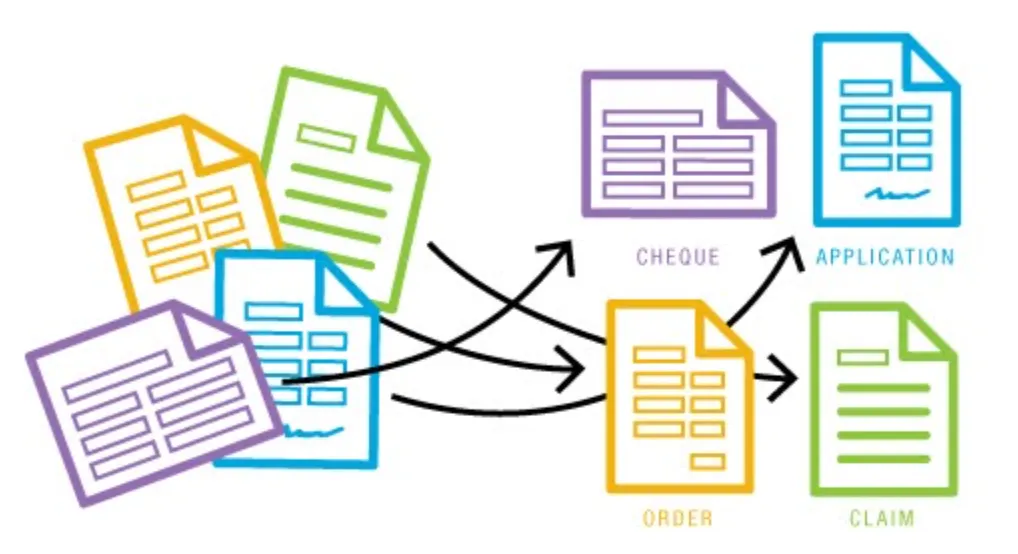
Document Classification
Source
Document classification is one of the tasks AI can handle. The type of document determines which AI systems or machine learning models we apply – the invoice and the promotion request mentioned earlier will be processed in different ways.
Why is that? Primarily because documents have different characteristics, which we will cover more thoroughly in later articles of this series. For now, let’s assume that purely textual data calls for natural language processing techniques and deep learning models that make use of the document’s textual features. Images, in turn, call for computer vision methods. And visually rich documents with strictly defined layouts call for a multimodal combination of the two.
Document Layout Analysis
Documents with a well-defined format, known as Visually-Rich Documents, can be handled with a computer vision technique called Document Layout Analysis (DLA). It consists of assigning particular parts of the document to predefined classes, for example table, text line, header, image, image caption, footer, etc.
AI research keeps producing specialized machine learning models that perform this task better and better. Multimodal deep learning algorithms with dedicated training routines on unlabeled multimodal data samples are at the forefront.
Below you can see Document Layout Analysis applied to a page from a scientific article.
Source
To see how Document Layout Analysis performs on your own data, look for one of the interactive demos on HuggingFace Spaces.
Table Structure Recognition
Source
Table Structure Recognition (TSR) is a particular case of layout analysis. TSR analyzes only the table area and identifies its components, such as row, column, cell, column header, etc. With TSR, tables in documents can be automatically parsed into a structured form usable, for instance, for analyzing or validating the document. Given the performance of AI models, TSR is applied not to the whole document but only to the part of it where a table has been detected.
TSR-based solutions perform well on tables with distinct visual boundaries, known as bordered tables. The more clearly the elements are visually separated, the easier the job is for the artificial intelligence model. Complex table hierarchies and borderless tables are where the difficulty lies.
Table Recognition
Detecting tables in a document is another computer vision task related to tables. It is a specific case of the Object Detection task applied to documents and consists of finding the smallest rectangle that encloses a table on a document page. It is a prerequisite for TSR.
On benchmarks, deep models are reported to reach nearly 100% effectiveness. With real-world documents, though, their effectiveness frequently falls short and calls for a custom solution tuned to the data at hand. Because Table Structure Recognition builds on the output of this task, errors carry over and severely lower the final performance. That is why the results at this stage deserve extra attention.
Optical Character Recognition
Source
Optical Character Recognition is a fundamental document processing step that pulls structured, computer-readable data out of a document in visual form and places it on the document. It matters especially for documents that lack a text layer but contain business-relevant content. OCR tools typically return a list of words or text lines together with the bounding boxes that contain them.
Visual Question Answering
VQA is about answering textual questions on the basis of an image or a document. An intuitive example of an AI system doing this is a chatbot you can ask about a document. Suppose we upload a company’s quarterly report to the system and, to speed up our analysis, ask the generative AI system the key questions, expecting it to give correct answers based on the document. Put simply, that is how VQA systems function.
You can try VQA on HuggingFace Spaces with the Donut deep learning model.
Key Information Extraction
I consider this one of the tasks with the biggest potential. It lets you extract information from a document in a structured key-value form. Once the document has been turned into a dictionary, that structured data can be used freely – for example passed on to other systems, run through business logic, used to validate fields, invoice data, etc. – which automates repetitive human work.
Source
KIE is usually built by combining two tasks: Semantic Entity Recognition (SER) and Relation Extraction (RE). The first assigns a class to every word in a document and forms continuous entities (typically with “Question” and “Answer” classes), while the second determines whether relationships exist between entities. With classes and relationships in hand, we can turn this information into a key-value dictionary.
Summary
In this article, I have explained what Intelligent Document Processing is and which tasks it involves. I described the advantages I see in using such AI systems for document processing, briefly covered the tasks Document AI handles, and sketched their possible business applications. I hope that, having read this, you now have a general sense of which AI techniques can support you in automated document processing. Upcoming posts will look more closely at specific problems and how AI algorithms solve them – stay tuned!