Cutting Time-to-Insight in Company Financial Data by 90%
How the people at our company stopped writing complicated SQL queries and started asking questions in plain English.
How the people at our company stopped writing complicated SQL queries and started asking questions in plain English.
Overview
This article describes how FinBot – an AI-powered natural language interface to BigQuery financial data – changed the way our company accesses its financial data. The story is told as a before-and-after comparison, showing measurable productivity improvements while going into enough technical detail for engineering readers.
The problem
At the end of every quarter, every month, and sometimes even more often, our finance team gets flooded with questions about the financial state of different projects or how it stacks up against the previous year or quarter. We hold a lot of data about our projects, and most of it is stored in BigQuery.
Digging up particular details or preparing a report when someone asks for specifics can be painful: you either have to know BigQuery yourself or wait until someone else analyzes the data for you. Locating data in this dataset usually requires several rounds of attempts, which wastes time and results in late decisions, bottlenecks, and annoyed managers.
The old way
Suppose you are one of those who made it through the administrative and security hurdles and obtained access to the BigQuery tables holding our financial data – your troubles are only just starting.
As a rule, the people who care about this data are not programmers, and even when they are, not every programmer knows how BigQuery works. Several tables gather data from various sources for reporting. If the existing reports do not meet your needs, though, you may have to get past a few technical obstacles before you understand what is what in the dataset.
Among them are:
- BigQuery SQL syntax requirements
- Intricate relationships between tables
- Counterintuitive column naming conventions:
a)sales_value_PLNvscosts_value_PLN
b)speciality_groupvsspecialty(note spelling)
c)profit_center= project name - Complicated temporal logic:
a) Q1 = months 1-3, Q2 = months 4-6, etc.
b) Year/month/period columns must be filtered correctly - Handling multiple currencies (PLN, USD)
Typical query workflow (before)
If you do not work with this dataset regularly, you go through more or less the same routine every time you open the BigQuery console:
- User wants: “How much did we make on Project X in Q2?”
- Step 1: Open the BigQuery console (1-2 min)
- Step 2: Recall/look up the table names (2-3 min)
- Step 3: Write the first version of the SQL:
SELECT SUM(sales_value_PLN) FROM olap_cube
WHERE profit_center = 'Project X' -- Wrong name?
AND quarter = 2 -- No quarter column!
AND year = 2025- Step 4: Fix errors (3-5 min)
- The column does not exist
- month BETWEEN 4 AND 6 is needed
- The profit center name is not an exact match
- Step 5: Repeat 2-3 times (5-10 min)
- Step 6: Format the results by hand (2 min)
- Total: 15-20 minutes to get a single answer
These eight steps are the very definition of frustration, and they are one reason why our finance team is so busy. If you need quick margin checks or other ad-hoc analysis, you are out of luck: you either learn the dataset inside out, or you wait.
Real examples of query complexity
To illustrate the problem precisely, consider a simple query someone might want to run against the dataset: “What was our revenue last quarter?”
To answer it, you have to write the following query in the Google console:
Required SQL:
SELECT SUM(sales_value_PLN) as revenue FROM `project.dataset.olap_cube` WHERE year = 2025 AND month BETWEEN 1 AND 3Here is another, eg:, “Top 5 contractors by margin in Backend guild”
Required SQL:
SELECT person, SUM(sales_value_PLN) as sales, SUM(costs_value_PLN) as costs, (SUM(sales_value_PLN) - SUM(costs_value_PLN)) / NULLIF(SUM(sales_value_PLN), 0) as margin FROM `project.dataset.olap_cube` WHERE guild = 'Backend' AND year = 2025 GROUP BY person ORDER BY margin DESC LIMIT 5To a software developer with even a little experience, these queries may not seem very complicated, but for many people in the company, particularly non-technical ones, writing queries like these means hours lost every week across the organization and a dependency on ‘SQL-capable’ team members – and although our data is open for everyone to view, self-service analytics remains a myth.
The solution (FinBot introduction)
Rather than asking the finance team for the top 5 contractors by margin this year in a given department, so that someone has to sit down and translate it into the BigQuery console for us, we could just put the same question to a chatbot and receive the answer. That is genuine self-service for anyone interested in this data, not only data engineers or programmers.
The idea behind the project was to clear up any ambiguities automatically and deliver answers in seconds rather than minutes, hours, or days. You should be able to ask questions the way you would ask a colleague, without worrying that you do not know everything about the data - if our bot cannot work out what you mean, it will ask follow-up questions - exactly like our finance lead would.
What FinBot is?
FinBot is the newest project from our Innovation Hub (the company division that tests and implements AI-related ideas). It is a financial analysis assistant that uses LangChain and LangGraph for agent orchestration, and Google BigQuery MCP so that agents can run queries against our data source.
FinBot’s stack:
- FastAPI (Python 3.10+) for the REST API
- LangChain + LangGraph for agent orchestration
- GPT-4o for natural language understanding
- Google BigQuery as the data source
- Redis for caching
- PostgreSQL for storing conversations
It can be accessed through:
- A web chat interface (SvelteKit)
- The REST API
Architecture at glance
The key challenge in this project was designing an architecture that would do more than just forward the user’s input to a BigQuery MCP server: it had to set up an agentic flow that preprocesses the user’s query and enriches it with extra properties, so that the final SQL Agent generates the queries we really want.
To achieve this, we built a dedicated multi-agent pipeline (described in Section 3) that figures out the type of request, how it maps onto the actual data in the database, and what the final output should be. Further components were added to support the multi-agent parts with caching, chart generation, and better context understanding.
Another crucial part of the system is the integration with Google SSO, which ensures that only people inside our organization can reach this data. The persistence layer, a simple Postgres database, exists solely to store users’ conversations, so that each user can look through earlier results, regenerate charts when needed, etc.
Technical deep-dive
Multi-agent architecture
For the FinBot chat to handle queries from real users, we cannot just pass them to an SQL agent that converts them into BigQuery SQL. That would only work if users knew how the data is stored in our datasets, which columns exist, and what they contain.
Take a simple user input such as “Show me all projects John Smith worked on in 2025”: it has little chance of becoming a correct SQL query, for several reasons. To begin with, the dataset has no column called project(s) – in our database, projects live in a column called profit_center (for historical reasons). Another issue is that there is no person named ‘John Smith’ – there is, however, a person named ‘Smith John’, with the surname first – you get the picture.
FinBot also has to be conversational. When we ask a follow-up such as “and James Wilson”, it has to remember what we asked earlier, so that it can fill in the context and build the right query for us from just that fragment.
To handle this, we built a multi-agent flow that tries to resolve several pieces of information, gather them together, and hand them over to the SQL Agent so it can produce the most suitable query. The agents involved in this workflow are described below.
Query router agent
The first stage of processing is a classifier: some queries do not have to reach the SQL agent at all, and we can short-circuit them to return results more quickly.
The query router agent assigns a query type:
DATA_QUERY- requires running SQLMETA_QUESTION- concerns earlier resultsEXPLANATION_REQUEST- asks how something was calculatedCLARIFICATION- changes the previous queryGENERAL- no SQL required
When we recognize, eg., the GENERAL query type because the user asks about the weather, we act like an ordinary chatbot, much like ChatGPT.
The query router agent decides whether entity resolution (performed by another agent in the flow) is required, pulls out preliminary entities when needed, and determines whether data will have to be grouped, providing a group_by_hint for aggregations, etc.
Preliminary entity extraction runs against a static knowledge base that is part of FinBot’s internals, eg., project gets translated into profit_center here; other, more complex entity scenarios are handled by the Entity Resolution Agent when necessary.
Example classification:
- Input: “Show me direct margins for all projects in 2025”
- Output:
{query_type: "DATA_QUERY", group_by_hint: "profit_center", needs_entity_resolution: false}
Entity Resolution Agent
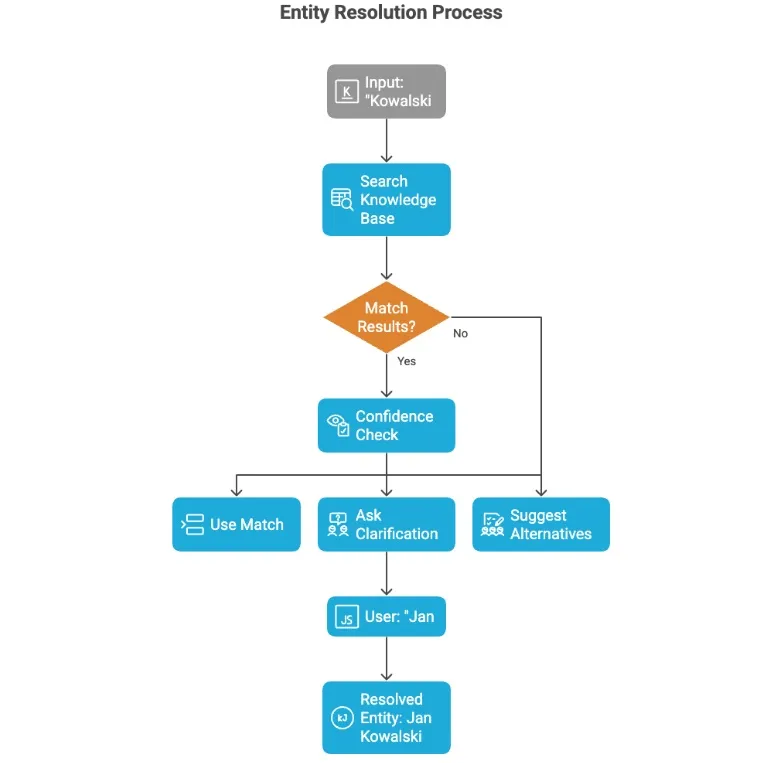
The Entity Resolution Agent bridges the gap between the data we store and the data the user asks about. Person names are a perfect example. We might ask about ‘John Smith’, ‘Smith John’ or simply ‘Smith’, and we want all of these mapped to the exact value stored in the database, so that the BigQuery SQL filter (WHERE person = ‘Smith John’ gets generated. The same goes for project names, specialities, division names etc.
The agent performs fuzzy matching against knowledge bases it builds from the data itself; sample sources include:
- The list of contractors from the database
- Profit center (project) names
- Guild names
- Specialty groups
When an entity cannot be resolved, this agent short-circuits the flow and asks clarifying questions about the ambiguity. For instance, if we ask about a person named ‘John’ but there are several records with that first name, the agent will try to find out exactly whom we mean:
- “Did you mean ‘John Smith’ or ‘John Brown’?”
The agent produces confidence scores, and when they fall below a given threshold, the workflow for fetching the actual results is stopped.
SQL Agent (Core Engine)
The SQL Agent is the central piece of our agentic system, as it runs the actual queries against Google BigQuery.
It is LangChain’s create_sql_agent of the openai-tools type. We use the GPT-4o model (temperature=0 for determinism) and build a system prompt containing:
- Full schema documentation
- Business context (metric formulas, terminology)
- Query patterns and examples
- Temporal mapping (Q1-Q4)
- Security constraints (SELECT only)
The agent adds context such as (year, quarter, month, department) and injects the conversation history and hints about resolved entities.
We designed the agent so that the exact SQL query can be pulled from the execution trace, which matters to some end users who want to confirm that the calculations were performed on the correct data in our datastore.
Chart Generator Agent
One of the newest features of our tool is automatic chart generation for specific data retrieved with FinBot . To support it, we built a small utility agent that, on request, takes the retrieved data and turns it into good-looking charts.
The agent examines the response text and automatically picks suitable visualization methods. It handles bar, line, pie, doughnut and table formats, and it produces Chart.js compatible JSON that the FinBot UI later uses to display the result.
Prompt engineering details
Business context injection
As briefly noted earlier, the user’s query is enriched with extra context. Using agents, we try to include information we already have from domain knowledge, such as:
- Business glossary terms
- Metric formulas (e.g., margin = (sales - costs) / sales)
- Frequent query patterns
Along with some terminology mappings eg:
- “revenue” →
sales_value_PLN - “project” →
profit_center - “team” →
guild
System prompt structure
The complete prompt is assembled from the elements listed below; which ones are chosen and handed to the next agent depends on the specific query, and it may be all of them or only a subset:
- Role definition: “You are FinBot, an expert financial analyst…”
- List of capabilities
- Table documentation with example columns
- Understanding of the key data model
- Query guidelines
- Temporal context
- Frequent query patterns
- Security constraints
- Instructions on response format
Data flow (end-to-end)
The diagram below shows the full path from a user’s query to the response. Apart from passing through the agentic flow with LangChain, a few extra steps run conditionally, either to speed things up (e.g., when the same question has been asked before) or to add capabilities such as creating a chart from the data returned by the BigQuery datastore.
Conversation persistence
For convenience, and to learn what users actually ask our FinBot, we added a persistence layer in the shape of a Postgres database, which lets us refine the solution later on.
Every user can look through their conversation history, generate charts for earlier answers, or check what the actual query against Google BigQuery was. This provides an audit trail that will help us improve going forward, and it also lets users go straight back to earlier contexts and conversations.
Caching strategy
To cut the costs of LLM calls, we introduced a simple Redis-based caching strategy. It relies on cache keys with a simple 1-hour TTL, built from the normalized query + context, and its main job is to cache queries for entity resolution agents and to enable cache-aware handling of follow-up questions. The cache is invalidated whenever the context changes.
The transformation
The new way - natural language queries
Example transformations
Typical interaction
With FinBot, users do not have to tweak queries or write them from scratch when they want to find several pieces of information. You simply carry on a conversation, and the bot understands the context of earlier queries, so it can build new ones for you automatically.
- User types: “How much did backend development cost in Q2 2025?”
- FinBot returns: “Backend development costs in Q2 2025: 125,430 PLN (April: 42,150 PLN, May: 48,280 PLN, June: 35,000 PLN)”
- User follow-up: “Which project had the highest?”
- FinBot (context-aware): “Project Alpha had the highest backend development costs at 32,500 PLN”
- Total time: ~10-60 seconds per query
Real query examples
Simple queries
- “What’s our total revenue for 2024?”
- “Show me costs for January”
- “List all projects in 2025”
Complex queries (now trivial)
- “Compare Q1 and Q2 margins for Backend guild”
- “Which specialties have negative margins this year?”
- “Top 10 contractors by sales rate in PLN”
Follow-up queries (context-aware)
- “How about for Q3?” (after a Q2 query)
- “Break that down by month” (after a yearly query)
- “What’s their margin?” (after a list of contractors)
Time-savings calculation
The new query automation drastically cuts the time needed to handle data requests. A single query now takes 10-60 seconds rather than 15-20 minutes, which means an average reduction of ~97% in time per query.
For a typical team member who runs 10 queries a week, that amounts to roughly 2.3-3.3 hours saved every week, or about 2.8 hours on average.
Across the organization (20 people using the system), the improvement adds up to considerable productivity gains:
- ~56 hours saved per week
- ~224 hours saved per month
- ~2,900 hours saved per year, which equals ~1.4 full-time employees’ worth of recovered capacity.
These numbers show that even modest improvements per query add up to significant efficiency gains across the whole organization.
Adoption & results
Rollout strategy
As with many new products, we opted for a phased rollout to safeguard UX quality, reduce risk, and collect feedback before scaling up. For FinBot, it was particularly important to try out the multi-agent architecture first with a small group of expert users (the finance team and, above all, its lead).
An early goal was to verify that the SQL produced by the SQL Agent was correct. We show these SQL queries in full at the side of the FinBot window (in the web-based version) so they are easy to access.
Another key area to test was entity resolution (particularly for names, projects, specialities, divisions, etc). It had to be checked against many scenarios (mispelling, different orders, partial words, etc).
The following phases included what we called the “managers rollout”, which brought in more people from other divisions, such as sales or marketing, to try FinBot, give us more insight into the queries they care about, and so on.
The rollout to the entire organization came last and required some preparation from the development team, such as recording a demo for users to watch and learn from, ensuring Google SSO worked throughout the company, and polishing the UI/UX for an even better final experience.
Metrics we looked at
To see how FinBot was used and where it delivered the most value, we began gathering a handful of simple usage and performance metrics. They were not intended as comprehensive analytics, but as a way to check whether the tool really solved the problems described above and how it performed under real-world load.
Usage metrics
- Number of queries per day/week
Query volume grew as non-technical users became more confident asking more complex questions. We noticed recurring patterns, such as spikes around month-end closings and during project profitability reviews. This confirmed our assumption that many people had steered clear of exploring data simply because SQL stood in their way.
- Most common query types
Most questions fell into a handful of categories:
- Profitability at the project level
- Revenue, costs, and margins for a specific time range
- Metrics at the people and guild level
- Period comparisons (Q1 vs Q2, year-over-year)
These lined up almost exactly with the pain points we described in the earlier sections.
- Average response time
Response times reliably stayed within the 10–60 second range, depending on how complex the question was and whether the result was served from cache. Compared with the old 15–20 minute workflow, users saw the improvement the moment they tried it.
Qualitative feedback
- Users are no longer reliant on “SQL-capable” people
One of the most noticeable cultural shifts was that routine questions to the finance team or engineers stopped coming. People who used to avoid BigQuery altogether began doing their own analysis.
- Decisions are made faster
PMs said that getting ready for client conversations became much quicker. Finance could check margins or budgets during meetings rather than waiting for someone to deliver SQL results.
- People like the conversational flow
Follow-up questions such as “…and for Q3?” or “Please, break it down by month” felt natural and took away the hassle of rewriting entire queries or finding their way around the BigQuery console.
All in all, the metrics and feedback showed that FinBot did more than just work technically - it changed the way people dealt with financial data every day.
Technical challenges and solutions
Some of the challenges we faced have already come up throughout this article, since they strongly shaped our architectural decisions across development iterations. Still, below I list the most significant ones, with a short description of each problem and an explanation of how we solved it.
Challenge: Ambiguous entity names
This is the most frequent problem and it affects the majority of queries. Users have no idea how the data looks in our BigQuery dataset, so if the SQL Agent builds a query containing person = "Brown", it will return nothing. The trouble is that “Brown” may match several people: there could be “Michael Brown” or “Brown Michael”, or perhaps someone who is really “Browne” but whom we call “Brown” – because why not.
As mentioned several times above, we solved this with the Entity Resolution Agent. It performs fuzzy matching with confidence scores against the data we hold for certain entities; if it finds a record with sufficient confidence, it passes it on as extra context further down the pipeline, and if not, it can ask the user to clarify what she/he meant by a given entity.
Challenge: Complex temporal queries
Another interesting issue appeared once we began using FinBot like the chatbots everyone knows (such as ChatGPT or Claude): you simply ask follow-up questions without giving much thought to how the backend will turn them into a real SQL query against the BigQuery dataset. You might ask about some data for Q3 2025 and then just add “and Q2”, and the bot has to understand what you mean.
To handle this, we built a ContextManager that extracts the temporal context when needed and assembles a larger, richer context for the SQL Agent using data cached for the user session.
Challenge: Performance
Our FinBot agentic system comes with a few pain points and bottlenecks we have to cope with. Some of them stem from the plain calls to the LLM (with a large context, system query, etc).
The bigger issue lies in the dataset’s capabilities and how quickly Google BigQuery answers sql queries. For complex queries, this takes up most of the request-response time that shapes the overall user experience. We mitigate both problems to some degree with caching and asynchronous processing wherever we can, but keep in mind that you can never be faster than your datasource, so the problem remains as long as we use BigQuery.
Future roadmap
FinBot is a recent addition to our portfolio of internal apps, and we are currently gathering statistics and other information about how people use it, what they lack, and what they would like to see in upcoming releases. Some of the proposed enhancements are:
- Trend prediction and forecasting
- Exporting to Excel/PDF
- Scheduled reports and alerts
- Dashboard administration
Scaling considerations
FinBot’s capabilities would grow considerably once we add more data sources and features such as currency monitoring, exchange rates, and accounting data unrelated to projects. These are not hard to add, but each brings another layer of knowledge to our bot, and those layers have to be tested by more people with deeper domain knowledge in the relevant areas, etc.
Apart from additional data sources, it would also be useful to integrate the bot with other systems we use, such as ERP or the financial software used by various departments. That future is so uncertain at the time of writing, however, that we can leave it aside for now.
Conclusion
FinBot shows well how you can open up your data to a broader audience through natural language queries. It relies on a multi-agent architecture for specialized processing and adds several layers that help manage the system’s complexity, resolve entities, clarify users’ questions, and respond quickly.
Adding more data sources and integrations to FinBot is not hard, but in projects like this, the real work starts with testing the results and their usefulness.
How can we help you
If your organization suffers from slow access to data, complicated SQL workflows, or reliance on a small group of experts, an agentic system like FinBot can give your teams genuine self-service analytics.
At our company, we help companies design and build custom AI assistants tailored to their data sources, business vocabulary, and security requirements.
Whether you are looking to create a natural language interface to BigQuery, ERP, or any internal dataset, we can support you all the way from concept through architecture and implementation to rollout. Contact us to talk about how we can help turn your data into instant insights.