The challenges of remote Event Storming as seen by a facilitator
Discover remote Event Storming through the eyes of a facilitator and find out what this role involves.
Have you ever considered running an Event Storming workshop remotely? Is it worthwhile, and can it actually be done?
We are a 100% remote company, and our clients are spread all over the globe, across various time zones. Under these circumstances, setting up an on-site Event Storming workshop would be hard and expensive in many respects, above all logistically. That is why we run both remote and on-site sessions, depending on the circumstances. Even so, running Event Storming workshops remotely is our default option.
What we learned from numerous sessions brought us to a few interesting conclusions. Remote workshops turned out to be doable in a way that ultimately delivered value to our clients. At the same time, they were harder for us than the original on-site format.
As part of an initiative aimed at sharing knowledge about tools and techniques related to Domain-Driven Design, we would like to present the challenges we encountered when opting for the remote variant of Event Storming. Although they closely resemble those of on-site workshops, these difficulties differ from them in some ways.
It should be noted that these reflections come from the viewpoint of the facilitator – the person who coordinates and moderates the workshop session, and in practice the one who has to deal with these challenges. The remaining organizers can, for instance, give the moderator technical support by recording the session, backing up every stage of the workshop, and so on.
Even if you do not plan to facilitate, you lose nothing! This article can just as well deepen your understanding of the technique by showing it from another angle.
The 4 most impactful challenges of remote Event Storming.
We aim to get the most out of the time and budget assigned to the Event Storming workshop. It pays to address the challenges with the greatest potential impact on the value delivered to the client first, and only then turn to less significant issues. That is why we picked the challenges based on our experience in running workshops.
Under each challenge, we also suggest sample solutions to the problem in question. Naturally, these are just a handful of the many possible approaches, and how well they work depends on numerous factors, such as the tools at hand and the goal of the workshop set by the client. In other words, no holy grail suits every scenario.
1. Keeping the participants’ energy steady.
Statistically, people can stay fully concentrated on a task for only a short stretch of 15 to 30 minutes. This depends mostly on their health, emotional condition, how much they have slept, and their ability to focus. If we push ourselves to go longer without breaks, our energy starts to decline, which can result in fatigue, irritability, passive behavior, a shortage of fresh ideas, and slower thinking.
Taking part in the Event Storming workshop demands concentration from beginning to end. On top of that, we want participants to take initiative, act proactively, connect facts from their areas of interest and business effectively, and draw constructive conclusions – after all, we will be extracting knowledge from their heads. At the same time, we want them to come away with a good impression of the workshop and to maintain team synergy and an open mind. Under such conditions, the artifacts the workshop produces will be of greater value to them than if people were worn out and unwilling to keep working together. Less activity means less knowledge and fewer problems uncovered, so it is worth making sure the participants’ energy stays stable.
One of the most effective remedies is taking breaks during the workshop. This reduces the risk of participants running out of energy too early, for example only halfway through the planned session. Breaks let participants recharge, relax, and regain a comparable span of concentration for the following tasks. As a bonus, they give the eyes a rest from working in front of a screen, so breaks benefit both the minds and the bodies of the participants.
The frequency and duration of breaks matter just as much. There is no ready-made formula here, since many factors affect how quickly people tire and lose focus. Projects, for instance, differ in complexity, so the more complex ones that are spread out over time will sap energy faster. By nature, people are accustomed to a certain work rhythm. Striking a balance between focused sessions and breaks is the key to making the undertaking a success.
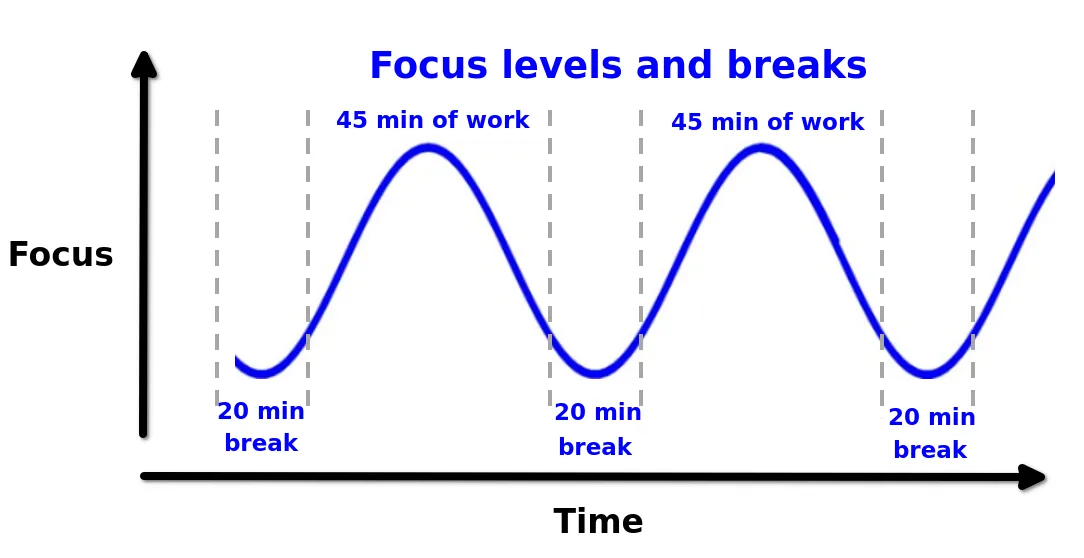
An example showing how breaks can help people regain their level of focus.
How can you work out how often to take breaks and how long they should be? In remote workshops, spotting the moments when most participants need a break is far harder than in on-site sessions. The facilitator sees little of the participants’ body language, gestures, sighs, and so on. This is why it makes sense to use various tools to gather quick feedback during sessions regularly at equal intervals. Here is an example of measuring the mood:
- Before the workshop starts, we announce that every 20 minutes we will use the text chat of the video conferencing tool to ask participants how badly they need a break.
- Participants reply with a number on a scale from 1 to 5. Someone eager and full of energy answers 1; the more tired we feel, the higher the number we send. Complete exhaustion sits at the opposite end of the scale, i.e. 5.
- The facilitator running the session sees the replies as numbers every now and then. If, in his subjective judgment, the numbers are high, he calls a break.
- After the break, he can gather feedback once more; this way, through trial and error, he can work out how long the breaks need to be.
- What matters most is not letting the majority of participants reach a state of total energy depletion. The exception may be the very end of the workshop, when this is perfectly normal.
Apart from the chat-based feedback described above, the facilitator can rely on more advanced tools, such as plug-ins or other software – the Miro platform, for instance, offers a mood-tracking template. Such tools can gather participants’ feedback and compute the average and median of the responses, e.g. on a numerical scale from 1 to 5. Their UI can also make voting easier, e.g. by offering buttons instead of chat messages.
An illustration of how a mood-tracking tool might look.
When running workshops at our company, we observed that the fewer the tools, the lower the barrier to entry for participants, which means they get into an Event Storming workshop session more quickly. It is important to bear this in mind and not go overboard with tools, which can overwhelm people and needlessly drain their energy. That way, we stay true to one of the workshop’s goals – keeping things simple.
Lastly, it is worth pointing out how hard it can be to stay focused amid external stimuli. People sitting in a room where they are distracted by roommates, children, or employees of other companies in an open space may lose focus and fall out of rhythm. For this reason, it is wise to ask participants ahead of the workshop to set up, as best they can, a quiet spot for the session where external stimuli will affect them less. Not everyone can do this, of course, but you will at least reduce some of the risk of the workshop failing.
2. Limiting the priming phenomenon.
First, a short explanation of the priming phenomenon. In our context, it means that one person or a group of people influences the thoughts, ideas, and conclusions of the whole team. This influence is frequently indirect and unconscious, taking the form of suggestions. The team starts thinking within a narrowed context, focused on the areas someone has steered them toward. This works against “outside the box” thinking, in which we want to view a project from many different angles.
To picture this phenomenon, think of a side channel of a river carved out by a small spring. Over a long time, more and more water flows into it, until finally it becomes the main channel of the whole river, and the river changes its course.
Because of priming, we may miss areas that might contain crucial information about business processes. Sometimes such unexpected “hidden gems” turn out to be the most valuable discoveries. Leaving ourselves room to explore them can reveal new perspectives or surprising aspects of a project.
A single person can shape the ideas and thinking context of others.
Avoiding priming matters most in the first stage of the Event Storming workshop, known as “Big Picture.” This is when we focus on discovering business processes holistically, from a “bird’s eye view.” Priming cannot be eliminated entirely, but sessions can be run in a way that reduces this psychological effect. That is no easy task, because remote workshops rely on online conversations in which, at any given moment, usually just one speaker out of the whole group has the floor. In an on-site workshop session, the office lends itself better to parallel conversations in subgroups, so they happen more naturally and easily there.
To reduce priming in remote sessions, we ask participants, wherever possible, to complete a given stage of the workshop individually. Each of them adds sticky notes on their own, at some distance from the others on the virtual wall, without discussing them. Only in the following step do we come together as a group to analyze their proposals, keeping what makes sense and removing duplicates. We follow this procedure in the “chaotic exploration” phase and when preparing the initial list of “actors and systems” before assigning actors to events.
Another technique is to run so-called “breakout sessions”. With 12 people at the session, for example, we can split the participants into smaller subgroups of 2-3 people. This, however, frequently means extra effort on their part, as they have to call each other for separate online meetings. On the other hand, some online meeting platforms such as Zoom allow the meeting owner to create breakout rooms on demand. This keeps the subgroups apart in the initial stage, so they do not influence one another while working on a single phase of the workshop. When the subgroups finish their task, everyone goes back to the main meeting, where we merge their ideas.
3. Getting through all the essential workshop phases.
Every type of Event Storming workshop includes phases in which key information comes to light. In Big Picture Event Storming, for example, these are often: “chaotic exploration”, “enforcing the timeline”, “reverse narrative”, and “actors and systems”. They yield the following information about business processes:
- what is going on
- when it occurs
- who triggers it
- in which order
- which systems it interacts with
There are also optional phases that can be used successfully to extend the Event Storming notation, e.g., looking for “opportunities and threats” in the processes uncovered. Such flexibility, after all, serves a variety of goals. Still, we must not go too far by dwelling on optional/additional information for too long, or we may not have enough time left for the key, core phases.
To deliver valuable knowledge for the client’s project, we ought to complete these essential phases of the workshop within the agreed time and budget. We certainly do not want to ask the client for a substantially longer schedule or a bigger budget because we failed to gather at least a basic amount of information in each of these phases. The fundamentals come first, even if business processes have further layers of complexity and depth.
If the client’s project calls for deeper exploration, an Event Storming workshop can be run at a more detailed level, such as “Process Level” or “Design Level”. These workshop types examine a chosen slice of business processes in much greater depth and usually involve a smaller group of participants, which makes them cheaper than Big Picture Event Storming workshops. Once we have the holistic view of business processes, we can move on to deeper levels of knowledge at any point in the later stages of the project.
Keeping time under control and fitting the workshop phases into fixed timeframes is hard even on-site. Remotely, though, our interpersonal interactions are more constrained, and time zone differences can make themselves felt. Some people, for instance, cannot stay longer in a session because their working day is drawing to a close, while ours is only just starting. As a result, the schedule is less flexible.
That is why it matters to watch how active the participants are, balancing time spent on discussion against getting through the individual phases of the workshop. The facilitator should give participants room so that everyone can speak on a given topic at least once. The “raise your hand” feature of online group video calls often helps here. In practice, one person may talk at length in a way that makes it hard to interrupt them, so “raising hands” serves both as a discussion tool and as a feedback tool. By observing the situation, the facilitator can support the discussion and then extend or shorten the timeframes of particular workshop phases, depending on whether people need more time to finish their tasks.
A further technique is to cap the time spent discussing areas of lower priority for the project. Online payment processes, for example, are highly generic and can be swapped for an off-the-shelf solution from an external company. Is it worth digging into discovering and organizing events here? Not really – at this point, it does not matter. When little time remains before the end of a workshop phase, we should concentrate on processes that form the core of our client’s business or support that core. Even if we fail to cover every process, singling out the most important ones still delivers some residual value. That may be exactly what our client needs most at this stage, and it is generally enough.
4. Technical problems and the tools behind them
Workshop participants can differ in screen resolution, computer performance, operating system, bandwidth, and Internet connection stability. Now and then this leads to problems, for instance when we use a tool that demands a lot of computing power from participants’ machines. People with less powerful computers may then lose track of what we are presenting or doing at the moment. We make every effort to prevent this and similar situations.
To run remote Event Storming workshops effectively, you have to take technical factors into account. A facilitator should pick tools such as a “whiteboard” that will not cause trouble for most of the workshop participants. A short survey before the meeting can help: which operating systems do the participants use? How long have they had their current computer? Its age is a useful hint, too. Based on the survey results, the facilitator can decide which tools to use and which to skip, whether to ask participants to switch off video when possible to save bandwidth, and so on.
It is also worth noting that a clever way to reduce problems is to set up a meeting with participants ahead of the workshop to check that everything works for them. For example:
- Can they share their screen?
- Is their camera working?
- Can others hear them?
- Can they access the whiteboard platform?
- Will their computer run smoothly with every tool open at the same time?
In the past, we have experienced a participant’s computer freezing while the tools were in use.
Walking participants through these steps a few days before the session helped us reduce the risk of technical issues.
Tips and tools that will help you tackle these challenges in a remote workshop
To finish, we have put together a short list of tools and tips that can help a facilitator run a remote Event Storming workshop successfully. It illustrates which preventive measures can be used, and it draws on the challenges described above as well as our own experience at our company.
Timeframe vs. focus
Based on our initial estimate of the project’s complexity, we split the workshop into 3 to 5 meetings. Every session takes 4 hours, breaks included. This is an upper limit within which participants can generally stay focused and engaged, especially when weighed down by so-called “digital fatigue” from looking at a screen.
We follow the rule of 1 workshop session per day, so participants do not wear themselves out and come back the following day rested and prepared for new challenges.
A video call with a chat
Every workshop session is an online meeting with video turned on, during which the facilitator shares their screen. Screen sharing is paused from time to time for workshop phases that participants should carry out on their own or in subgroups. Technically, the video communicator should offer a chat (as Google Meet does, for example).
Encourage participants to keep their cameras on. This lets the facilitator read at least some of the participants’ verbal cues and body language, which helps in adjusting the length and frequency of breaks, resolving conflicts, and avoiding miscommunication.
Common workspace
Besides the online meeting, the facilitator relies on a tool known as a “whiteboard”, to which sticky notes and other notes are added in real time. This is the space that gets shared during the meeting. Every participant is given access to the board, so they can all edit its contents simultaneously. It has to be one single board, not a few separate ones.
Here is how a common workspace might look. One whiteboard tool is the Miro.com platform, widely used for many kinds of remote workshops that take the form of brainstorming.
Three modes of work
For most of the workshop, participants work as one group in a single online meeting run by a facilitator. This is the default mode of work.
At other times, however, participants receive tasks to complete on their own. They do not discuss anything with each other then, yet they do not need to leave the meeting either. This phase has a set timeframe, after which they go back to the shared working mode described above.
The third mode of work is the exception: tasks carried out in subgroups. We split into several subgroups of 2 or 3 people each. For a fixed, agreed period, each subgroup has to gather in a separate online meeting to talk things over without affecting the other subgroups. Here, too, a time limit is set in advance, after which everyone returns to the default working mode.
Splitting the work into three modes requires extra effort, but in return it limits the priming phenomenon, which was described earlier in this article.
The opening of the “Chaotic exploration” phase can be done individually to prevent early priming. Here you can see that each participant used a slightly different area of the whiteboard so that their events would not overlap.
A stopwatch
The final important and useful tool in the facilitator’s kit is a stopwatch. It helps you keep track of how much time passes in each phase and work mode of the workshop. It also shows the time of breaks, which matters to participants: with the stopwatch in view, they do not need to watch the clock themselves and can concentrate on what counts – the workshop itself.
Ideally, every participant should be able to see the stopwatch, either on the screen shared by the facilitator or as a plug-in within the whiteboard tool. In our case, the Miro.com platform already offered such a feature, and we gladly made use of it.
Using a stopwatch during the remote Event Storming session.
What have you learned?
You have learned how facilitating a remote Event Storming workshop might look and which challenges you may encounter. We covered the most significant ones along with examples. Being aware of them is valuable, since you now know what to expect, and it will help you get ready should you facilitate such workshops.
You have also learned about possible solutions to facilitation problems and tools that can support them. The aim was not to present the best possible solutions, which in any case depend on the nature of the project, its budget, and other factors. The aim was to provide a solid foundation for starting or continuing your journey with the remote version of Event Storming.
We are also working on another article about less common Event Storming challenges that you should know about as well. It should be published in the coming weeks, so stay tuned!
We would also love to hear from you in the comments if you know better ways of running this workshop remotely or any interesting online facilitation tools. This variant of the workshop is still developing, and perhaps you, too, will help shape it by making it even easier to work with.