ScyllaDB Beyond Cassandra, Part 2: Search, CDC and the Storage Layer
A technical look at how ScyllaDB and Apache Cassandra differ in secondary indexes, vector and full-text search, change data capture, and workload prioritization, illustrated with a support-ticket example.
Tablets, Raft and other parts of ScyllaDB make calling it “Cassandra rewritten in C++” less and less accurate.
A second group of differences sits nearer to the application. How do you query a column that isn’t part of the primary key? How do you keep a search index up to date? How do you run a backfill without swamping interactive traffic? How much disk space does compaction require, and must SSTables even reside on local disks?
ScyllaDB and Cassandra answer these questions in different ways. Some of the answers are mature features; others came with ScyllaDB 2026.3. They shape both the queries you’re able to write and the infrastructure underneath them.
Secondary indexes: the CQL looks alike, the work behind it doesn’t
Imagine a support application that stores tickets keyed by ID. Retrieving a single ticket is simple. Looking tickets up by an external reference, however, calls for a different access path.
Example : find the tickets linked to CRM-1842.
CREATE INDEX tickets_external_ref_idx ON support.tickets (external_ref);

SELECT ticket_id, body FROM support.tickets
WHERE external_ref = 'CRM-1842';
Under the hood, ScyllaDB’s global secondary indexes are built on materialized views. The indexed value serves as the partition key of an index table. A query reads that table first to locate the matching base-table keys and then retrieves the rows. Keeping the index up to date costs extra work whenever indexed values change, and the index rows may reside on different nodes than the base rows.
Cassandra 5’s Storage-Attached Indexing (SAI) stores index structures next to the memtables and SSTables on every replica. Queries rely on these local indexes on whichever replicas they reach. No comparable global index table partitioned by the indexed value exists. The nearest ScyllaDB equivalent is its local secondary index, which co-locates index and base data but can only serve queries that also restrict the partition key.
This influences where reads are sent, what writes have to keep updated, and how costs vary with selectivity. A query that returns ten rows should be tested differently from one that matches half of the table.
One compatibility detail is also worth noting: ScyllaDB accepts Cassandra’s StorageAttachedIndex class name for vector indexes and maps it onto its own implementation. Accepting this declaration doesn’t mean ScyllaDB is running Cassandra’s SAI engine.
Vector search brings a different kind of lookup
A ticket ID locates a single record. An embedding can help locate earlier reports of the same issue, even if they’re phrased differently. “Connection fails after renewing the certificate” could be related to “TLS handshake errors following certificate rotation.”
Cassandra supports vector search already. ScyllaDB’s implementation follows a different deployment model.
Its Vector and Text Search service is, for now, a ScyllaDB Cloud feature. Vector search needs version 2025.4.3 or newer, and full-text search needs 2026.3.0 or newer. In both cases, the indexing service has to be turned on.
The architecture keeps storage nodes apart from indexing nodes. ScyllaDB stores the rows together with their embeddings. Dedicated nodes hold in-memory HNSW indexes and use USearch for approximate nearest-neighbour search. A CQL query goes to the indexing service, which determines candidate row keys; ScyllaDB then uses those keys to fetch the matching rows. Indexing capacity can be scaled independently of database capacity.
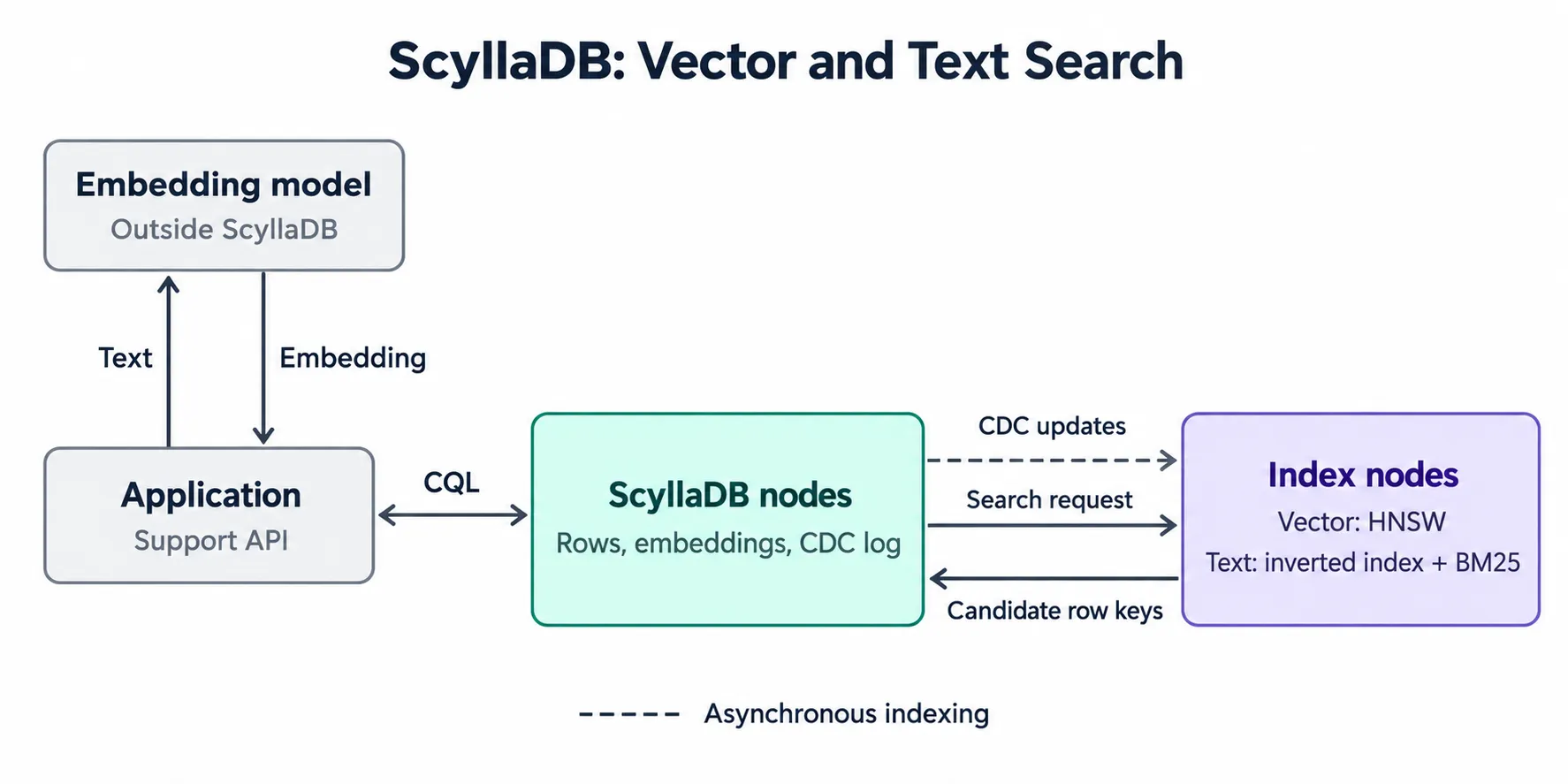
ScyllaDB nodes hold the rows and embeddings, while dedicated indexing nodes keep the vector and full-text indexes up to date via asynchronous CDC updates.
That means one more resource to size. A database might have ample storage while its vector index runs short of memory. Vector dimensions, graph configuration and the count of indexed rows all play a role. Approximate search also brings a recall/latency trade-off: answering fast and finding every relevant neighbour are two distinct goals.
Generating embeddings remains the application’s job. It picks the model, decides how long ticket discussions get split into searchable chunks, and takes care of re-embedding when the model is swapped.
Example: find five similar tickets.
Let’s say every ticket is stored along with an embedding. That value comes from an external model, and every model produces output of a fixed size. For a model returning 384 values, such as all-MiniLM-L6-v2, the table gets a vector column of the matching size, plus an index on it:
ALTER TABLE support.tickets ADD embedding vector<float, 384>;

CREATE CUSTOM INDEX tickets_embedding_idx ON support.tickets (embedding)
  USING 'vector_index'
  WITH OPTIONS = {'similarity_function': 'COSINE'};
When a new ticket comes in (“TLS handshake errors following certificate rotation”), the application sends its text to that same model – whether a hosted API or one running locally – and receives 384 numbers in return. It hands them to the query as a bind parameter. The query syntax matches Cassandra 5:
SELECT ticket_id, body FROM support.tickets
ORDER BY embedding ANN OF ?
LIMIT 5;
Full-text search handles the exact words you typed
At times the most useful search term is just SSLHandshakeException. The name of an exception, a product identifier or a quoted phrase may be more precise than a semantic description.
ScyllaDB 2026.3 introduces full-text search via fulltext_index indexes and BM25 ranking. For the body column of a ticket:
Example: find the tickets that mention SSLHandshakeException.
CREATE CUSTOM INDEX tickets_body_fts ON support.tickets (body)
  USING 'fulltext_index';

SELECT ticket_id, body FROM support.tickets
WHERE BM25(body, 'SSLHandshakeException') > 0
ORDER BY BM25(body, 'SSLHandshakeException')
LIMIT 10;
An analyzer breaks text into terms and normalizes them. The index locates matching documents and ranks them. Analyzers specific to a language also deal with word forms via stemming. The table has to use tablets, and partition-key columns can’t be indexed. Creating a full-text index turns on CDC for the base table automatically, which adds change-log storage you need to budget for.
Queries need matching BM25() expressions in both WHERE and ORDER BY, as well as a LIMIT. Paging, grouping and aggregation aren’t supported at the moment.
Expiration deserves its own consideration. Ordinary cell-level TTL doesn’t emit CDC events, so the index may keep entries after the underlying values have expired. When the index has to follow expiration, the documentation advises per-row TTL, which does emit deletion events.
Full-text indexes run on the same indexing nodes that host vector indexes, and both get changes asynchronously via CDC. As a result, a row update succeeding and that update becoming searchable happen at different times. For the support application, I’d measure how long it takes for a newly added answer to show up in search, in addition to query latency.
Text and vector indexes can coexist on a single table, but hybrid search currently needs two queries. The application combines the result lists itself, for instance with reciprocal rank fusion, which merges their rankings without needing raw scores to be comparable.
In multi-tenant applications, a different limitation weighs more: a full-text query can’t carry any extra WHERE restriction, a tenant or partition key included. The search FAQ states that vector search supports filtering, whereas full-text search doesn’t.
Filtering in the application thus has to be designed with care. Fetching the global top 20 matches and then discarding other tenants’ tickets could leave you with nothing usable. Authorization also has to take place before any retrieved content gets to a user or an AI agent. For a shared ticket table, this restriction might decide whether the built-in text search is an option at all.
For less demanding search needs, keeping rows, embeddings and text indexes behind CQL can spare you a separate search integration. Even so, I’d test the real queries before planning to decommission an existing search engine.
CDC gives applications a change log they can query
The search service is just one of the consumers of ScyllaDB’s change stream. Your application can consume it as well.
ScyllaDB CDC writes changes to log tables that are queried via CQL. The records are split into streams, so a consumer follows several streams and keeps track of how far it has got. The log captures mutations, but you can turn on optional preimages and postimages to get extra row state (at an additional cost).
Native Apache Cassandra CDC exposes commit-log segments on each node for consumers to process. Consumers are responsible for managing those files, deleting them included. Once the configured CDC space is full, writes to tables with CDC enabled may be rejected. ScyllaDB offers a different integration interface: clients read database tables instead of gathering commit-log files from nodes. This is among the most significant differences between the two CDC implementations. Cassandra consumers must deal with copies of every mutation, without any cross-node ordering, and must deduplicate them. ScyllaDB’s log table is read via CQL, so the consumer gets a single logical record.
For a Kafka pipeline, the ScyllaDB CDC Source Connector reads these log tables and publishes the changes via Kafka Connect. This can feed a search engine, a cache or an analytical projection.
In our ticket scenario, CDC could also kick off embedding generation whenever the text changes. The worker has to tie each embedding to the text version it actually processed. Otherwise, a sluggish job working on an older revision might overwrite the embedding of a newer one. ScyllaDB’s vector index will dutifully index whatever vector you write, stale ones included.
Retention calls for the same care. CDC records live for a configurable period. If a consumer lags behind that window, it needs a way to rebuild or reconcile. A change feed is only valuable if the application knows how to recover after missing a portion of it.
Run the backfill at a lower priority
Adding search frequently involves processing years’ worth of existing records. The backfill reads tickets, calls an embedding model and writes vectors, all while the support API keeps serving users.
ScyllaDB’s workload prioritization lets you assign service levels to database roles, each getting a different share of scheduling resources. The API and the backfill can run under separate roles, with the API given higher priority.
Example - prefer API requests over the backfill. For the existing roles used by the two clients:
CREATE SERVICE_LEVEL interactive WITH SHARES = 1000;
CREATE SERVICE_LEVEL bulk WITH SHARES = 100;
ATTACH SERVICE_LEVEL interactive TO api_role;
ATTACH SERVICE_LEVEL bulk TO backfill_role;
Shares define relative priority when resources are contended. They can give interactive requests precedence over backfill work, but they neither reserve hardware nor guarantee any particular p99.
This covers the database operations performed by those roles. A backfill with lower priority still needs concurrency limits of its own, and you shouldn’t assume its database service level governs the separate vector indexing service. When tuning its concurrency, I’d monitor API latency, backfill progress and indexing lag side by side.
Compaction alters how much storage you need
The search features get more attention, but compaction can affect the infrastructure bill more heavily.
An LSM database merges SSTables from time to time. While a large merge is in progress, the input files and freshly written output can exist simultaneously, so the cluster needs room on top of the live dataset.
ScyllaDB’s Incremental Compaction Strategy (ICS) splits SSTable runs into smaller fragments, 1 GB each by default. Compaction works through those fragments and frees consumed input step by step, so it doesn’t have to keep the whole set of large input files around until the entire operation completes.
ICS keeps the overall read/write trade-offs of size-tiered compaction. Rows that are updated often may still end up spread over several SSTables, and outdated versions may take up space until they get merged. Cutting temporary compaction space doesn’t remove every kind of storage overhead.
On the Cassandra side, the relevant point of comparison is now the Unified Compaction Strategy, which arrived in Cassandra 5 and was discussed in the earlier article. UCS supports configurable tiered and leveled behaviour together with sharded compaction. Comparing only against Cassandra’s older size-tiered defaults would overlook that work.
Disk usage evolves as updates pile up and compaction runs. The size of a dataset right after loading tells you little about the capacity you’ll need after months of overwrites, deletions and maintenance.
SSTables can reside in object storage too
ScyllaDB 2026.3 brings preview support for keeping SSTables in S3-compatible object storage. A keyspace’s STORAGE option picks the configured endpoint and bucket. These objects are the database’s live SSTables, and both compaction and reads work directly on them.
This ties in with a storage question that also comes up with diskless Kafka: how much data does a compute node really need to own physically? ScyllaDB’s implementation lets tablet ownership move by handing over references to shared objects, so the SSTable payload doesn’t have to be copied during migration.
The present object-storage documentation is aimed at archival workloads. Reads are considerably slower than from local storage, and there’s no local disk cache. Consequently, the number of SSTables a query touches influences remote access costs in addition to latency.
The preview needs tablets as well as changes to paging, timeouts and tablet balancing. For now it doesn’t support secondary indexes, materialized views, CDC, LWT, counters or backup/restore. Clusters that combine local and object-backed user keyspaces aren’t supported either. As a result, the search and CDC features covered above can’t be used together with this storage mode.
Object storage doesn’t back up those live SSTables automatically either: ScyllaDB removes objects once their last reference is gone, and ScyllaDB Manager can’t back up such keyspaces. Without backup, this is a feature to try out on throwaway archival datasets. Moving tablet ownership without copying the data is a capability worth keeping an eye on as the implementation matures.
The interface is familiar, the internals are not
CQL and the wide-column data model still tie ScyllaDB to Cassandra. Beneath the surface, though, the two databases take different paths regarding where indexes reside, how applications consume changes and how SSTables are laid out. These decisions shape query capabilities, data freshness and storage costs.
The earlier article dealt with ScyllaDB’s execution model and cluster management. Search, CDC and storage carry that divergence further, into application architecture. Calling ScyllaDB “Cassandra in C++” omits a growing part of the system.