Document AI from a Business Point of View
Pulling key information out of documents like invoices, receipts, contracts, or reports is among the most frequent challenges businesses deal with – and document AI can automate it.
Every month you have tens of thousands of documents to process, and you’re wondering if investing in AI is worth it. Or perhaps someone on your team suggested, “OpenAI can probably do this – let’s try it”?
Pulling key information out of documents like invoices, receipts, contracts, or reports is among the most frequent challenges businesses deal with – and document AI can automate it. It is, however, also one of the easiest to design badly. The technology you pick has a direct effect on costs, scalability, output quality, and how frustrated your users get.
Below is a list of essential questions every company should ask itself before committing to a machine learning (ML) solution. Picking the right approach is not only a technical decision but a strategic one, with long-lasting consequences for costs, capabilities, and flexibility.
- Do we build our own solution or purchase an off-the-shelf one (build vs. buy)?
- Is low operational cost (OPEX) more important to us, or are we ready to accept a larger upfront investment (CAPEX)?
- Do we need full control over the model, or is a “black box” that works good enough?
- Do we want to develop in-house capabilities and invest in upcoming AI initiatives?
In this article, I compare three practical ways of tackling this problem:
- Off-the-shelf SaaS services (Azure AI Document Intelligence)
- Commercial LLMs (OpenAI)
- Fine-tuning open-source models
I’m not trying to crown a universal winner. Rather, I’ll show which approach performs best at which scale, with which trade-offs, how their operational costs compare, and what to consider before spending your ML team’s time or your money on external APIs.
The first part explains what VRDU (Visually-Rich Document Understanding) actually is and why classical NLP frequently breaks down on real-world documents such as invoices or contracts. After that, I go through the three most practical ways of extracting key information from visually-rich documents – SaaS tools, Large Language Models (LLMs), and fine-tuned open-source models.
Next, I compare these solutions in terms of cost, control, scalability, and implementation effort. I also present a cost breakdown based on actual calculations, so you can estimate ROI and pick the path that suits your needs and scale. Whether you’re putting together a PoC, scaling a mature platform, or trying to steer clear of costly mistakes – this guide is meant to help.
What is Visually-Rich Document Understanding (VRDU)?
The majority of Natural Language Processing (NLP) systems work on plain text: lines, paragraphs, and sequences of words. Business documents, however, play by different rules.
Consider an invoice image. It isn’t just text – it’s structure: columns, fields, headers, table rows, signatures. Key information can sit in a corner, beside a logo, in the footer, or underneath a table. Two documents can hold identical data but lay it out differently.
This is why classical NLP or Information Extraction (IE) approaches, which depend solely on text sequences, frequently fall short. They have no visual awareness – no sense of where information is placed on the page.
Visually-Rich Document Understanding (VRDU) is a field that brings together text recognition (OCR), layout analysis, and modeling of the visual-textual context (e.g. relationships between fields, positions within tables, the hierarchy of headers).
Put simply: when the layout of your documents carries meaning, you need a solution that understands it and makes use of it.
What is Key Information Extraction from documents?
Key Information Extraction (KIE) means automatically pulling specific, business-relevant data out of documents. This covers fields such as:
- Invoice number, date of sale, net/gross amount, VAT rate, tax ID
- Contractor information
- Bank account number
- Contract expiry date or product name
Classical optical character recognition (OCR) turns a document image into text, but KIE goes further: it figures out which parts of the text matter, what they stand for, and where that information fits in your data model.
It’s not only about what was written but about what it means within the context of the whole document.
Converting semi-structured text into structured data is the hardest step. The same number may be an invoice ID in one spot and a bank account number in another. The word “VAT” may show up several times, each time with a different meaning. The item table on an invoice calls for sequential processing and an understanding of each column’s context.
A good KIE solution doesn’t just recognize fields – it also assigns each of them a correctly predicted label, data type, and position. In more advanced scenarios, it can detect relationships between fields as well (e.g. which amount goes with which VAT rate).
This is why KIE needs more than classical NLP, computer vision, or OCR alone – to work efficiently, it requires a combination of content understanding, analysis of the document structure, and awareness of visual context.
Below you can see sample output from such a KIE solution (source: Microsoft), with particular fields identified on an invoice. After extraction, this data becomes part of a structured digital document and can feed into any workflow: it can be sent to other systems, exported, or validated.

How to solve this problem?
While analyzing this challenge, I found three markedly different ways of solving it. In this section, I’ll describe each of them from a business angle.
AI-powered SaaS
What makes this approach attractive is its simplicity:
- No in-house ML team required
- No infrastructure to look after
- No training data needed upfront
All it takes is an API and a handful of documents, and results can start coming in within days. In this example, I’ll use Azure AI Document Intelligence, which supports many languages.
Benefits
- Fast deployment – simply connect to the API and build a basic integration to get results
- High-quality OCR and layout understanding – Microsoft relies on its own Vision + NLP engines
- Low barrier to entry – no model training, hyperparameter tuning, or manual data validation required
- Multilingual support – it currently supports 48 languages, with good coverage of European and Asian markets
- Very little training data needed – the documentation says as few as 5 labeled samples per document layout may suffice, and a data annotation tool is provided
Risks
- Costs grow with volume – every document page is a separate API request, which at high volumes can add up to hundreds of thousands of dollars a month
- No control over the model – you have no insight into its inner workings, and you can’t tailor it to your particular data or deal with edge cases
- Limited fine-tuning options – available only for selected models and capped at 50,000 examples
- Vendor lock-in – changing providers can bring substantial technological and organizational costs
- No public benchmarks – there’s little transparency regarding expected accuracy or model performance
- There may be no guarantee that your data stays private and isn’t used, e.g., to train future versions of the vendor’s model (this depends on the specific solution; some may define it in their privacy policy)
- Possible problems with regulatory compliance with GDPR and other regulations (this depends on the specific solution; some may define it in their policy)
Who is this approach suitable for?
An AI-powered SaaS solution is the most sensible choice when:
- You need a quick prototype without setting up an internal ML team
- Your document volume is small to medium (e.g. tens of thousands a month)
- You have a small labeled dataset and don’t plan to invest in expanding it
- Stability is your priority, together with SLA and security – rather than full control over how the model behaves
- Data extraction is a supporting tool, not the heart of your competitive advantage
In these situations, SaaS delivers outstanding time-to-value. As scale and customization requirements grow, though, it rapidly becomes less cost-effective.
Open-source models
The option that demands the most, both technologically and organizationally, is building your own machine learning model for key information extraction, trained on your company’s data and deployed in your own environment.
With this approach, you control the entire process:
- Choosing the model architecture (e.g. LiLT, LayoutLM, Donut)
- Building your own processing pipeline (OCR, relation extraction, field classification)
- Retraining the model on an ongoing basis
- Deploying on your own infrastructure (cloud or on-premise)
Benefits
- The best match for your particular data – the model learns from your company’s documents, with edge cases taken into account
- Full control over how the model behaves – you can fine-tune it, retrain it, analyze its errors, and add new field classes whenever needed
- No token fees – after deployment, operational costs are much lower and depend on the time and resources spent processing the data
- Satisfies security and privacy requirements – crucial in sectors such as finance, healthcare, and logistics
- A chance to build internal ML infrastructure – a single project can lay the groundwork for your whole AI strategy
- Strong performance supported by research – several academic papers confirm how effective popular open-source model architectures are: 1, 2, 3, 4, 5
- Better performance than the other solutions
Risks
- Significant upfront cost – you need an ML team, DevOps, annotators, and time for implementation. It’s a long-term investment
- Complex infrastructure and maintenance – training, testing, deployment, monitoring, and automated retraining all increase operational complexity
- Possible OSS license restrictions – some models may only be used non-commercially (this has to be assessed in the risk analysis)
- A large amount of high-quality training data – a small dataset may not suffice to train a robust model, and tens of thousands of labeled samples may be required. Some of them can be gathered passively (e.g. from user corrections), but preparing them still costs effort and time
Who is this approach right for?
This option fits organizations best when they:
- Process millions of documents a month
- Have (or are able to build) a large training dataset
- Have (or are building) an ML / Data Science team
- Want complete ownership of the solution and of their data
- Treat AI as a strategic matter, not a one-time implementation
At the right scale, building such a solution quickly pays for itself, and the company gets not only a model but also the groundwork for an AI architecture tailored entirely to its needs.
LLMs
The third way of extracting information from documents relies on commercial Large Language Models (LLMs) – such as GPT-4o (OpenAI), Claude, or Mistral – as the central processing component.
A typical pipeline goes like this:
- OCR – turn a document (e.g. a PDF or scan) into text, keeping the reading order of its fragments
- Prompt engineering – write queries such as “Extract the data from this document in the format: {prompt_format}”
- Post-processing – clean up and structure the response, validate the fields, and apply fallback rules or classifiers
Benefits
- Fast prototyping – LLMs cope surprisingly well with varied language, unusual layouts, and imperfect OCR
- No model training required – all you need is a well-designed prompt and some test data
- Low entry cost – perfect for a proof-of-concept (PoC) or feasibility studies (R&D)
- Short-term investment
- Flexibility with non-standard document types – e.g. financial reports, service requests, handwritten notes
Risks
- No determinism – one and the same prompt can produce different results, which may make some applications harder or impossible
- Hallucinations and extraction errors – the model may “guess” data that’s missing, which is unacceptable in areas like accounting, finance, or law. On top of that, nothing guarantees the model will return exactly as many fields as you expect, which adds yet another class of errors
- Output quality is hard to validate – without references to document coordinates, testing and debugging become more difficult. Coordinates produced by LLMs are typically wrong
- Inference gets more expensive at scale – billing is per token, and documents are usually long
- Not enough comprehensive research confirming how well LLMs perform – the only study I found that evaluates GPT-4o shows these models doing worse than dedicated open-source models (more on it here)
- Fine-tuning the model on your own data is impossible (or very costly)
- Sending documents to an external API may be unacceptable in regulated industries (finance, medicine)
- A lot of prompt engineering experimentation is required
Who is this approach right for?
Extraction based on LLMs is a good fit when:
- You’re only beginning to explore the problem space and want to try out a few concepts quickly
- You work with atypical documents that don’t follow fixed templates (e.g. letters, reports, notes)
- You want to create a PoC without tying up ML resources or infrastructure
- You’re ready to give up some precision and control in exchange for quicker implementation
It’s an excellent tool for exploring and iterating quickly, but not necessarily the right technology for a production-grade system operating at scale with strict accuracy requirements.
Key differences
Operational costs
I put together a table comparing the operational costs of each solution. Most of them were hidden deep in the documentation. For LLMs, I needed to make assumptions about token usage, and for the Open-Source model, I estimated processing times based on models of a similar size. The chart below leaves no doubt as to which option wins on operational costs.
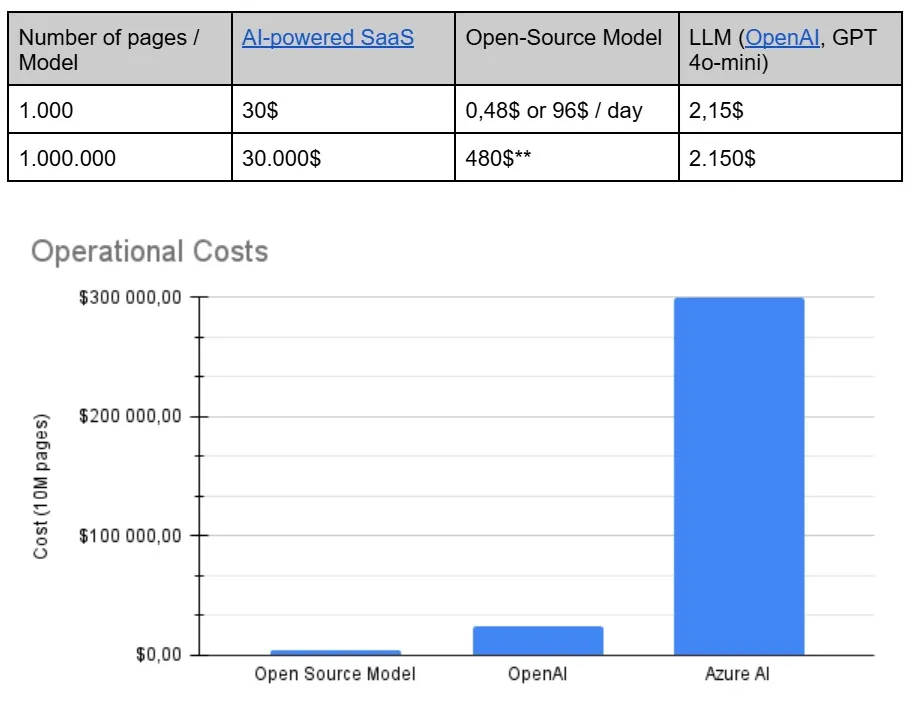
A chart showing the operational costs of various tools.
Assumptions
For this simulation, I assume a PDF file is sent to the GPT-4o model together with a system instruction describing the task. That instruction adds tokens, but let’s assume it fits within 500 tokens.
Calculations
For this simulation, I assume a PDF file is sent to the GPT-4o-mini model together with a system instruction describing the task. That instruction adds tokens, but let’s assume it fits within 500 tokens. Let’s also assume the response is no longer than 1,500 tokens.
The GPT-4o-mini model uses more tokens to represent images, and users appear to confirm this in discussions. The token count is the same as for GPT-4o, so I’ll use that model to compute the cost of processing the image and then add GPT-4o-mini’s output cost.
GPT-4o Calculations
2.5$ / 1,000,000 = 0.0000025$ per input token
500 input tokens = 500 × 0.0000025$ = 0.00125$
GPT-4o-mini Calculations
0.6$ / 1,000,000 = 0.0000006$ per output token
1,500 output tokens = 1,500 × 0.0000006$ = 0.0009$
0.00125$ + 0.0009$ = 0.00215$ per page
How to choose the right approach based on scale and needs? - Summary
No single solution fits every case of extracting data from documents. Each approach – SaaS, LLM, or a custom model – has its place. What matters is not which technology is superior but which one suits your particular context best: your scale, the resources you have, your quality requirements, and your long-term strategy.
Here’s a summary that may help you decide:
What’s next?
If you’re thinking about introducing a system for extracting data from documents, a good starting point is a needs analysis, followed by matching the technology to your organization’s scale and processes.
We run workshops and consultations in which we:
- Evaluate the potential for automation
- Compare the available approaches (e.g. SaaS, LLM, custom model)
- Put together a recommendation tailored to your case
- Prepare a project roadmap that’s ready for deployment