Vibe Coding Put to the Test Against the OWASP Top10 2025
This article examines where “vibe coding” – fast, AI-driven software development that prioritizes speed and looks – meets the web application security risks listed in the OWASP Top 10 2025. In a hands-on experiment, the author creates a web application almost entirely with AI help and checks it against the newest OWASP Top 10 release candidate. The review shows how typical vulnerabilities such as SSRF, XSS, insecure design, authentication failures, logging gaps, and misconfigurations readily appear once security discipline takes a back seat. The article contrasts the first vibe-coded MVP with a hardened version refined by AI and points out which risks persist even after several rounds of improvement. It stresses that AI can speed up development, but secure software still needs clear constraints, validation, and independent security verification in line with OWASP guidance and modern SSDLC practices.
The OWASP Top 10 – the go-to reference for the most critical web application security risks – has just been released in a new 2025 edition, its first major revision since 2021. That makes it an ideal time to ask how the growing popularity of vibe coding relates to these risks. So I used AI to build a simple web app and checked it against the new Top 10. The findings show why “ship fast, fix later” can be a risky strategy.
source: https://owasp.org/Top10/2025/
OWASP Top 10 2025
The OWASP Top 10 summarizes the security problems most frequently found in web apps. It is based on a large dataset of real-world application security findings, grouped by the underlying weakness (CWE). Categories are ordered mostly by how many applications they occur in, rather than by absolute counts. Most entries are derived straight from the data, and a few are added based on community surveys.
First, one key point – the OWASP Top 10 is mainly an awareness document, not a standard for coding or testing. It describes AppSec risks that are not always easy to test for – the absolute minimum and merely a starting point in the world of AppSec. If you need an OWASP standard that helps you put application security into practice, turn to ASVS – the Application Security Verification Standard.
Right now, what we have is the Top 10 2025 release candidate. Data collection and analysis are already complete, though, and only formatting and editing remain, so in terms of the substantive knowledge we can consider it final. Below is a short overview of what changed compared with the 2021 edition. The full document, with a detailed explanation of every item, is available on a dedicated site: https://owasp.org/Top10/2025..
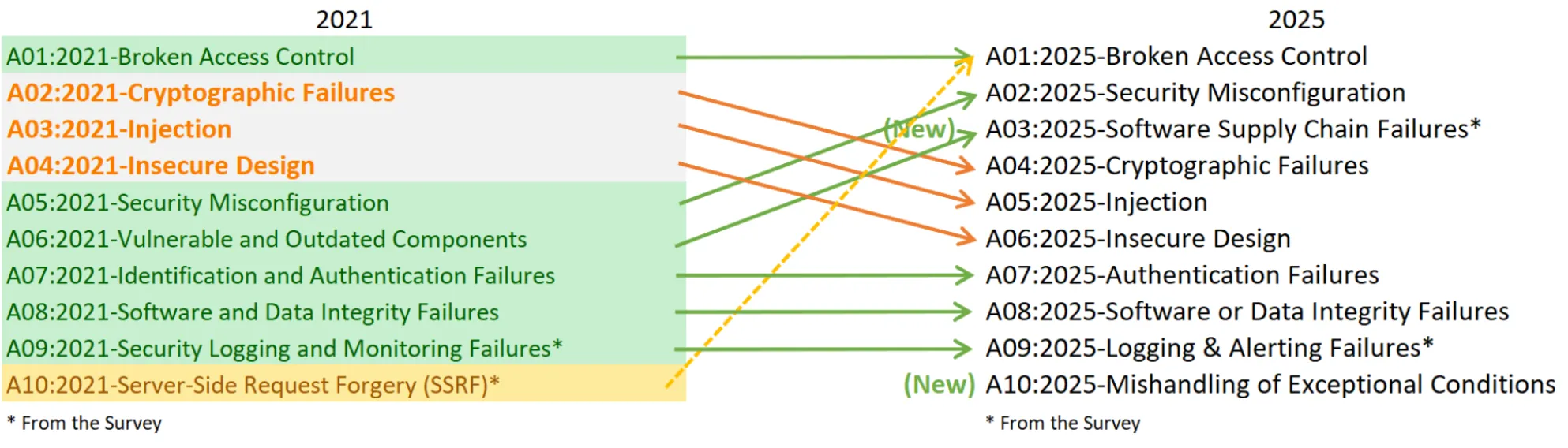
source: https://owasp.org/Top10/2025/0x00_2025-Introduction/
Vibe coding vs OWASP Top 10
The plan is straightforward: we will vibe code a web app that offers plenty of opportunities to make the security mistakes covered by the OWASP Top 10 2025. The goal is to see how often we may unwittingly introduce vulnerabilities, particularly when we are not paying close attention.
Importantly, the point is not to show that AI is insecure or that vibe coding is bad by nature. Rather, it is to see what actually happens and how changes in discipline and workflow affect how frequently common web security weaknesses appear.
We are going to vibe code a personal gallery app for storing your favorite websites. At first sight it is simple – a minimal UI with login, a list of saved links, and extras such as the ability to export the gallery. What seems like an innocent side project is in fact an ideal sandbox for security pitfalls, each of which maps in some way onto the OWASP Top 10. The potential vulnerabilities are:
- Operations on user-provided URLs – Accepting URLs to generate website previews can open the way to Server-Side Request Forgery (SSRF) or injection attacks unless they are properly validated and restricted.
- Import/export gallery functionality – File operations lacking proper input validation expose the app to denial-of-service (DoS) risks, cross-site-scripting (XSS) problems, file operation vulnerabilities, and data integrity failures.
- Authentication flows – If login and registration are implemented carelessly, they can reveal which accounts exist through enumeration or permit unauthorized access due to weak session management.
We will test two versions of the vibe-coded app:
- Vibe code MVP app – Short, simple prompts, quick code, no checklists, and just minimal manual testing. This is the “just ship it mindset”, putting speed ahead of caution – I expect this style of coding to introduce many vulnerabilities in exchange for nice visuals, which tend to get the most attention in a very quick MVP.
- Vibe MVP app to production-ready (in AI opinion) state – Takes the previously generated app and improves it with several prompts, adds tests, and concentrates mainly on getting it to production.
Vibe coding a vulnerable MVP app
Created with Claude Opus 4.5 in Cursor (a blank setup, with no rules, etc.).
The initial prompt:
Create a full-stack web app named “WebsiteHub PRO” with an awesome cosmic, rocket-themed design that looks truly stunning – so that it convinces potentially wealthy businessmen to invest in the project.
- It is a personal collection of interesting websites. When I add a website URL, the app should automatically display it in the gallery with the site’s name/title, an attractive preview image, and the original link.
- I want to type a URL into an input field, press a button to add it, and see it show up in the gallery right away.
- I want to export the whole gallery into one file so I can view the links offline. I also want to be able to import it again from a local file.
- Add login so that different people can have separate galleries and keep their own data. I also need a basic admin panel where an admin user can view and manage all saved sites and every user’s gallery. Put the admin credentials in configuration.
- Keep the saved websites in a Postgres database.
- Run Postgres in Docker for local development.
- Write a clear README describing how to run the app locally from start to finish.
Left free to pick the language and tools, the AI produced an app with this tech-stack:
- Framework: Next.js 14 (App Router)
- Language: TypeScript
- Styling: Tailwind CSS
- Database: PostgreSQL
- ORM: Prisma
- Authentication: JWT (jose)
Vibe coding rapidly produced a simple yet rather good-looking MVP:
On the first attempt, the MVP app ran into most of the OWASP Top 10 items. Unsurprisingly, a single prompt will not give you a fully secure, fully working website. I did not use any automated scanners – this is a fast manual review, not a complete professional security audit. Even so, it was enough to identify several OWASP Top 10 issues that are fairly easy to spot and fix, such as:
| ❗ Info |
|---|
| This is not a complete security assessment – just a few hand-picked highlights. There may well be more vulnerabilities than those listed here. |
| OWASP Top 10 | status | vulnerability |
|---|---|---|
| A01:Broken Access Control | ❌ | The site fetches metadata from any URL it is given – internal addresses included, such as http://localhost:3001, where the app itself is running (internal IP). This is a textbook case of Server-Side Request Forgery (SSRF) |
| A02:Security Misconfiguration | ❌ | A classic – misconfigured security headers. Leaving out headers such as CSP (Content-Security-Policy), X-Frame-Option etc. is an oversight that, by default, opens the way to attacks like XSS and data leakage. |
| A03:Software Supply Chain Failures | ⚠️ | In such a small application this is very easy to notice, but still, practically every dependency is outdated, notably with npm install flagging a critical vulnerability in Next.JS 14.2.5 |
| A04:Cryptographic Failures | ❌ | The app does follow good practices, such as Bcrypt with 12 rounds for passwords and the modern jose library that avoids deprecated cryptographic algorithms, yet it still makes a very basic mistake – if the environment variable is missing, the app falls back to a default JWT secret key. This could let someone forge authentication tokens. Fixing it is simple and obvious – throw an exception when the application starts, since it is better to treat misconfigurations as explicit failures than as silent vulnerabilities. |
| A05:Injection | ❌ | Prisma ORM protects against SQL injection. The app, however, lets you export your gallery as an HTML file to open in a browser, and while generating it, website titles and descriptions are dropped straight into the code with no safety checks. That results in a XSS (Cross-Site Scripting) vulnerability – a malicious user could import a JSON file with fake data such as <script>alert('hacked')</script>, and that malicious code could end up running in your browser. |
| A06:Insecure Design | ❌ | Judging AI design decisions makes little sense when it had complete freedom in a blank project, but one problem is obvious right away – the JSON import feature takes input without any limits. An attacker can upload JSON containing 1M+ sites, causing a denial-of-service (DoS). Simple limits would eliminate this completely. |
| A07:Authentication Failures | ⚠️ | As with A06, there is not much point in assessing the security of something like authentication in an app that AI wrote from scratch without any rules. Still, it is worth pointing out that the login uses generic error messages (“invalid credentials”), which prevents account enumeration – a vulnerability I assumed would be “easy to achieve” but which was in fact handled correctly. Password requirements, on the other hand, are minimal (just 6+ characters); I would have expected AI to impose stricter standards here, since stronger password rules seem obvious. |
| A08:Software or Data Integrity Failures | ❌ | The JSON import feature does not check the authenticity or integrity of data and has no proper validation. This could easily be fixed by adding proper data schema validation and cryptographic signatures to verify imports. |
| A09:Logging & Alerting Failures | ❌ | On failed attempts, the login endpoint responds with 401 Unauthorized – yet it logs nothing at all. An attacker could make thousands of credential-stuffing attempts and the application would never notice. Even a one-line console.log would greatly improve the audit log, but the AI just did not generate any. As OWASP puts it: “Attacks and breaches cannot be detected without logging and monitoring.” |
| A10:Mishandling of Exceptional Conditions | ❌ | Exceptional conditions in an app quickly generated by AI are a wide subject, but one especially interesting case is the empty catch block in the app function that fetches the user – if the authentication check fails for whatever reason, the code silently swallows the exception and redirects to login. As a result, genuine errors (le.g. a malformed API response) are handled exactly like authentication failures, which can hide critical problems. The fix is trivial: log the error before the redirect. |
Example Attack Scenario: XSS in Import / Export Flow
Below is a detailed example of how the XSS vulnerability described under A05: Injection could be exploited. When the gallery is exported as HTML, the app relies on raw string interpolation with no HTML escaping at all (generateHtmlExport function):
<h3><a href="${site.url}" target="_blank" rel="noopener noreferrer">${site.title}</a></h3>
${site.description ? `<p>${site.description}</p>` : ''}
The dashboard renders user data safely, but the HTML export function assembles HTML through simple string concatenation without any sanitization.
The attacker prepares a malicious JSON file:
{
 "version": "1.0",
 "exportedAt": "2025-12-01T00:00:00.000Z",
 "sites": [
   {
     "url": "https://github.com",
     "title": "Github",
     "description": "Really nice site with nothing to worry about, used by millions of developers around the world. <script>alert('XSS!')</script>",
     "addedAt": "2025-12-01T00:00:00.000Z"
   }
 ]
}
How the attack unfolds:
- Import passes validation – Validation only checks that the fields are strings, not what they contain.
- Malicious data stored – The data is written to the database.
- User exports as HTML – The title/description are inserted directly into the HTML markup.
- XSS executes – Once the user opens the exported HTML file, the injected scripts run in their browser.
From MVP to “production-ready” (in the AI’s view)
For the second phase, I did not create a new application. I took the MVP vibe coded earlier and hardened it step by step. This time, I added Cursor rules that explicitly split responsibilities between agents (planning, development, and testing). Then I ran a series of smaller, targeted prompts, asking the AI again and again to improve the same codebase until it explicitly declared that the application could be regarded as “production-ready”.
Initial prompt:
Review @vibe-websitehub-pro.
Put together a plan of what has to be changed before the app is made public.
Finally, confirm that these steps would be sufficient for this application to be considered production-ready.
The result was 15 critical / high must-fix items to address before public deployment, covering most of the vulnerabilities listed for the MVP version, plus another 15 medium / low.
The issues were addressed using the prompt below, with agentic iteration and test-driven-development (TDD):
So let’s implement every critical and high-ranked issue.
We will handle the items one at a time, from the top, using test-driven-development – first draw up an implementation plan using @vibe-websitehub-pro/.cursor/rules/product-engineer.mdc, then write test cases with @vibe-websitehub-pro/.cursor/rules/test-developer.mdc , then write the code with @vibe-websitehub-pro/.cursor/rules/main-developer.mdc.
Run all the necessary tests, and if anything fails, keep iterating on fixes with @vibe-websitehub-pro/.cursor/rules/main-developer.mdc until every test passes.
After finishing each item on the list, give me a brief summary and ask whether you may move on to the next one.
Claude Opus 4.5 again produced the plan, but because the implementation involved so many steps, I had to switch to a cheaper model – Cursor’s auto mode (a balance of quality and speed). Below is the updated OWASP Top 10 assessment table after applying the fixes the AI proposed to make the app production-ready (after +20 agentic iterations, which took around 3h):
| ❗ Info |
|---|
| This is not a complete security assessment – just a few hand-picked highlights. There may well be more vulnerabilities than those listed here. |
| OWASP Top 10 | status | vulnerabilities / fixes |
|---|---|---|
| A01:Broken Access Control | ❌ | SSRF was fixed with URL validation that blocks private IPs and localhost. Admin routes are guarded by middleware performing session and role checks. However, after a user logs out, the JWT token stays valid for 7 days. Logout merely removes the cookie on the client side, so the token can still be used from a different device or browser until it expires. That is dangerous, because a compromised token would let an attacker keep access even after the user believes they have logged out. |
| A02:Security Misconfiguration | ❌ | Security headers (CSP, HSTS, etc.) were added and HTTPS is enforced through middleware. Yet the CSP still includes 'unsafe-inline' and 'unsafe-eval' in script-src, which leaves an XSS path open through scripts. |
| A03:Software Supply Chain Failures | ⚠️ | The dependencies remained outdated – npm install still flags critical vulnerabilities. |
| A04:Cryptographic Failures | ✅ | The JWT secret is now validated (min 32 chars, throws if absent). |
| A05:Injection | ❌ | Prisma ORM takes care of SQL injection, and sanitization was added to the JSON import feature. However, the HTML export function still inserts user data into HTML without escaping, so this critical XSS vulnerability remains unfixed. |
| A06:Insecure Design | ✅ | Input limits and maximum lengths were added to prevent DoS. Rate limiting, pagination, and transactions improve the overall security of the design. Import validation still has no array size limit – a JSON with millions of sites could still trigger DoS – but this was in the production plan at position #24, marked as a medium issue, and was not implemented because we only addressed critical / high issues. |
| A07:Authentication Failures | ✅ | Strong password rules are enforced on the server (8+ chars, uppercase, lowercase, number, special char). Auth endpoints are rate limited. Generic error messages prevent enumeration. Still, it is worth noting that two-factor-authorization (2FA) is now a standard for authentication, although I did not expect it here anyway. |
| A08:Software or Data Integrity Failures | ⚠️ | Import validation and sanitization were added, but there are no cryptographic signatures for full integrity verification. |
| A09:Logging and Alerting Failures | ✅ | API request logging was implemented with a structured logger. |
| A10:Mishandling of Exceptional Conditions | ✅ | Errors are handled correctly – the app logs full details on the server while sanitizing responses sent to the client. There are no silent failures. |
Summary
This experiment is just a single example of vibe coding an app with an LLM. Another model, tech stack, prompting style, or agentic workflow might yield very different outcomes – and that is worth stressing. The aim is not to argue that AI can or cannot write secure software, but simply to show how easily common OWASP Top 10 issues appear when speed and convenience come first.
Keep in mind, too, that the OWASP Top 10 covers the most common web application risks – not every one of them. Plenty of other vulnerabilities exist, and a vibe-coded app can fall victim to those as well. Here, the second “production-ready” iteration fixed many critical problems, but a number of weaknesses were left (e.g. outdated dependencies, a loose CSP, export JSON XSS, etc.). The model declaring this state “production-ready” is an outcome, not a guarantee. Without independent verification – Software Composition Analysis (SCA), Dynamic Application Security Testing (DAST), manual review, etc. – such a claim has no real operational value. Leaving known critical vulnerable dependencies in place is reason enough on its own to doubt any “ready for production” statement.
It is also worth keeping in mind that LLMs replicate both good and bad patterns from their training data. Without guidance and verification, insecure defaults appear on their own. Clear constraints, validation, and iterative checks can improve the results considerably – but that is still just one layer. A realistic approach nowadays assumes that code (whether written by people or by AI) is scanned continuously: SCA and Static Application Security Testing (SAST) for code and dependencies, plus scanners for configuration, Infrastructure as Code (IaC), and containers, all integrated into a Secure Software Development Lifecycle (SSDLC). Tools such as Aikido gather these checks in one dashboard and keep them running in the background.
AI is advancing quickly, so secure software cannot depend on vibes or good intentions – it requires awareness, process, and automated security tooling built into the pipeline by default.