Lessons about Kafka from earning the Confluent Certified Developer for Apache Kafka (CCDAK) certificate
What I took away from studying for the Confluent Certified Developer certification in Apache Kafka.
The CCDAK certification is about building Kafka applications and is aimed at developers who already have some basic hands-on experience with Apache Kafka. In this post, I share what I learned while studying for the Confluent Certified Developer certification in Apache Kafka.
Source: certificates.confluent.io
When the certification makes sense
CCDAK is a sensible pick if you want to prove your advanced general knowledge of Kafka, or to go deeper into the details and properly understand how it works internally and what it is made of. One of the official exam prerequisites is A minimum of 6-12 months hands-on experience using Confluent products, so you should know at least the basics of Kafka.
Practical takeaways from studying for the CCDAK exam
As I see it, the CCDAK exam focuses most on understanding Kafka’s infrastructure, where it is used, and stream processing as a concept. It also tests whether you know, and can apply in real-world situations, various Kafka-related products such as Kafka Connect or Kafka Streams, as well as Confluent products like Confluent Schema Registry.
For me, the biggest gain was a deeper understanding of how Kafka producers, brokers, and consumers work internally and how they are configured. I got to build on topics I already knew, such as Kafka’s overall infrastructure or Connect, but I also learned a great deal about things I had barely touched before - like building ksqlDB applications and processing Kafka events with SQL-like queries - or even concepts I had never heard of, such as MirrorMaker.
I appreciated that passing the CCDAK exam requires some practical know-how about tuning Kafka for different performance goals - throughput, latency, reliability, and so on.
I learned mostly from Kafka: The Definitive Guide (free to download), the Kafka documentation, and the self-paced Confluent Trainings. They all offered a well-structured learning path that took me through Kafka’s concepts in an orderly way. Splitting the material into specific topics and components made it easy to follow.
I also recommend our excellent Kafka Visualization tool, which lets you experiment yourself and simulate how data moves through a replicated Kafka topic.
The concepts I found most interesting while studying for CCDAK
Below is a short overview of a few concepts that I personally found the most interesting. It assumes you already know the basics of Kafka.
Why is Kafka so fast?
Kafka is built for high throughput - one of the first phrases you are likely to hear about Apache Kafka. Put differently, high throughput means moving large volumes of data quickly, close to real time. Uber and LinkedIn are well-known examples, handling trillions of messages a day. So where does that speed come from?
Mostly from Kafka’s distributed architecture and its partitioning mechanism, which splits topics into partitions. Since each partition can be assigned to a particular broker, work can be spread over many nodes, which makes Kafka very scalable and is the core idea behind its high throughput.
What I understood much better while preparing for the CCKAD certification, though, was how efficiently Kafka manages resources, which is just as important for its speed. Two concepts in particular stand out - Sequential I/O access and the Zero Copy principle:
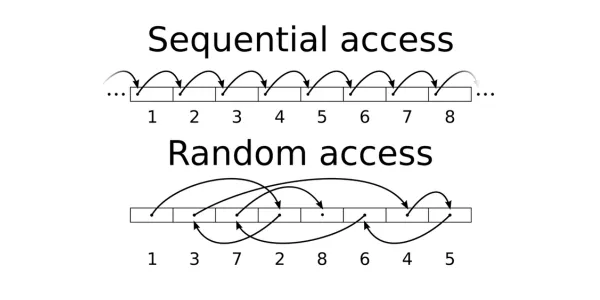
Messages in Kafka topics are split into partitions and written straight to the Kafka Broker’s physical storage. Because messages in Kafka are immutable and form an append-only log, Kafka can use a sequential I/O access pattern, reading and writing data in a contiguous, ordered way. This is very efficient and performs better than a random I/O access pattern.
Source: wikipedia.org
In conventional systems, data lands in a local cache before it is sent to clients. Since producer, broker, and consumer all share the same message format, Kafka can apply the zero-copy optimisation. It makes data transfer more efficient by skipping unnecessary memory allocation: data goes straight from the filesystem into the socket buffer, and from there it can be sent to the consumer clients.
Why does replication matter so much in Kafka’s architecture?
Replication is one of Kafka’s core features. Every Kafka topic partition should have replicas - exact copies - spread across different brokers to provide resilience. One replica, called the leader, handles all writes and reads. The remaining replicas only have to keep up and copy every message by fetching it from the leader - this is what being in-sync with the leader means.
Even though partition leader election and the in-sync replicas mechanism are handled behind the scenes on the server side, understanding them is essential to understanding Kafka, because they are the core of its fault tolerance. This is probably the area where my knowledge grew the most while preparing for CCDAK, looking at it from several angles:
From the broker’s point of view
If the broker hosting the leader replica fails, Kafka can automatically pick a new leader from among all in-sync replicas. Interestingly, Kafka has a preferred leader election mechanism (the preferred leader being the first replica that led the partition when the topic was first created). When our broker comes back online, Kafka can automatically hand partition leadership back to the original leader.
What if no in-sync replica is available when a new leader has to be elected? To begin with, we can guard against this by setting the min.insync.replicas config parameter. The cost is availability, because Kafka will refuse new messages whenever there are too few in-sync replicas.
If min.insync.replicas is not set, there are 2 choices - either wait for the original leader to come back online, or let an out-of-sync replica take over as the new leader, which means losing every message written to the old leader while that replica was lagging. The unclean.leader.election.enable parameter controls this behaviour.
From the producer’s point of view
In the producer configuration, the producer acks parameter sets how many brokers (hosting partition replicas) must confirm receiving a message before it counts as successfully sent. acks=all guarantees that every in-sync replica has confirmed the message, which gives strong durability at some cost in performance. On the other hand, acks=0 puts the producer in fire-and-forget mode. A middle ground is acks=1, where only the leader confirms the message. The leader may still fail before the replicas copy the message, though, so data can still be lost.
From the consumer’s point of view
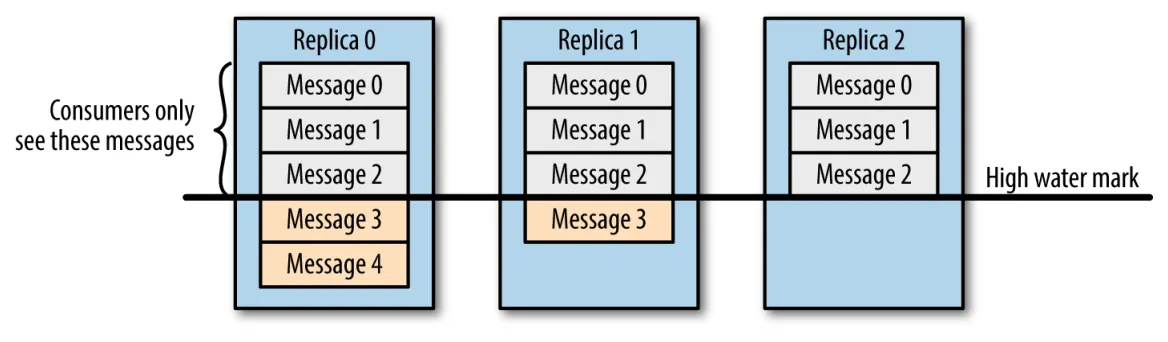
Consumers can read only from the leader replica, and only messages that come before the high-water mark - the last offset committed across all in-sync replicas. In practice, this means consumers never see data that has not yet been safely replicated.
Source: Kafka The Definitive Guide
Why does Kafka scale so well?
Kafka was built with scalability in mind. The CCDAK certification places particular weight on the main reason for this - the topic partitioning mechanism - namely that the partitions of one topic can live on different brokers and be spread evenly across them. We can add a broker to a cluster or remove one (scale out or in), for example to increase capacity, and Kafka can then redistribute the partitions across all brokers in the cluster. This keeps the load balanced over the whole cluster.
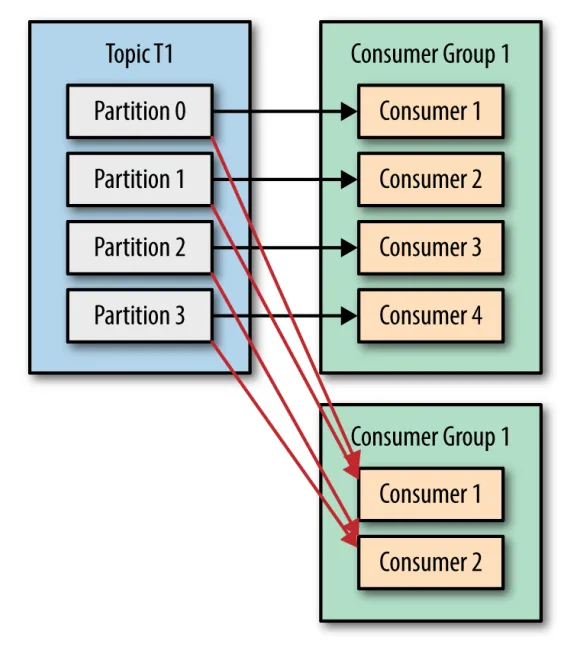
The more partitions a topic has, the more consumers can read from it in parallel. Kafka consumers are grouped into consumer groups, which consume data independently of one another. Within a consumer group, each partition can be read by just 1 consumer. Scaling consumption from Kafka topics is mainly done by adding consumers to, or removing them from, a consumer group. Whenever the number of consumers in a group changes, Kafka starts a rebalance, shifting partition ownership between consumers so that the load stays even and processing continues uninterrupted.
Source: Kafka The Definitive Guide
What happens inside Kafka Streams?
Kafka ships a stream-processing library for building applications that both read their input from and write their output to Kafka clusters. Such an application runs as its own JVM instance, outside the broker. It talks to Kafka by consuming data and writing results back to the broker, while the processing itself happens locally on the client side. The broker also takes care of rebalancing and scaling when a new Kafka Stream app instance joins or leaves.
While studying for the CCDAK certification, I learned how Kafka Streams handles stream processing internally: it splits the stream into smaller units of work called stream tasks, whose number is derived from the number of partitions in the input topic(s). Every task processes data from one or more Kafka topic partitions and can run on its own thread. The maximum number of active tasks therefore matches the number of partitions in the input topic - and this effectively sets the maximum parallelism of a Kafka stream application.
What I find especially interesting is how Kafka Streams copes with failures during operations such as aggregations. Such operations are stateful, because they have to keep and update state based on the messages they process. Since tasks process data locally, Kafka Streams maintains a local state store using an embedded RocksDB. Every state store is backed up in the Kafka Broker on a compacted changelog topic. As a result, after a failure Kafka Stream can rebuild its state and carry on on another node simply by reading the changelog from the start. A full restore may take a while, so Kafka Streams also provides stand-by tasks that keep their state in sync with the other tasks, allowing an almost instant restore.
Source: developer.confluent.io/courses/kafka-streams
Wrapping up
When I prepared for CCDAK, I had a little more than the recommended 6-12 months of hands-on Kafka experience. Still, I found plenty of areas where my understanding grew - some concepts became clearer, some were completely new to me, and I also caught important details I had missed before in topics I thought I knew.
All in all, I am happy with the structured learning process that got me certified, and I recommend the CCDAK certification as a good way to broaden or confirm your practical knowledge of Apache Kafka.