AI watermarking explained
This blog post looks at watermarking in artificial intelligence, the types it can take, and how it is used in different domains, including images, text and audio.
As Generative AI spreads through chatGPT, Dalle, Midjourney and other tools, generated content is gradually surrounding us. On top of that, numerous cases are under way concerning the illegal use of data to train models, such as Getty Images vs Stability.ai (the company behind Stable Diffusion) or visual artists vs Midjourney or Deviant Art.
AI watermarking is the response to these problems. This blog post explains what it is and how it applies to different modalities, such as images, text and audio.
AI watermarking - definition and importance
Steg.AI’s invisible watermark with a C2PA signature
The word watermarking may bring to mind UV marks on banknotes or a special paper mark on diplomas – things that are extremely difficult to forge. In AI, there is a similar kind of signature.
Watermarking means marking content so that it carries additional information, such as proof of authenticity. In AI, a watermark can be completely visible (for example, a visible code embedded in the content) or invisible (like the one shown in the picture above). Such patterns can be detected either by people or by dedicated tools.
Types of watermarking
AI watermarking can be classified in two main ways:
- Open/closed watermarking: This depends on whether the implementation is available to the public**.** Open watermarking encourages innovation, and the community can find and fix errors. On the other hand, knowing what the watermark looks like and how it’s produced could make it easy for anyone who wants to strip or forge it.
- Model/content watermarking: This depends on where watermarking is applied – within the available model or through an external tool. The choice can matter, because in some domains, such as text, a watermark can’t be created without access to the model. Model watermarking mainly enforces particular distributions of the output and of intermediate layers for a selected set of inputs. Content watermarking concentrates on adding noise or a signature to the data.
Watermarking across different modalities
This section goes through examples of watermarking types and explains how watermarking is used in domains such as computer vision, text or audio.
Images
Examples of visible watermarks in images produced by Stable Diffusion models.
In computer vision, adding watermarks to confirm that data came from a particular source has become fairly common. A good illustration is the ongoing case between Getty and Stability.ai, where the image provider’s watermark can be seen in the generated images.
At the same time, Computer Vision has many invisible watermarks for generated data, such as SynthID (offered on Google Cloud for images and also for audio), the watermarking API introduced by AWS, or open-source demos by TruePic and IMATAG. OpenAI has also introduced a new format for its images as a result of adding watermarking to Dalle-3 (based on C2PA).
Another popular topic in computer vision is data poisoning, for example Nightshade, which adds extra noise to your images (imperceptible to people) that has devastating consequences for models trained on illegally scraped data. Imagine a picture of a cow lying in a field and casting a shadow. After Nightshade transforms it, the image looks unchanged to the human eye. To the model being trained, however, the shadow hides the shape of a green purse, which damages the learning process. Transformations such as cropping, taking screenshots, smoothing pixels or adding noise make no difference, because the patterns survive. Glaze (from the same University of Chicago lab) works in a similar way: it alters pictures with an unrelated style (imperceptible to people but strongly affecting machines), which makes prompt-based image generation models output irrelevant pictures. For example, a charcoal image protected with Glaze might be perceived by the machine as abstract art in the style of Jackson Pollock, so the prompt “generate me charcoal style image” could lead to irrelevant, undesired changes).
Photoguard immunization, taken from the original paper.
When it comes to preventing deep fakes from being created from existing images, there are tools such as Photoguard. Their goal resembles the methods described above: they modify the original pictures in a way the human eye can’t see. During inference, though, models either ignore the prompt or disregard the original image’s context.
TruePic is one tool that relies on the C2PA standard to sign an image in its metadata, making it possible to trace the image’s origin. Its Hugging Face space lets you both sign images and verify signatures.
The Internet offers a number of Deepfake detectors, such as the community detectors on HuggingFace or the Content at Scale detector, but their quality and stability are frequently questionable.
Text
The GLTR demo for spotting AI-generated text
While watermarking image data is fairly easy to picture, watermarking text is an entirely different matter. With images, pixels can be altered in a range the human eye can’t perceive; with text, that isn’t possible. Most solutions in this area take advantage of how today’s text generation models work, namely next token prediction (e.g. originality.ai).
One interesting text watermarking method randomly splits the vocabulary into two sets: preferred tokens (“green tokens”) and restricted tokens (“red tokens”). Then, depending on the watermarking mode, the restricted tokens are either avoided entirely (“hard watermarking”) or tokens from the green group get a higher probability (“soft watermarking”). Tampering with model output can impair text generation quality, which is why the authors of WaterBench put forward a unified benchmark for comparing different watermarking algorithms for autoregressive LLMs.
Among methods that operate purely at inference time, the GLTR method deserves a mention. Based on the preceding tokens, it tries to predict the logits for the next token and then locates the position of the “chosen token” among the returned logits. Text written by people contains fewer “most common choices” (marked green in the graphic) and more rare ones (marked purple in the graphic). This only works if we have full access to the model’s outputs, so we can obtain logits for any input we like. In addition, we’re restricted to the models we can access, so rather than answering “Was this text generated by AI?”, we answer “Was this text generated by model XYZ?”.
It’s worth stressing that current text watermarking methods are far from perfect and can produce many false positives. For that reason, cases occur where OpenAI might quietly withdraw public access to such tools.
Audio
Alongside the progress of GenAI for images and text, audio is developing quickly too. Sadly, voice recognition systems are frequently used for biometric scanning in banks (luckily not on their own, but usually combined with a PIN, fingerprint or password), and they can be exploited for suspicious purposes.
Audio watermarking works much like image watermarking: the recording is modified outside the range humans can hear (beyond 20-20000Hz), yet dedicated models can detect the changes.
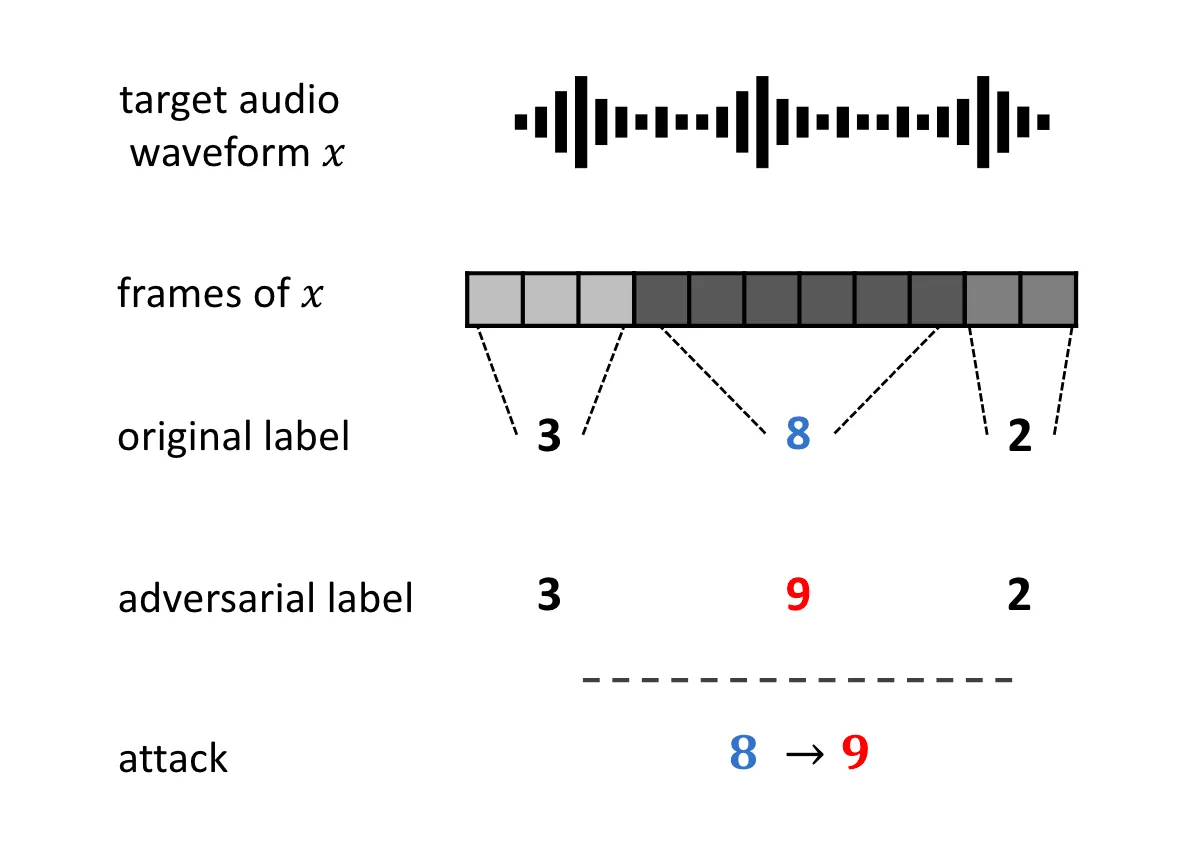
A useful picture from the Venomave paper.
For voice systems, there are well-known methods of poisoning the data used by unwanted trainers. WaveFuzz adds targeted noise that renders voice samples worthless for training while they sound the same to human listeners: the frequency-space characteristics stay the same, but the structure of the MFCC representation (widely used by AI systems for audio) is different. The authors of Venomave, in turn, attempt to add noise that, for chosen elements of an audio recording, pushes the model towards the decision boundary, which makes reproducing the audio directly very hard.
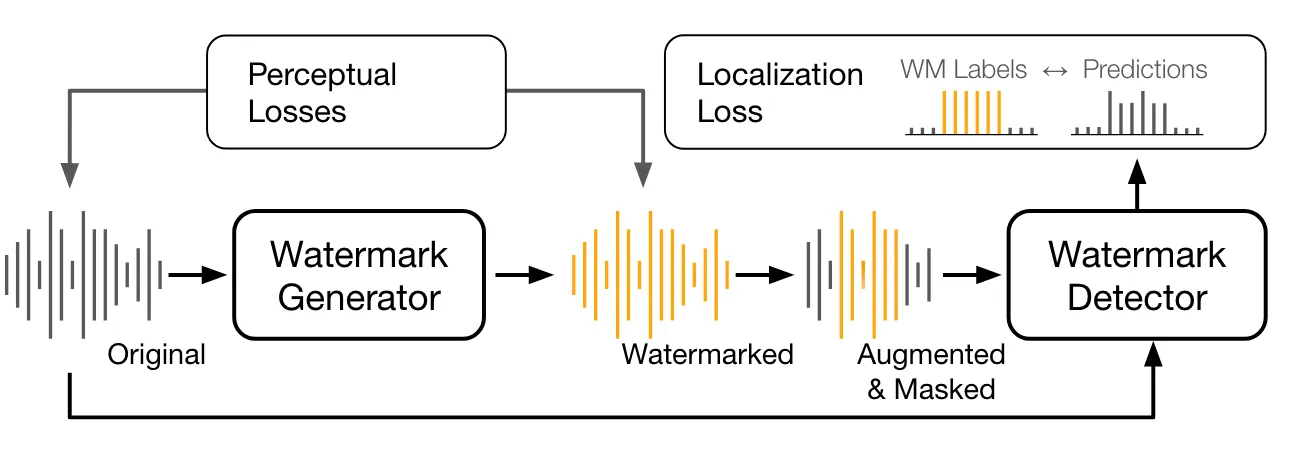
The training setup of the AudioSeal watermarking scheme, taken from the original paper.
AudioSeal is a good example of a watermarking system in which the generator and detector are trained jointly, which makes them robust to natural audio transformations while still enabling high-quality detection. A Perceptual loss is used so that original samples and watermarked samples (produced by the watermark generation model) can’t be told apart. The other component is the watermark detector, which relies on a Localization loss to predict whether a watermark is present, no matter what perturbations were applied to the watermarked sample.
Conclusions
This blog post explained what watermarking in AI is and which types exist, and it gave an overview of how it’s used in domains such as image, text or audio. With this knowledge, we may be able to pick the right tools – for instance, to stop our photos from being scraped and used for training by unwanted parties, or from becoming the target of deep fakes.
If you’d like to watermark the data your product generates, feel free to get in touch with us!