Machine Learning libraries worth using in any project
Picking the right libraries for a Machine Learning project is a lot of effort. To save you time, here is a list of the most interesting ones.
A huge number of libraries can be put to use in Machine Learning projects. Naturally, a few of them have built up a solid reputation over the years, and they are the obvious choices for anyone kicking off a new project based on machine learning algorithms. Still, putting together the right set (or stack) of them can be rather difficult.
The Why
With this post, I want to offer a broad overview of the machine learning library landscape and share a few of my reflections on using these tools. If you are just getting started with a machine learning library, this text can give you some general background on the available options and a better starting point for further learning.
I have grouped the libraries described below according to the role they can play in your project.
These are the categories:
- Model Creation - libraries for building machine learning models
- Working With Data - libraries for feature engineering, future extraction, and every other operation that involves handling features
- Hyperparameters Optimization - libraries and tools for tuning model hyperparameters
- Experiment Tracking - libraries and tools for keeping track of experiments
- Problem Specific Libraries - libraries for tasks such as time series forecasting, computer vision, and handling spatial data
- Utils - libraries that are not strictly about machine learning, but which I have still found handy in my projects
Model Creation
PyTorch
Built by engineers at Facebook and made open source in 2017, it is among the best-known machine learning libraries on the market and is based on the open-source Torch package. The PyTorch ecosystem covers every kind of machine learning problem and offers a wide range of specialized libraries such as torchvision or torchaudio.
The fundamental PyTorch data structure is the Tensor object, which stores the multidimensional data our model works on. Conceptually, it resembles the NumPy ndarray. PyTorch can also take advantage of computation accelerators: it supports CUDA capable NVIDIA GPUs, ROCm, Metal API, and TPU.
The key component of the core PyTorch library is nn modules, which holds layers and tools that make it simple to assemble complex models one layer at a time.
class NeuralNetwork(nn.Module):
    def __init__(self):
        super().__init__()
        self.flatten = nn.Flatten()
        self.linear_relu_stack = nn.Sequential(
            nn.Linear(28*28, 512),
            nn.ReLU(),
            nn.Linear(512, 512),
            nn.ReLU(),
            nn.Linear(512, 10),
        )

    def forward(self, x):
        x = self.flatten(x)
        logits = self.linear_relu_stack(x)
        return logits
A simple PyTorch neural network made of 3 linear layers.
On top of that, PyTorch 2.0 has already been released, making PyTorch better still. PyTorch is also used by many companies, Uber, Tesla, and Facebook among them.
PyTorch Lighting
You can think of it as an “add-on” for PyTorch whose goal is to drastically cut down the boilerplate code required to work with our models.
Lightning is built around hooks - functions invoked at particular stages of the model train/eval loop. Thanks to this, we can supply callback functions that run at a given moment, for instance when a training step finishes.
Trainers Lighting takes over many tasks that you would otherwise have to handle yourself in PyTorch, such as the loop, hardware calls, or zero grads.
Below you can see roughly equivalent pieces of code in PyTorch (Left) and PyTorch Lightning (Right).
source: https://lightning.ai/docs/pytorch/latest/starter/introduction.html
TensorFlow
This library, created by a team at Google Brain, first came out in 2015 under the Apache 2.0 License, and version 2.0 followed in 2019. It offers clients in Java, C++, Python, and even JavaScript.
Just like PyTorch, it is broadly used across the industry, by companies such as Google (no surprise there), AirBnb, and Intel. Google has also built a rather large ecosystem around TensorFlow, including tools and libraries like the optimization toolkit, TensorBoard (covered below), or recommenders. The TensorFlow ecosystem even comes with a web based sandbox where you can experiment with visualizing your model.
Once again, the tf.nn module is the most important piece, supplying every building block needed to construct machine learning models. Tensorflow relies on its own Tensor (flow ;p) object to store the data used by deep learning models. It also supports all the popular computation accelerators, such as CUDA or RoCm (community), Metal API, and TPU.
class NeuralNetwork(models.Model):
    def __init__(self):
        super().__init__()
        self.flatten = layers.Flatten()
        self.linear_relu_stack = models.Sequential([
            layers.Dense(512, activation='relu'),
            layers.Dense(512, activation='relu'),
            layers.Dense(10)
        ])
    def call(self, x):
        x = self.flatten(x)
        logits = self.linear_relu_stack(x)
        return logits
Keep in mind that TensorFlow and Keras use the Dense layer where PyTorch uses the Linear layer. The model’s forward pass is also defined in the call method rather than in a forward method.
Keras
In purpose and origin, this library resembles PyTorch Lightning, except that it targets TensorFlow, giving it a higher-level interface. Created by François Chollet and released in 2015, it comes with Python clients only. Keras also has its own collection of python libraries and problem-specific libraries such as KerasCV or KerasNLP for more specialized scenarios.
Up to version 2.4, Keras worked with several backends besides TensorFlow, but since that release TensorFlow has been the only supported one. Because Keras is merely an interface on top of TensorFlow, it shares the core concepts of the backend underneath, and the same applies to the supported computation accelerators. Companies such as IBM, PayPal and Netflix use Keras.
class NeuralNetwork(models.Model):
    def __init__(self):
        super().__init__()
        self.flatten = layers.Flatten()
        self.linear_relu_stack = models.Sequential([
            layers.Dense(512, activation='relu'),
            layers.Dense(512, activation='relu'),
            layers.Dense(10)
        ])
    def call(self, x):
        x = self.flatten(x)
        logits = self.linear_relu_stack(x)
        return logits
Keep in mind that TensorFlow and Keras use the Dense layer where PyTorch uses the Linear layer. The model’s forward pass is also defined in the call method rather than in a forward method.
PyTorch vs. TensorFlow
It would not be entirely fair of me to skip a comparison of these two.
As you have just seen, they are fairly alike when it comes to the features they offer and the ecosystems that surround them. Sure, there are some small differences and peculiarities in how each one works or in what it provides, but I consider them more or less negligible.
What truly sets them apart is how they define and run the computational graphs of machine and deep learning models.
- PyTorch relies on dynamic computational graphs, meaning the graph is built on-the-fly while the code runs. This gives more flexibility and makes debugging more intuitive, because developers can change the graph at runtime and inspect intermediate outputs with ease. The downside is that it can be less efficient than static graphs, especially for complex models. PyTorch 2.0, however, tries to tackle these problems with torch.compile and FX graphs.
- TensorFlow relies on static computational graphs that are compiled before they run. This makes execution more efficient, since the graph can be optimized and parallelized for the hardware it targets. On the flip side, debugging can be harder, because intermediate outputs are not easy to get at.
Another visible difference is that PyTorch feels lower level than Keras, yet higher level than plain TensorFlow. This positioning makes PyTorch more flexible and simpler to use when building custom models with lots of adjustments.
As an aside, both libraries hold roughly equal market share. Also, even though TensorFlow relies on the call method and PyTorch on the forward method, both of them support call semantics as a shortcut for invoking model(x).
Working with Data
pandas
If you work with python, you have surely heard of this library. It is most likely the best-known python library for handling data of all kinds. It first appeared in 2008, with version 1.0 arriving in 2012. It offers functions for filtering, aggregating, and transforming data, as well as for combining several datasets.
At the heart of the library lies the DataFrame object, a multidimensional table that can hold data of any type. The library puts a strong emphasis on performance, with some of its parts written in pure C to make it faster.
Apart from its focus on performance, pandas offers plenty of features for:
- cleaning and preprocessing data:
- dropping duplicates,
- filling in null values or nan values.
- analyzing time series:
- resampling,
- windowing,
- time shift.
It can also handle many input/output operations:
- reading from and writing to .csv or .xlsx files
- running database queries
- loading data from GCP BigQuery (using pandas-gbq)
numpy
This is another well-known library for working with data, mainly of the numeric, data science sort. Its best-known element is the ndarray - a structure that represents a multidimensional array of numbers.
Apart from ndarray, numpy offers many high level mathematical functions and operations for working with that data. It is also likely the oldest library in this group, with its first version released in 2005. It was written by Travis Oliphant on the basis of an even older library called numeric (released in 1996).
Numpy is extremely performance-oriented, and its contributors keep trying to squeeze more out of the algorithms already implemented in order to cut the execution time of numpy functions even further.
Like every library covered here, numpy is naturally open source too, and it is distributed under the BSD license.
scipy
This library is dedicated to supporting scientific computing. Released in 2001, it is even older than numpy (2005). It is built on top of numpy, and ndarray serves as the fundamental data structure across scipy. Among other things, it adds functions for optimization, linear algebra, signal processing, interpolation, and spares matrix support. Overall, it sits at a higher level than numpy, which lets it offer more complex functions.
Hyperparameter optimizations
Ray-tune
This is a component of the ray toolset, a collection of related libraries for building distributed applications with a focus on machine learning and Python. The Tune part of the ml library is dedicated to hyperpriming optimization, offering a range of search algorithms such as grid search, hyperband, or bayesian optimization.
Ray-tune can handle models built in most programming languages and with the libraries found on the market. Every library mentioned in the model creation section is supported by ray-tune.
The core concepts of ray-tune are:
- Trainables - objects handed to tune runs; they are the model whose parameters we want to optimize
- Search space - holds every hyperparameter value we want to test in the current trial
- Tuner - an object that executes runs; calling tuner.fit() kicks off the search for the best set of hyperparameters. At minimum, you need to pass it a trainable object and a search space
- Trial - every trail stands for a single run of a trainable object with a specific set of parameters taken from the search space. Trials are produced by the Ray Tune Tuner. Since it represents the result of running the tuner, a Trial holds loads of information:
- the config used for that trial,
- the trial ID,
- plenty of other things.
- Search algorithms - the algorithm applied in a given execution of Tuner.fit. When none is specified, Ray Tune falls back to RadomSearch by default
- Schedulers - objects responsible for managing runs. They can pause, stop and start trials within a run, which can improve efficiency and shorten the run. If you do not choose one, Tune defaults to FIFO - the run is executed one item after another, as in a regular queue
- Run Analyses - the object conniving the outcome of a Tuner.fit execution as a ResultGrid object. It holds all the data about the run, such as the best result across all trials or the data from every trial
BoTorch
This library is built on top of PyTorch andis a member of the PyTorch ecosystem. Its sole focus is hyperparameter optimization using Bayesian Optimization.
Being the only library in this section designed to work with one particular model library, BoTorch can be troublesome to use with anything other than PyTorch. It is also the only one still in beta and under heavy development, so you may run into some unexpected issues.
BoTorch’s main strength is its integration with PyTorch, which makes working with the two together much easier.
Experiment Tracking
Neptune.ai
This web-based tool acts both as an experiment tracker and as a model registry. It runs in the cloud following the classic SASS model, although if you are determined enough, you can also use a self-hosted version.
It offers a dashboard for viewing and comparing your model’s training results. You can also use it to save the parameters of individual runs. On top of that, it is easy to version the dataset used in a given run along with any metadata you think might prove useful.
It also makes version control of your models simple. Naturally, the tool does not depend on any particular library and can host models built with any of them. To enable integration, neptune provides a REST style API together with its own client, which you can download and install with pip or any other python dependency manager. The API is reasonably well documented and fairly easy to understand.
The tool is paid, with a straightforward pricing plan split into three tiers. However, if you only need it for a personal project or you belong to a research or academic unit, you can apply to use it for free.
Neptune.ai is a young tool, so you may miss some features familiar from other experiment tracing tools. Even so, the neptune.ai support team is eager to respond to user feedback and add the missing functionality – at least that was our experience, since we rely heavily on Neptune.ai in one of our client projects.
Weights&Biases
Also called WandB or W&B, this web-based tool provides everything required to serve as an experiment tracing tool and a model registry. Its feature set is roughly comparable to that of neptune.ai.
That said, weight and biases appears to offer better visualizations and is generally a more mature tool than Neptune. WandB also seems to concentrate more on individual projects and researchers, putting less weight on collaboration.
Its pricing plan is likewise simple, split into 3 tiers, including a free tier for private use. W&B also treats researchers and academic units the same way Neptune does - they can always use Weights and Biases for free.
Weight and Biases also offers a REST like API to simplify integration. It appears to be better documented and to provide more feathers than the one from Neptune.ai. Interestingly, they also ship a client library written in Java, in case you, for whatever reason, built your machine learning model in Java rather than Python.
TensorBoard
This is a visualization toolkit built specifically for the TensorFlow ecosystem. It is meant primarily to serve as an experiment tracking tool, with an emphasis on visualizing metrics. Although it is a TensorFlow-specific tool, you can also use it with Keras (unsurprisingly) and PyTorch.
It is also the only free option among the three tools covered in this section. Here you can host and follow your experiments. Tensorbord, however, lacks model registry features, which can be rather inconvenient and may push you toward some 3rd party tool to fill that gap. Then again, the TensorFlow ecosystem surely has a tool for that.
Because it is a directory part of the TensorFlow ecosystem, it integrates with Keras or Tensorflow far more smoothly than either of the two previous tools.
Problem specific libraries
tsaug
This is one of the few libraries for time series augmentation. It is open source, created and maintained by a single developer. It came out in 2019 and is currently at version 0.2.1. It offers a set of 9 augmentations, including Crop, Add noise, or TimeWrap. For a project of this kind, the library is reasonably well documented and straightforward to use.
Sadly, for reasons I do not know, the library appears to be abandoned and has not received an update in 3 years. Plenty of issues remain open without anyone looking at them. I find this rather unfortunate, as few other libraries offer augmentation for time series data.
If, however, you need a time series for data mining or augmentation and would rather use a more current library, Tsfresh could be a good option.
Opencv
This library concentrates on functions for image processing and computer vision. Originally built by Intel, it is now open source under the Apache 2 license.
OpenCv offers a set of functions for image and video processing, image classification data analysis, and tracking, together with ready-made machine learning models for handling images and video.
Geopandas
This library, built on top of pandas, aims to offer functions for handling spatial data and data structures. It makes it easy to read and write data in geojson and shapefile formats, or to read data from postgis systems. Apart from pandas, it depends on many other spatial data libraries, such as pygeos, geopy or shapely.
The library’s basic structures are:
- GeoSeries - a column of geospatial data, for example a series of points, lines, or polygons
- GeoDataFrame - a tabular structure that holds a set of GeoSeries.
Utils
matplotlib
As its name implies, this is a library for drawing all sorts of plots ;p. In addition to simple plots such as lines or histograms, matplotlib lets us build more complex ones - 3d shapes or polar plots. Naturally, it also lets us tweak elements such as plot colors or labels.
Although it is fairly old (released in 2003, which makes it 20 years old as I write this), it is still actively maintained and developed. With roughly 17k starts on GitHub, it has a sizeable community and is likely the second choice for anyone who needs a data visualization tool.
It has good documentation and is fairly easy for newcomers to pick up. It is also worth mentioning that matplotlib serves as the foundation for higher-level visualization libraries.
seaborn
Speaking of ml libraries of that kind, seaborn is one such example. As a result, the functionality seaborn offers is similar to what matplotlib provides.
The API, however, is higher level and needs less boilerplate code to get comparable results. Among other small differences, seaborn’s color palette is softer and its plots look more modern and attractive. Seaborn is also the easiest to integrate with pandas, which can be a considerable benefit.
Below is the code for drawing a heatmap in matplotlib and in seaborn, together with the resulting plots. The imports are shared.
import matplotlib.pyplot as plt
import numpy as np
import seaborn as sns

data = np.random.rand(5, 5)

fig, ax = plt.subplots()
heatmap = ax.pcolor(data, cmap=plt.cm.Blues)

ax.set_xticks(np.arange(data.shape[0])+0.5, minor=False)
ax.set_yticks(np.arange(data.shape[1])+0.5, minor=False)

ax.set_xticklabels(np.arange(1, data.shape[0]+1), minor=False)
ax.set_yticklabels(np.arange(1, data.shape[1]+1), minor=False)

plt.title("Heatmap")
plt.xlabel("X axis")
plt.ylabel("Y axis")

cbar = plt.colorbar(heatmap)

plt.show()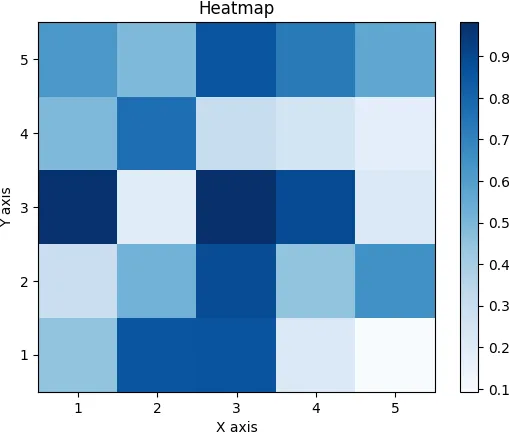
sns.heatmap(data, cmap="Blues", annot=True)
# Set plot title and axis labels
plt.title("Heatmap")
plt.xlabel("X axis")
plt.ylabel("Y axis")
# Show plot
plt.show()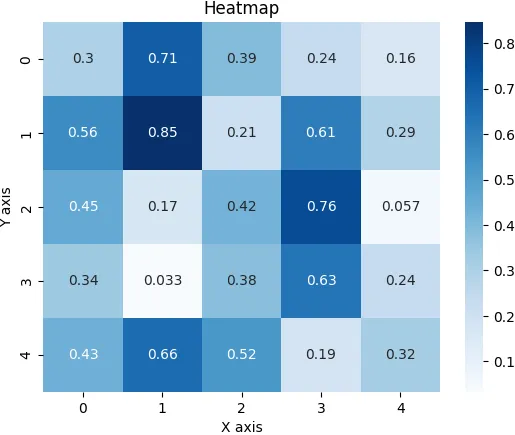
hydra
Every project eventually reaches a point where some value needs to become configurable. If you work with a tool like jupyter, this is quite simple: you just move the value in question into the .env file - et voila, it can now be configured.
When you are building a more conventional application, though, it is not that easy. This is where Hydra rears its ugly (yet rather handy) head. It is an open source tool for managing and running the configurations of Python-based applications.
It is built on the Omega-Conf library, and in the words of its main page: “Its central feature is the ability to build a hierarchical configuration dynamically through composition and to override it via config files and the command line.”
The capability mentioned in that quote – hierarchical configuration – turned out to be very handy for me. In my case, it did the job well and let me separate config files more cleanly.
coolname
Giving your taint runs a unique identifier is always a smart move. If, for whatever reason, you dislike UUID or simply want your ids to be readable by humans, coolname has you covered. It produces unique, alphabetical, word based identifiers ranging in length from 2 to 4 words.
The number of combinations is roughly as follows.
- an identifier 4 words long has 1010 combinations
- an identifier 3 words long has 108 combinations
- an identifier 2 words long has 105 combinations
That is considerably fewer than with UUID, which means a higher chance of collision. Comparing the two, however, is not what this text is about.
The creators chose the vocabulary by hand and describe it as positive and neutral (the project’s README describes the word lists in more detail), so you will never get an identifier like you-ugly-unwise-human-being. Naturally, the library is entirely open source.
tqdm
This library adds progress bar functionality to your application. Displaying that kind of information may not be the most crucial thing you need, but it is still pleasant to watch and lets you follow your application’s progress while it runs an important task.
Tqdm also relies on sophisticated algorithms to estimate how much time a task has left, which can be a game changer and help you plan your time. Tqdm also claims its performance overhead is barely noticeable - in the range of nanoseconds.
On top of that, it is fully standalone and requires nothing but python to run, so it will not pull half of the internet onto your disk.
jupyter-notebook (+JupyterLab)
Notebooks are an excellent way to share results and collaborate on a project. Thanks to the idea of cells, separating different pieces and responsibilities of your code is easy.
The fact that one notebook file can hold code, images, and rich text outputs (tables) side by side only adds to its existing strengths.
Notebooks also let you run pip install directly in cells and use .env files for configuration. This takes a lot of software engineering complexity off your plate.
Summary
That wraps up the various machine learning libraries I wanted to present to you. My aim was to give a broad overview of each library and its potential use cases, supplemented with brief notes from my own experience of working with them. I hope I managed to achieve that and that this article has broadened your understanding of the machine learning library landscape.
Thanks for your time.